MailerLite Review: Still Worth It After the 2026 Price Changes?
MailerLite still builds a newsletter faster than anything else I have tested at this price, but the platform I am reviewing in August 2026 is a more expensive one than the platform most existing reviews describe.
On June 16, 2026 MailerLite renamed Growing Business to Comfort and Advanced to Power, raised paid prices by roughly 10 to 30 percent across every subscriber tier, and cut the free plan from 500 subscribers and 12,000 monthly emails to 250 subscribers and 2,500 monthly emails. That free tier had already been halved once, from 1,000 subscribers down to 500, in September 2025.
This MailerLite review is based on re-testing in August 2026 on a creator newsletter with 6,800 subscribers, where I worked across both the free trial and a paid tier. The short answer: the product got slightly better and noticeably more expensive, and the free plan stopped being a reason to choose it.
So is MailerLite worth it now, or is it a fine platform that lost its main advantage? Here is what I found.
What is MailerLite?
MailerLite is a cloud-based email marketing platform for newsletters, automated campaigns, landing pages, signup forms, and small websites, sold on a freemium model with paid plans starting at $12 per month as of August 2026. It was founded in Lithuania, stores subscriber data on EU servers, and is GDPR-compliant, which matters if you handle European contacts.
So what is MailerLite in practice? Beyond email marketing campaigns, you get a website builder, forms and pop-ups, and paid newsletter subscriptions through Stripe. The visual workflow builder keeps automation usable for non-technical marketers, and AI features assist with send timing and content variations.
What Changed at MailerLite in 2026
As of August 2026, MailerLite runs four plans: Free, Comfort, Power, and Enterprise. Here is what moved this year:
- Plans renamed (June 16, 2026). Growing Business became Comfort. Advanced became Power. Growing Business and Advanced plan users whose dashboards still show the old names stay on legacy rates until their billing cycle renews.
- Prices up roughly 10 to 30 percent across every subscriber tier, applied to existing customers as well as new ones.
- Free plan cut again. From 500 subscribers and 12,000 monthly emails down to 250 subscribers and 2,500 monthly emails. Seats went from 1 to 2, and free accounts gained custom templates, blogs, promotional pop-ups, and the HTML campaign editor.
- Free-plan feature caps enforced from August 13, 2026: 3 automations, 3 forms, 1 digital product, 1 landing page, 1 website.
- Trial cut to 14 days, down from 30. It covers premium features including live chat, templates, the preference center, and the AI writing assistant.
- Comfort gained features that used to sit on the top tier, including the preference center, Smart sending, and the AI writing assistant.
30-Second Verdict: Should You Choose MailerLite?
MailerLite is worth paying for in August 2026 if the editor is what you are buying and you are comfortable starting on a paid plan. It is no longer worth choosing for the free plan, which at 250 subscribers and 2,500 monthly emails is a trial in everything but name.
- Features: Email automation, drag-and-drop editing with 70+ content blocks, landing pages, a website builder, pop-ups, and AI writing tools. A/B testing is included on every plan, including Free.
- Pricing: Free covers 250 subscribers and 2,500 emails per month. Comfort starts at $12 per month for 500 subscribers with a 5,000-email monthly cap. Power starts at $25 per month for 500 subscribers and removes the send cap. Enterprise is custom-priced above 200,000 subscribers. Annual billing saves 10 percent.
- Pros: An interface non-technical users pick up without training, automation on the free plan, A/B testing at every tier, transparent per-subscriber billing that does not charge for unsubscribed or bounced contacts, and support agents who understand email marketing rather than just their own product.
- Cons: Reporting stops short of attribution, there is no phone support on any plan, no transactional email or SMS, fewer native integrations than ActiveCampaign or Mailchimp, and account suspensions with little explanation are a documented and recurring complaint.
- User experience: I had my first campaign built and scheduled in under 30 minutes without opening a tutorial. Account approval was the slow part, not the software.
- Alternatives: Mailchimp if integration breadth matters more, Kit if you are a creator selling to a list, or Sender if the free-tier ceiling is what pushed you to look.
MailerLite Key Features Review
MailerLite campaigns give you three personalization layers I used constantly: merge tags through custom fields, dynamic links, and conditional blocks that show different content to different segments. Time-zone delivery and automatic UTM tagging caught mistakes I would otherwise have shipped.
You can edit links after sending, which saved me once when a landing page slug changed post-send. Smart sending optimizes timing and runs auto resend campaigns to subscribers who did not open the first send, and the HTML editor is available on every plan, including Free, since the June 2026 update.
Campaign Builder & Editor
The drag-and-drop editor is the reason to look at MailerLite. Inline editing, reusable blocks, and visibility rules for dynamic content blocks let me build a newsletter faster here than in any other tool at this price, and there is a plain-text option alongside the HTML editor.
Embedding Instagram and Facebook posts directly into emails removed a design step I would normally hand to a designer.
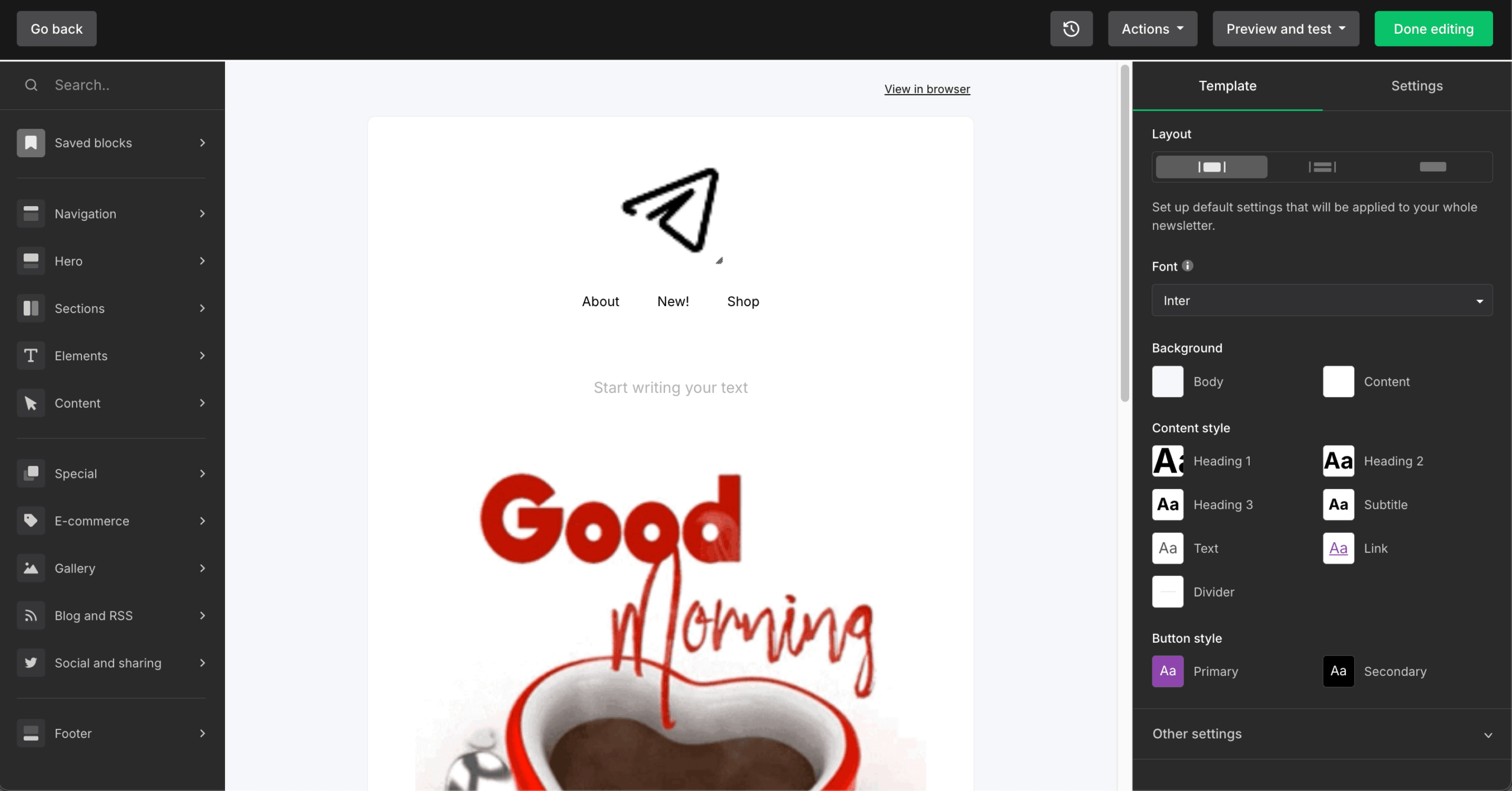
Saving block templates as brand modules and reusing them across campaigns is the workflow I settled on. Combining dynamic blocks with segments keeps one master template running instead of five near-duplicates.
A/B Testing Capabilities
I ran A/B tests on subject lines, sender names, and content, and MailerLite picks winners on opens, clicks, or conversions automatically. Split tests cap at two variants per element, and multivariate testing on the Comfort and Power plans goes further: pick up to three variables from subject line, sender name, content, and send time, and MailerLite generates every combination for you, up to eight versions of one campaign.
Two limits are worth knowing before you plan a test. Under 1,000 recipients every version has to go to your whole list, which makes the result noisier than the interface suggests, and any test that includes send time goes to all recipients regardless of list size.
A/B testing is included on every plan, including Free, which no other free tier in this bracket matches. Automations have built-in A/B steps, and you can test landing pages and forms too. The AI suggests variant ideas in the interface, which is useful when you have run out of subject line angles.
You get a template gallery, blank layouts, and reusable blocks. MailerLite lists 100+ email templates, and until June 2026 they were paid-only. Free accounts now get custom campaign and landing page templates, and the full template library sits on the Comfort plan and above.
I found out the hard way that the premium template access disappears when the 14-day trial ends. If you build your first three campaigns on trial templates, budget time to rebuild them.
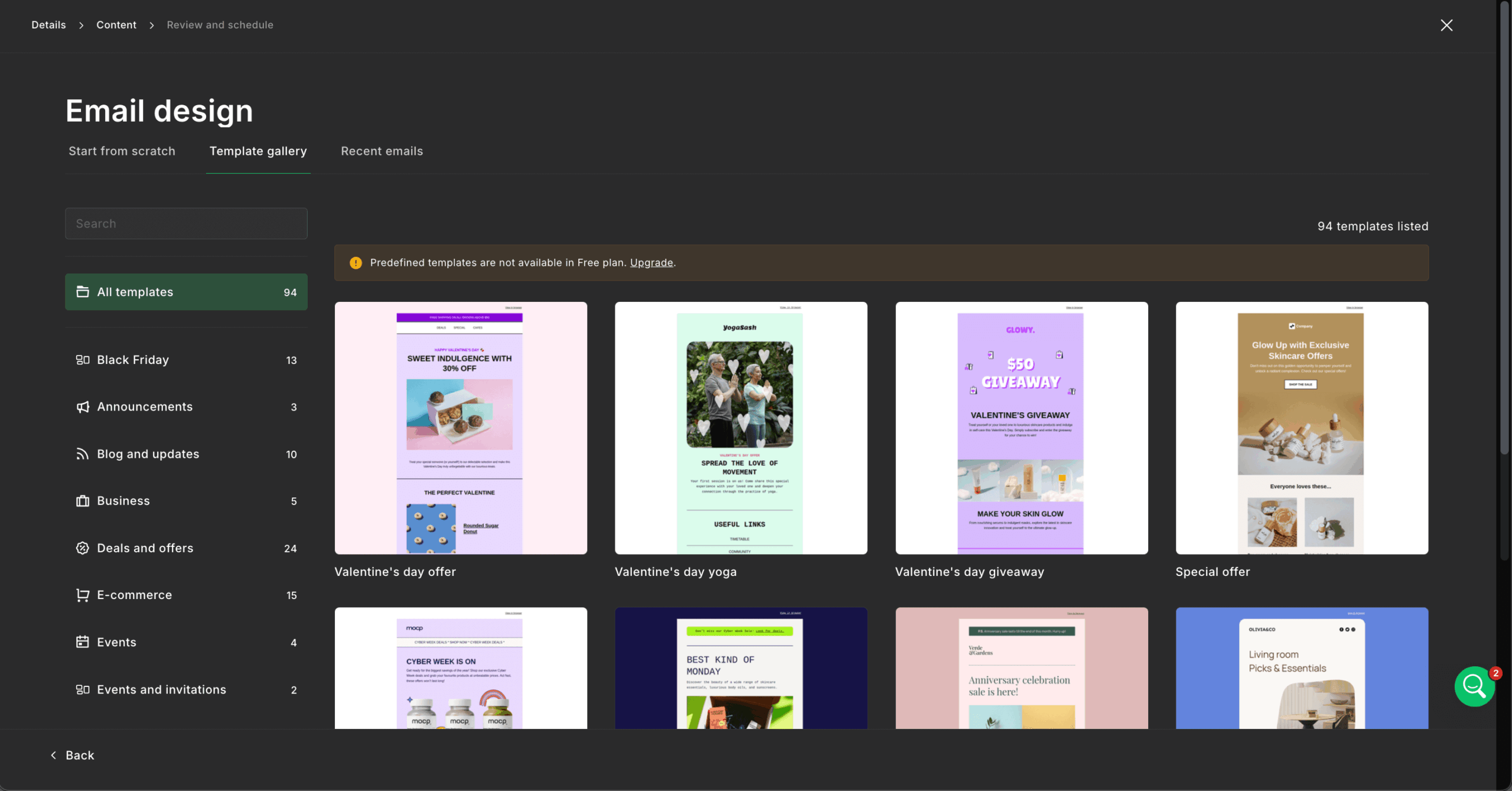
My approach now is to keep a simple base layout and customize through dynamic blocks per segment, maintaining one master template. The system handles standard newsletters well and gets restrictive when you need a complex custom design, which is where I would reach for a dedicated email template builder instead.
MailerLite’s automation builder handles email marketing automation from seven triggers: group joins, form completions, link clicks, field updates, anniversaries, dates, and segment joins, plus ecommerce triggers. Multiple triggers in a single workflow require the Power plan.
Automation volume is capped by plan: 3 active automations on Free, 50 on Comfort, and unlimited on Power. Free accounts are also limited to 5 steps per automation, which rules out anything past a short welcome sequence.
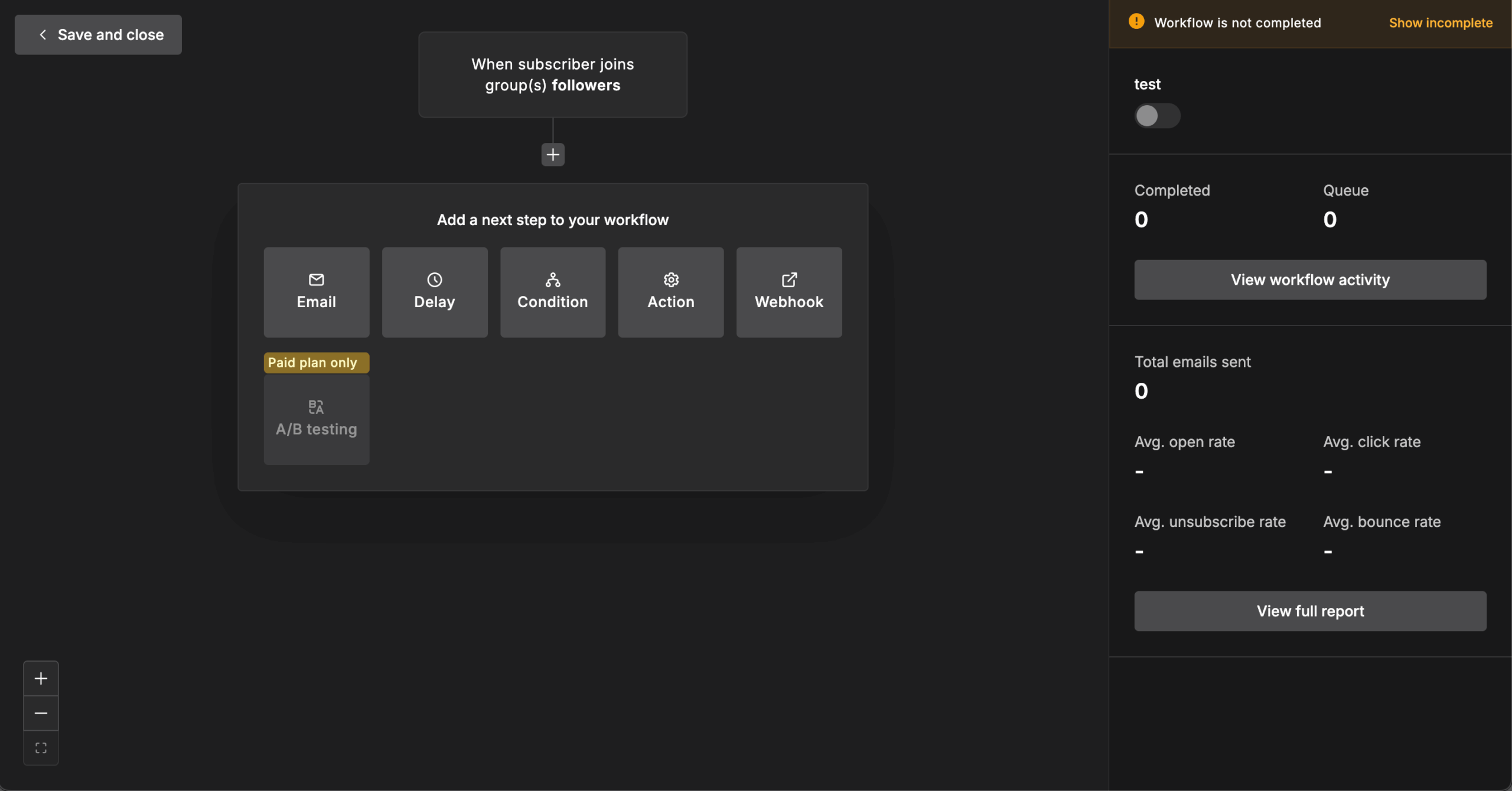
The Action step moves subscribers between groups, updates fields, or unsubscribes them, with a cap of five moves per subscriber to prevent loops. Automation A/B testing works, anniversary triggers repeat, and webhook actions connect to external tools. What I missed was deeper behavioral triggering: MailerLite reacts to email and form activity well, and to on-site behavior barely at all.
Setting up authentication was quick. SPF and DKIM took me about ten minutes from account settings using MailerLite’s DNS instructions, and their DMARC guidance is specific enough to follow without a consultant.
Here is EmailToolTester’s testing history for MailerLite’s inbox deliverability. Over a longer window the number has moved a lot:
Year
Dec 2025
Jan 2024
Jan 2023
Apr 2022
Oct 2021
Mar 2021
Sept 2020
Feb 2020
July 2019
Jan 2019
Mar 2018
Aug 2017
Deliverability %
92.7%
89.8%
91.7%
98%
95.7%
96.9%
90%
78.4%
94.8%
92.6%
89%
77.6%
The swing from 77.6 percent in 2017 up to 98 percent in 2022 and back to the high eighties by 2024 is why I would not pick a platform on one deliverability score. Treat any single figure, including the current one, as a snapshot of the sending pool at that moment rather than a property of the platform.
MailerLite pushes its Email Verifier, but domain authentication and list quality matter more. Dedicated IPs are Enterprise-only (as an add-on), and they are only worth it at genuinely high volume.
I used MailerLite’s form builder to create embedded forms, pop-ups, and slide-ins with display rules for exit intent, scroll depth, time on page, and page targeting. Hidden fields capture UTM parameters, which makes signup source attribution possible without extra tooling.
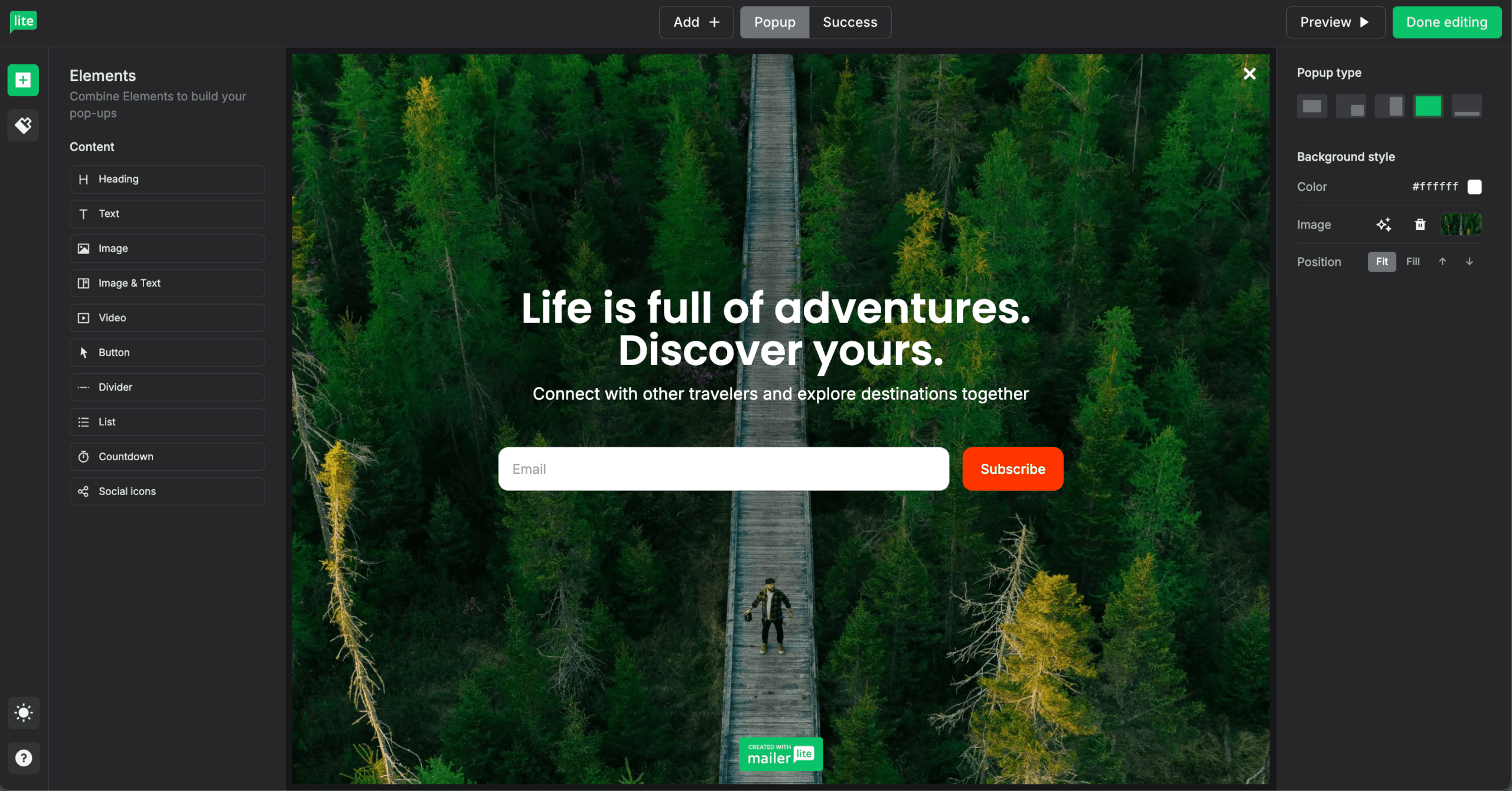
The preference center, which lets subscribers manage their own settings, moved down to Comfort in the June 2026 update. Forms connect to automations and support custom fields. I still needed custom CSS when a brand wanted something specific. Free accounts are capped at 3 active forms.
The landing page builder covers templates, custom domains, SEO controls, password protection, code injection, and A/B testing. Click tracking shows where people click, which is useful without being deep analytics.
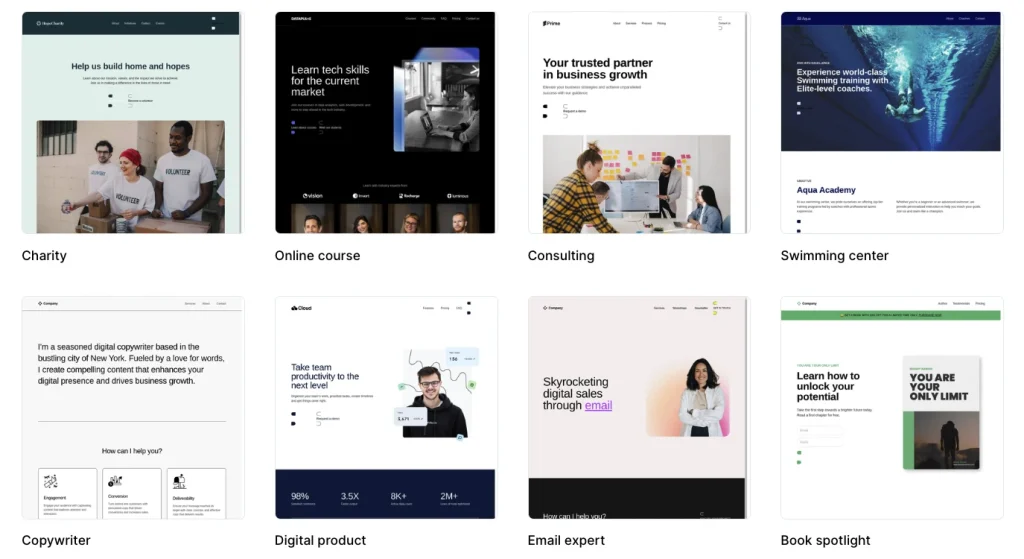
Stripe integration lets you sell products and subscriptions directly from a page. Free accounts get 1 landing page, Comfort raises that to 10 hosted pages, and Power removes the cap. For campaign-specific pages it saves buying a separate tool, and complex layouts still need a dedicated builder.
Beyond landing pages, I built a full site with a blog, custom domain, password protection, and basic SEO controls, with website tracking and the deeper site analytics gated to the Power plan. It suits lightweight sites where email integration matters more than design control.
It works for resource hubs, content libraries, and simple business sites. It is not a CMS, so anything with real content architecture needs a proper platform connected through integrations.
Groups and Segments split the way most people expect: Groups are manual lists of email subscribers, and Segments update automatically from rules. Custom fields give you room for personalization, and the preference center hands data management back to the subscriber.
One thing I learned the hard way: removing someone from a Group immediately pulls them out of any automation triggered by that Group, which will silently break a long nurture sequence.
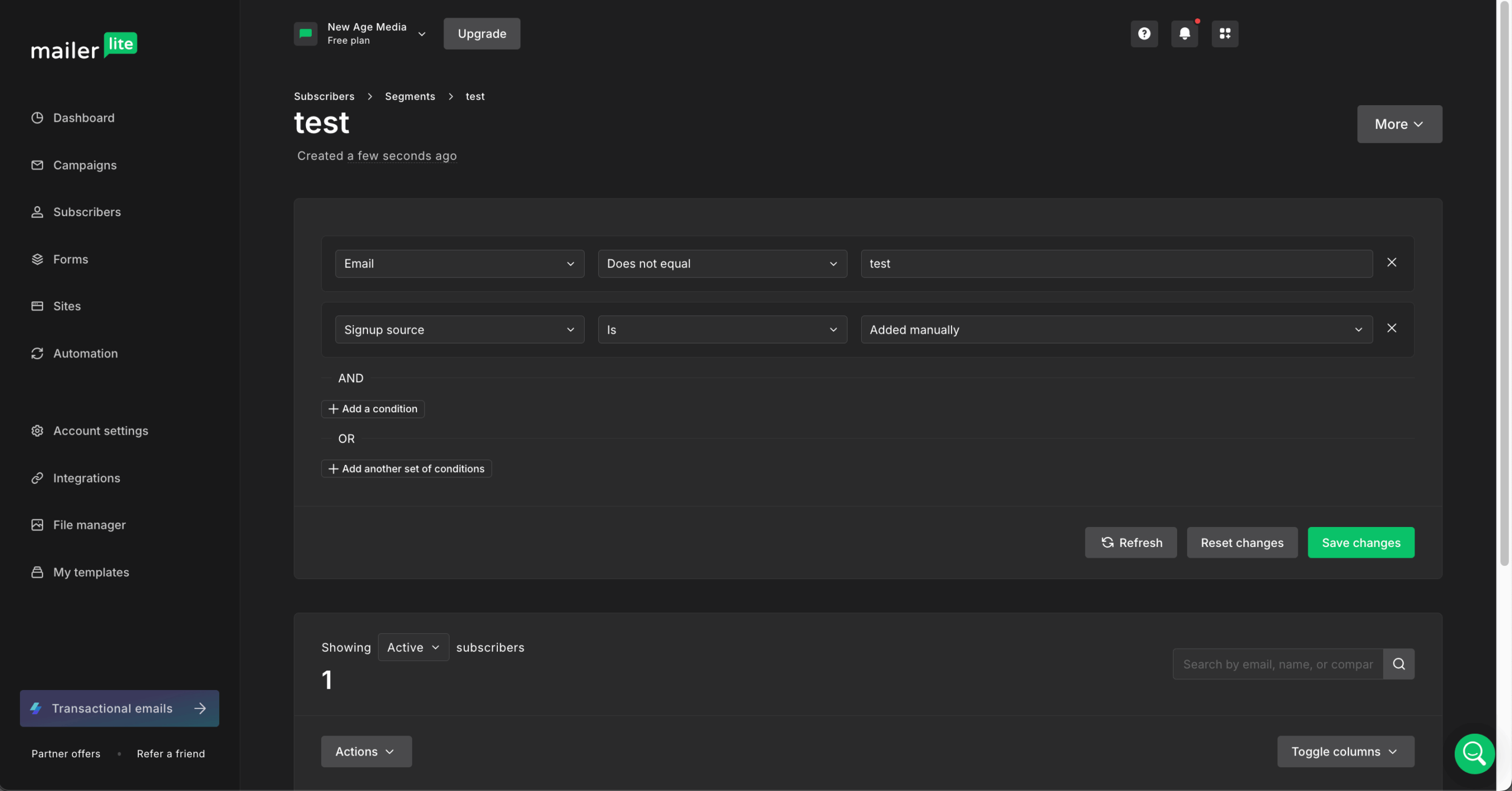
Segmentation is simpler than what enterprise platforms offer, and for most small businesses that is the right trade. If you need rules that combine purchase history, on-site behavior, and campaign activity in one condition set, you will hit the ceiling here faster than you expect, and the segmentation logic you can build is the thing to test during your trial.
MailerLite also counts subscribers fairly: unlike Mailchimp, it does not bill you for unsubscribed or bounced contacts.
MailerLite covers the connections most small businesses need natively: Shopify, WooCommerce, WordPress, Zapier, and Stripe. The directory ran to 130+ native integrations when I checked in August 2026.
The REST API is rate-limited to 120 requests per minute per token, per MailerLite’s own developer documentation, and returns a 429 with no Retry-After header when you exceed it, so you need your own backoff logic. Real-time webhooks and ecommerce endpoints that sync products, orders, and customers are included.
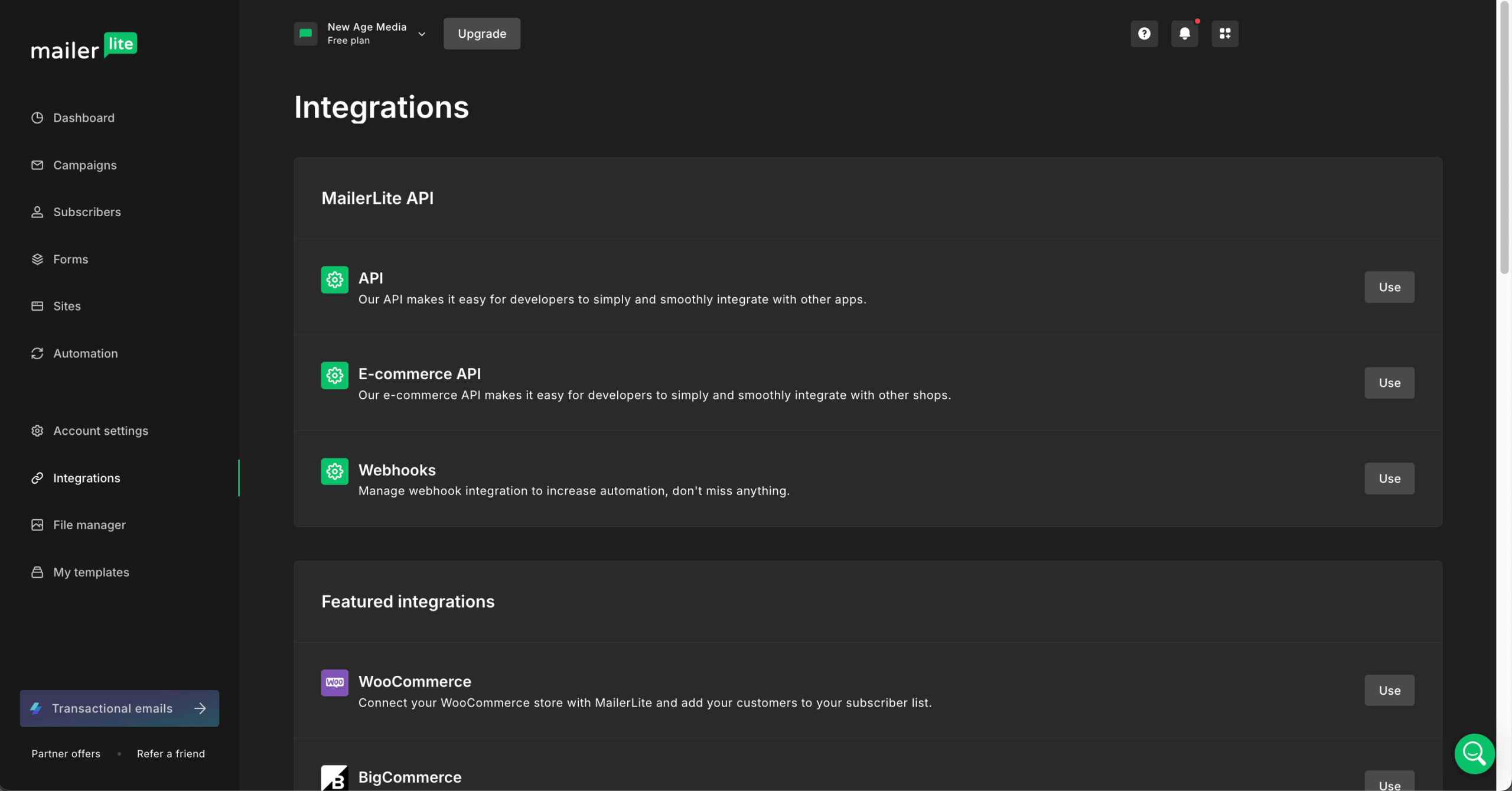
For CRMs like Salesforce I went through Zapier rather than building a custom connection, which is how most third party tools connect here. The directory covers the basics and is not as deep as ActiveCampaign’s. Enterprise teams with specialized tools will be writing workarounds.
Native Shopify and WooCommerce connections give you abandoned cart automation and purchase tracking, and product blocks pull images, descriptions, and prices into campaigns automatically. Purchase data lands on subscriber profiles, so you can segment on it.
The monetization side is where MailerLite has invested. Through Stripe you can sell digital products, run paid newsletter subscriptions, take bookings, and process checkouts, and MailerLite charges 0 percent commission on those sales. For a creator monetizing a list, that is a real cost difference against platforms that take a cut.
Pro tip: turn off Shopify’s own abandoned cart emails or your customers get two. The ecommerce feature set handles small-shop needs and stops short of predictive analytics or journey mapping.
Reporting covers the essentials: opens, clicks, unsubscribes, bounces, complaints, device data, and location breakdowns. Click maps show what people clicked inside an email, and UTM tracking connects cleanly to Google Analytics.
MailerLite added custom reports in April 2026, which let you build dashboards around chosen metrics and group them by subscriber, campaign type, or time period. It closes part of the gap with bigger platforms, and it is the single most useful addition of the year.
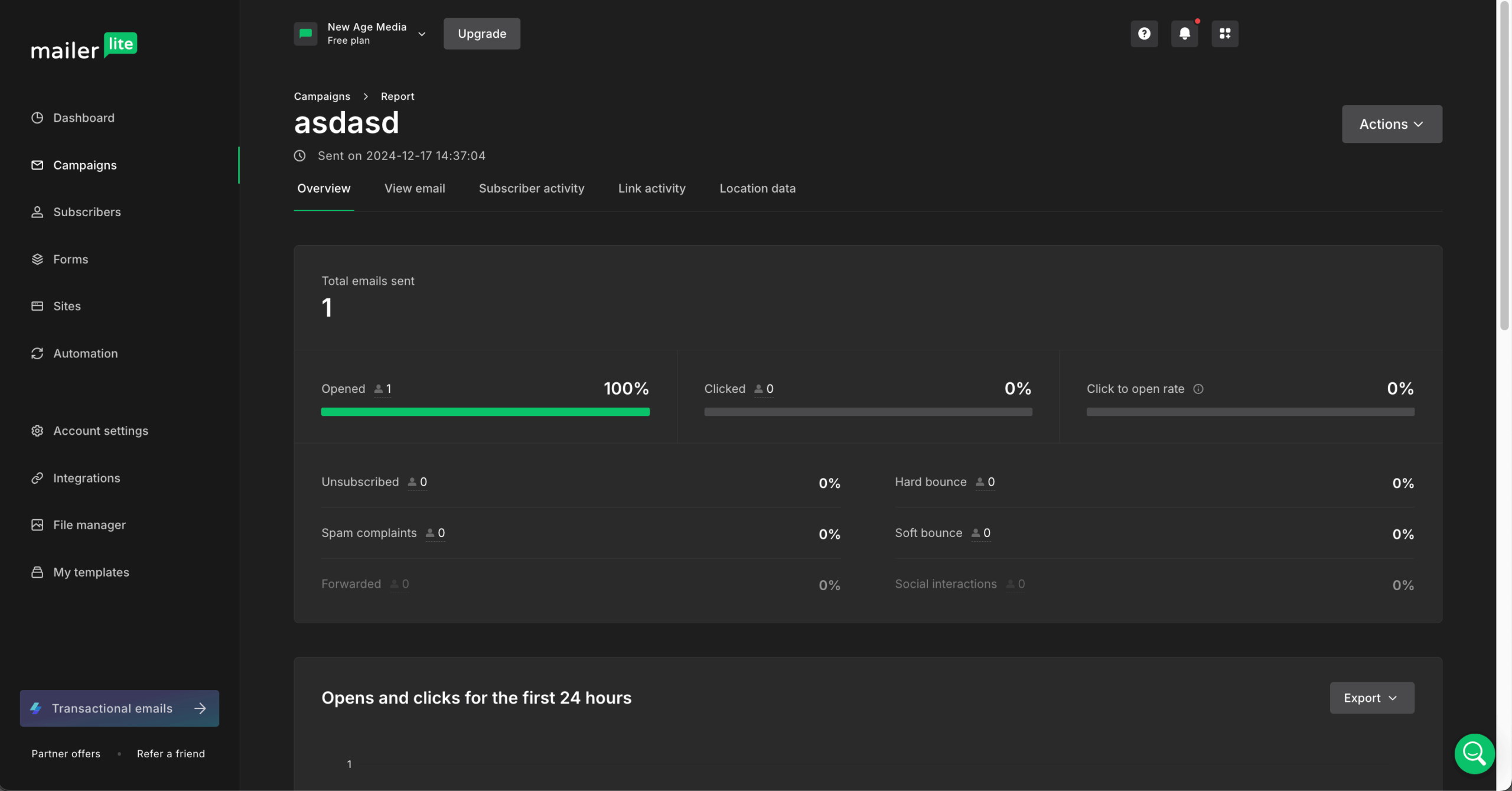
The caveat that still matters: MailerLite does not filter bot clicks and cannot show accurate open rates for Apple Mail users under Mail Privacy Protection, so both metrics run inflated, by an amount that depends on which email clients your list uses. Standardize your UTMs early, lean on clicks and conversions rather than opens, and decide which email marketing metrics you will actually act on before you build reports around them.
I used the AI writing assistant and subject line generator for quick variations, and Smart sending to set delivery timing from subscriber behavior. The AI generates A/B test variants and adjusts tone, which speeds up the boring part of campaign production.
Access depends on plan. The AI writing assistant moved down to Comfort in the June 2026 update, Power keeps the full set, and Free accounts get limited credits. Output still needs checking against brand voice.
Support tiers are clear. Free users can contact support by email and live chat for the first 14 days and use the knowledge base after that. Comfort adds 24/7 email support. Power adds 24/7 live chat. Enterprise adds onboarding and personal support from a named contact on MailerLite’s customer success team.
Response times stayed under 24 hours in my testing, and MailerLite’s support team answered email marketing questions rather than reading scripts. There is no phone support on any plan, which is the gap people notice when something breaks mid-send.
MailerLite Account Approval & Verification Process
MailerLite reviews new accounts manually to protect platform reputation. You verify your website, business details, and sending practices before you can send at volume.
Domain authentication through SPF and DKIM is required, which improves inbox placement and slows onboarding for beginners.
To speed the account approval process up: make sure your website is publicly accessible, complete your profile accurately, authenticate your domain before you send, and do not upload cold or purchased lists. Clear branding and clean list history get approved faster.
MailerLite Pricing Plans and Value
MailerLite pricing was restructured on June 16, 2026: the Growing Business plan is now Comfort, and the Advanced plan is now Power. Prices below reflect that update and are quoted at 500 subscribers, the floor for both paid tiers, where Comfort covers up to three users and Power removes the seat cap. Annual billing saves 10 percent, and registered nonprofits get 30 percent off.
Free
Comfort
Power
Enterprise
$0 free
From $12/month (price scales with subscriber count)
From $25/month (price scales with subscriber count)
Custom pricing (200,000+ subscribers)
- Up to 250 subscribers
- 2,500 emails/month
- 2 user seats
- Drag-and-drop builder and HTML campaign editor
- Landing pages and website builder
- Promotional pop-ups
- A/B testing
- 3 automations (5 steps each), 3 forms, 1 landing page, 1 website, 1 digital product
- Email and live chat support for the first 14 days
- MailerLite logo on emails and pages
- All Free features, plus:
- Up to 3 users
- Monthly send cap of 10x your subscriber tier (5,000 emails at 500 subscribers)
- Logo removal
- 24/7 email support
- Full template library and saved blocks
- 50 automations, dynamic emails
- Facebook custom audiences
- Preference center, Smart sending, AI writing assistant
- Sell digital products and paid subscriptions via Stripe
- 10 hosted landing pages
- All Comfort features, plus:
- Unlimited monthly emails
- Unlimited users and automations
- Multiple automation triggers per workflow
- Advanced website analytics
- 24/7 live chat support
- All Power features, plus:
- Dedicated account manager
- Custom onboarding and migration help
- Deliverability consultation and optional dedicated IP
- Enterprise SLA and security
- Custom contracts and SSO
The number that catches people out is the subscriber slider, not the headline price. Comfort at $12 is a 500-subscriber price, and the same plan costs several hundred dollars a month once your list runs into six figures, which is worth modelling against your growth curve before you commit rather than after.
The Free Plan After the 2026 Cuts
The MailerLite free plan now covers 250 subscribers and 2,500 emails per month, with 2 user seats. Feature caps are 3 automations at 5 steps each, 3 forms, 1 landing page, 1 website, and 1 digital product, enforced on all free accounts from August 13, 2026.
Free accounts did gain something in the trade: custom campaign and landing page templates, blogs, promotional pop-ups, and the HTML campaign editor. That does not offset a 50 percent subscriber cut and an 80 percent send cut. Treat it as a place to build and test rather than a place to run a list, and check MailerLite’s free plan page for current caps before you plan around it.
MailerLite’s Pros and Cons
Here are the MailerLite pros and cons in short.
- Interface that non-technical users pick up without training
- A/B testing on every plan, including Free
- Automation included on the free plan, within tight caps
- Per-subscriber billing that excludes unsubscribed and bounced contacts
- Multilingual support with knowledge base and academy resources
- Time-zone scheduling and Smart sending from the Comfort tier
- Fewer native integrations than ActiveCampaign or Mailchimp
- Segmentation gets limiting for large or behavior-driven lists
- No phone support on any plan
- MailerLite’s templates are rigid to customize for design-led teams
- Account approval can delay your first campaign
- Reporting lacks attribution and cross-channel tracking
- No transactional email (that requires a separate MailerSend account) and no SMS
Pros
The user interface is the main reason to pick MailerLite. Non-technical users build campaigns without training, and the editor with 70+ content blocks was the fastest building experience in my testing.
A/B testing on every tier including Free is unusual at this price. Automation on the free plan is real rather than decorative, though the 3-automation and 5-step caps mean you are testing the feature, not running on it. Support answers in multiple languages, and billing that ignores dead contacts keeps costs predictable as lists churn.
Cons
Integration depth is the first ceiling most teams hit, and connecting a CRM usually means routing through Zapier. Segmentation is fine for list-and-campaign rules and gets thin once you want behavior-driven conditions.
No phone support on any plan is the complaint I hear most from teams running time-sensitive sends. The account approval process delays launches, reporting stops short of attribution, and bot clicks and Apple MPP opens both inflate engagement numbers.
The one to weigh seriously before committing a list: MailerLite enforces list hygiene rules algorithmically, and account suspensions arriving without a clear explanation are the most common reason users leave. Keep an export of your list and your templates somewhere outside the platform.

Should You Choose MailerLite?
For a small business under 10,000 subscribers that wants an editor it can hand to a non-designer, working automation, and a predictable bill, MailerLite is a reasonable paid choice at $80 per month. It is the wrong choice if your plan depends on the free tier, if you need transactional email or SMS, or if losing account access without warning would stop your business.
Best For
Not Ideal For
Freelancers & Solopreneurs
Affordable campaigns with automation from day one.
Enterprise Marketing Teams
Segmentation, reporting, and integration limits make large-scale operations painful.
Content Creators & Bloggers
RSS campaigns, lead magnets, and monetization at 0 percent commission.
Multi-Client Agencies
No client workspaces or team-based permission structures.
Small Ecommerce Brands
Product-focused emails and store integrations without complexity.
Data-Driven Marketing Operations
Limited attribution and no cross-channel reporting.
Who MailerLite is Best For
MailerLite for small business works best where getting things done beats having every feature. Visual builders let non-technical users build campaigns without a designer, and creators get RSS-to-email, tagging, and Stripe monetization in one place.
Small shops get straightforward Shopify and WooCommerce connections for abandoned carts and product promotions. If you need segmentation, testing, and scheduling and you are willing to pay from month one, MailerLite does the job.
Who Should Consider an Alternative
Enterprises and agencies will miss role-based permissions, template sharing, and client workspaces. Teams that need deep CRM integration end up with Zapier workarounds, and reporting will not tie email results to the rest of your digital marketing through multi-channel attribution or journey mapping. If the free-tier ceiling is what sent you looking at MailerLite alternatives, that is the specific gap to shop against.
To be even-handed about it: MailerLite’s editor is among the best in this price bracket, its template range is wider than most competitors’, and its website builder and creator monetization tools have few direct equivalents at the price. If design control and selling digital products are your priorities, MailerLite is likely the stronger choice and the gaps above may not be worth switching over.
MailerLite User Reviews and Reputation

MailerLite holds an aggregate 4.5 out of 5 across review platforms, built from 4.6 on G2, 4.7 on Capterra, and 4.3 on Trustpilot. The pattern across all three is consistent: high marks for ease of use and value, recurring complaints about design flexibility and account suspensions.
G2 reviewers praise the clean interface, affordability, and beginner-friendly builder, which matches my experience. The drag-and-drop editor, automation workflows, and support responsiveness come up repeatedly, and G2 rates MailerLite support at 9.3 out of 10.
The recurring complaints are limited design flexibility, missing brand-wide color settings, and updates that disrupt existing workflows. Several reviews describe sudden account termination over bounce rates without warning, which reflects strict list-hygiene enforcement that catches users with older lists.
Capterra reviewers consistently cite ease of use, value, and a feature set without bloat. The short learning curve and support responsiveness come up often, and the website builder surprises people who signed up for email alone.
The gaps reviewers name are limited language support, missing convenience features such as link triggers, and workflow improvements experienced users want. These read as friction rather than deal-breakers.
Reddit treats MailerLite as simple, clean, and reliable at a competitive price, and compares it favorably to Mailchimp on cost. Creative limitations show up when people design complex layouts or work heavily with images, which matches what I hit.
The loudest complaint is strict bounce-rate enforcement leading to sudden account termination. That is the risk to plan for from day one with list hygiene. Despite it, Reddit generally recommends MailerLite for affordable, straightforward email marketing.
Final Verdict on MailerLite
So, is MailerLite worth it? As of August 2026, yes on a paid plan and no on the free one: Comfort at $12 per month buys an editor with 70+ content blocks, working automation, and A/B testing at every level, while the 250-subscriber free plan is now a trial rather than a usable starting point.
The June 2026 reprice changed the calculation rather than the product. MailerLite is still email marketing software a non-specialist can run without help, for teams that value ease over depth, and it is no longer the cheapest way to get there, which matters if you are shopping on price per subscriber rather than on interface quality.
What it still does not do: transactional email, SMS, behavioral triggering, or attribution reporting. If none of those are on your list, MailerLite covers the ground. If two or more are, you are buying a second tool within a year.
MailerLite Alternatives
MailerLite is known for one of the cleanest editors in email marketing, with landing pages, a website builder and affordable paid plans. But in June 2026 it cut its free plan to 250 subscribers and 2,500 emails a month, raised prices at several subscriber levels, and kept its more advanced automation on the higher Power plan. Which alternative is better depends on what you’re replacing it for, and these five cover the most common reasons people switch.


ActiveCampaign: best for advanced automation
ActiveCampaign makes sense if you’ve outgrown MailerLite’s automation. Its workflow builder handles decision trees, goal tracking and lead scoring, and it adds CRM features that suit B2B companies and agencies running complex funnels. The trade-off is that it has no free plan, it costs more as your list grows, and it takes longer to learn, so it’s worth asking honestly whether you’ll use the depth you’re paying for. See the full MailerLite vs. ActiveCampaign breakdown.
Kit: best for creators
Kit is the one to pick if you’re a blogger, author or course creator. Its free plan covers up to 10,000 subscribers, 40 times MailerLite’s new limit, and its visual automations, sequences and monetization tools, including paid subscriptions and tip jars, are built around creator businesses. The trade-off is that its templates are simple and text-focused, its free plan includes only one automation, and its paid plans cost more than MailerLite’s. See the full MailerLite vs. Kit breakdown.
Mailchimp: best for integrations and a broader toolkit
Mailchimp suits businesses that want one marketing hub with extensive integrations, multichannel features and deeper analytics. The trade-off is that its free plan is even more limited than MailerLite’s, at 250 contacts and only 500 emails a month, multi-step automation requires a paid plan, and it bills for every stored contact, including unsubscribed ones. See the full MailerLite vs. Mailchimp breakdown.
Brevo: best for large lists you email occasionally
Brevo makes sense if you have a big list but don’t email it often. It charges by emails sent rather than subscribers, its free plan stores up to 100,000 contacts, and it adds SMS, WhatsApp and transactional email in the same platform. The trade-off is that the free plan caps you at 300 emails a day, Brevo branding stays on free and Starter emails, and automation and A/B testing require its Standard plan. Read our full Brevo review.
Sender: best for a like-for-like switch with a bigger free plan
Sender is the closest alternative for MailerLite users affected by the free plan cuts. It offers a comparable drag-and-drop editor, visual automation and landing pages, and its free plan covers 2,500 subscribers and 15,000 emails a month, ten times MailerLite’s subscribers and six times its sends, with SMS on paid plans. The trade-off is that Sender doesn’t include a full website builder like MailerLite’s, so you’d need a separate tool if you host your site there. Read our full Sender review.
Which alternative should you choose?
Pick based on what’s pushing you away from MailerLite:
- Need advanced automation or CRM: ActiveCampaign
- You’re a creator selling digital products: Kit
- Want more integrations and a broader toolkit: Mailchimp
- Have a large list you email occasionally: Brevo
- Want a similar tool with a bigger free plan: Sender
FAQs
It is affordable at entry and less so as you scale. Comfort starts at $12 per month for 500 subscribers, which is competitive against Mailchimp and Klaviyo, and the June 2026 increase of roughly 10 to 30 percent narrowed that gap. Prices climb with your subscriber count, and advanced features such as multiple automation triggers, unlimited sending, and 24/7 live chat require the Power plan.
The 250-subscriber free tier forces an upgrade earlier than it used to, which hits small businesses hardest. Enterprise features such as dedicated IPs cost substantially more.
Yes, MailerLite has a free forever plan, but at 250 subscribers and 2,500 emails per month it functions as a trial. You get the drag-and-drop builder, the HTML campaign editor, A/B testing, landing pages, and 2 user seats, capped at 3 automations of 5 steps each, 3 forms, 1 landing page, and 1 website from August 13, 2026.
Support runs for the first 14 days only, after which you are on the knowledge base. Emails sent on the free version carry MailerLite branding. If you are asking is MailerLite free in the sense of running a real list at no cost, the answer in 2026 is no.
MailerLite covers email marketing fundamentals and stops before enterprise capability. You do not get multichannel automation, behavioral triggers beyond clicks and form activity or spam score previews. Reporting improved with custom reports in April 2026 and still lacks cohort analysis and revenue attribution dashboards.
Design customization is limited, and large ecommerce teams will find segmentation less capable than Klaviyo or ActiveCampaign. For most small businesses these are nice-to-haves rather than blockers.
A Mailchimp migration is straightforward for data and slow for everything else. MailerLite imports files, maps fields, and transfers lists and groups without much friction, and CSV import lets you create custom fields during the transfer.
The time cost is rebuilding templates, automations, and forms, which do not transfer. Budget a day for a simple setup and a week for anything with multiple live automations.
Yes. MailerLite is an established email marketing service used by over a million senders worldwide. It is GDPR-compliant, stores data on EU servers, and offers two-factor authentication, encryption, and a data processing addendum.
The caveat is availability rather than security: accounts can be suspended for list-hygiene violations with limited explanation, so keep external backups of your subscribers and templates.
MailerLite handles deliverability through authenticated sending, IP reputation management, list-cleaning tools, and spam checks. Independent testing put its deliverability score at 92.7 percent as of December 2025 and inbox placement at 79.82 percent as of June 2026, which is upper-middle of the market.
Your own results depend more on domain authentication, list quality, and sending consistency than on the platform. Smart sending and time-zone delivery help by smoothing send spikes.
Who's behind these reviews?

- Hands-on testing across multiple email marketing tools
- Fair comparisons using a unified evaluation process
- Insights verified with real user reviews from trusted sources
- No sponsorships or affiliate ties
- Clear, unbiased scoring and methodology