
MailerLite Free Plan 2026: New Limits and What Changed
If you’re a small business trying to get email marketing off the ground without paying for it, the free-plan math matters. Many either push you toward a paid tier quickly or include just enough restrictions to get annoying. MailerLite sits somewhere in between.
Today MailerLite offers 250 subscribers and 2,500 emails per month, completely free. You also get access to automations, landing pages, and signup forms, although each comes with feature use limits.
Following MailerLite’s August 13, 2026 update, those feature caps are now actively enforced, making the Free plan more limited than it was before while still covering the basics for smaller lists.
What are MailerLite’s free plan limits in 2026?
The MailerLite free plan covers 250 active subscribers and 2,500 emails per month, with 3 active automations, 3 active forms, 1 landing page, 1 website, 1 digital product and 2 account seats – MailerLite branding stays on everything, and support runs through the Knowledge base.
Limit
Value
Active subscribers
250
Emails per month
2,500
Active automations
3
Active signup forms
3
Landing pages
1
Websites
1
Digital products
1
Account seats
2
Support
Knowledge base (plus a 14-day premium trial)
Branding
Yes
Three rules decide how those numbers actually land on your account.
Unsubscribed and bounced contacts don’t count. Only active subscribers count toward the 250, so people who opt out or hard-bounce stop eating into your allowance – a list that reads higher in your dashboard can still sit inside the cap.
Your 2,500 emails reset on your account registration date. Not the 1st of the month, and not the start of the billing cycle date – a free account doesn’t have one. Whatever day you signed up is the day your sending limit ‘refills’.
Only active or published items count. Drafts are free. Build ten automations and keep three switched on, or design several landing pages and publish one – the cap applies to what’s live, not what’s sitting in your account.
What changed on 16 June 2026 – and what happened on 13 August
What
Was
Now
In force from
Active subscribers
500
250
16 June 2026
Emails per month
12,000
2,500
16 June 2026
Account seats
1
2
16 June 2026
Landing pages
10
1
13 August 2026
Active automations
Not published
3
16 June 2026
Active forms
Not published
3
13 August 2026
Templates, HTML editor, blogs, promotional popups
Paid only
Included
16 June 2026
Worth being precise about the subscriber cut, because plenty of write-ups aren’t. The free plan carried 1,000 subscribers for years, but MailerLite had already trimmed it to 500 before this round. So 16 June took it from 500 to 250 – a real downsize.
Subscribers, sending and seats changed on the day. The feature caps didn’t: MailerLite gave existing accounts until 13 August 2026 to get underneath them.
After that date, an account still over the caps moves into a restricted state – extra automations stop running, extra forms stop collecting, extra landing pages come down. Cross 250 subscribers or 2,500 monthly sends and sending itself pauses until you reduce usage or upgrade.
And here’s the part that catches people out: a deactivated item can’t be switched back on while you’re still over the limit. You don’t get to pick your three automations by toggling things off and on. Same for forms and landing pages. Sitting on eight active automations today? Hopefully you had time to choose the top three ones before 13 August.
What Do You Get with the MailerLite Free Plan?
Here’s the odd thing about the June update: MailerLite took plenty away, but it also handed a fair bit back.
You get the core kit: email campaigns, subscriber management, signup forms, a landing page builder, basic analytics and email A/B testing.
Then there’s the pile that used to be paid-only. Custom campaign templates and landing page templates. The HTML campaign editor, if you’d rather paste your own code than fight a drag-and-drop builder. Promotional popups – those sat behind the paywall until this year. Blogs, too, which means the website builder actually publishes posts, not just a static page. And 2 account seats instead of one, so your designer doesn’t have to borrow your login.
You also get 1 website, 1 landing page and 1 digital product you can sell straight from the account. No credit card required, so poking around costs you nothing but an afternoon.
The interface doesn’t feel like a stripped-down version, though. Same drag-and-drop builder as paid plans, same automation tools (albeit some restrictions), same landing page creator.
Automation: what 3 active automations actually buy you
The visual workflow builder lets you create branching logic based on opens, clicks, purchases.
In August 2026 I tested it using a dummy welcome campaign: new subscribers get email 1 immediately, email 2 after 3 days if they opened the first one, email 3 after a week regardless. Worked exactly like it should – no “upgrade to unlock advanced triggers” nonsense.
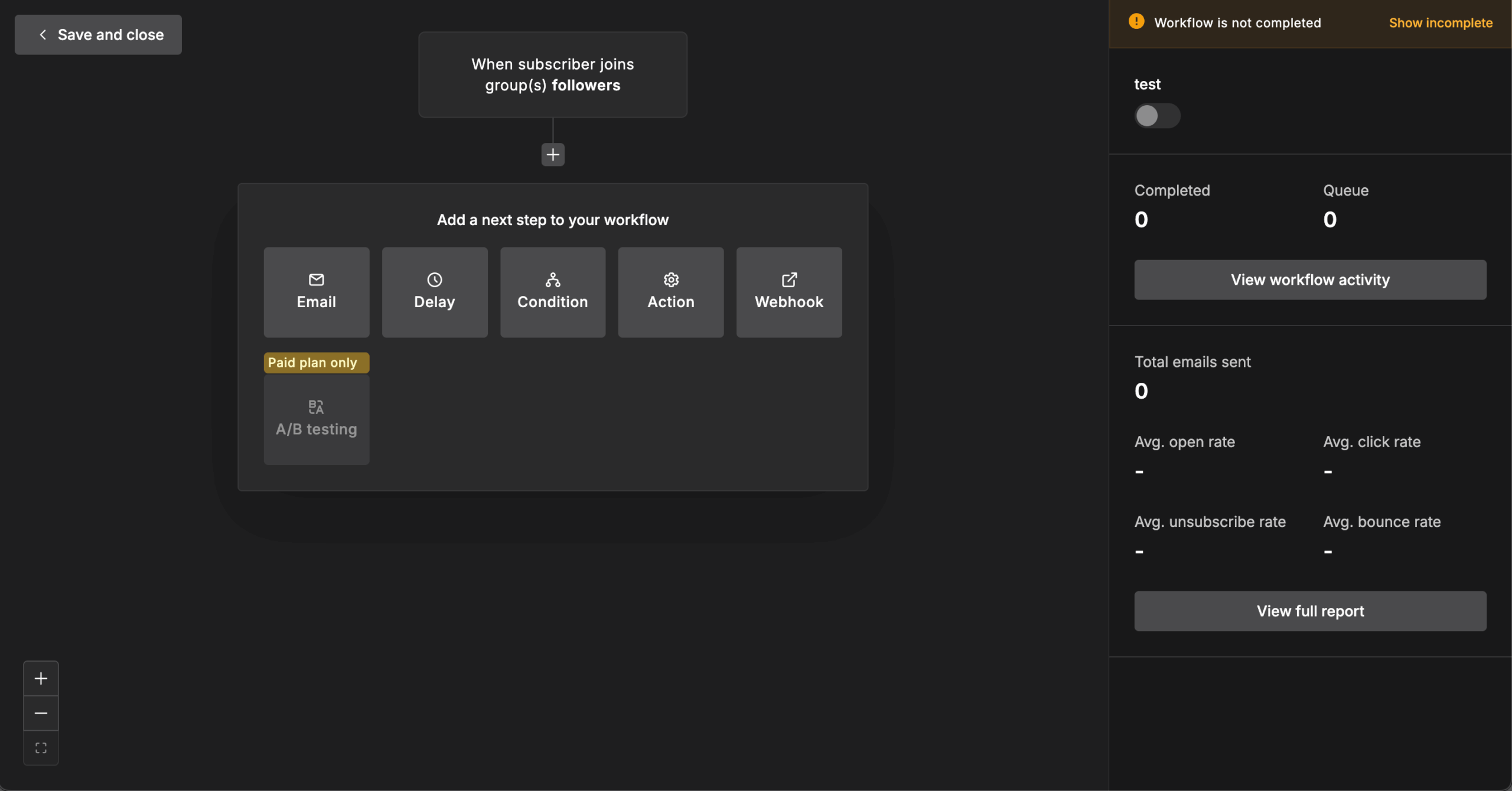
While the Free plan’s automation features still work as expected and haven’t been stripped back, you’re limited to 3 active automations per account with 5 steps per automation, which can feel restrictive once you start building more than a welcome flow.
Landing pages, forms and websites: the new caps
The free plan carried 10 landing pages until June 2026. Now, from August, it carries just one – a cap that’s easy to miss because MailerLite doesn’t surface it prominently. You can also build one basic webpage, which is fine for a portfolio or a business page, but anything structurally ambitious belongs on WordPress or Squarespace.
That page does get the full treatment, though. Conversion tracking, integration with your subscriber lists, and the same drag-and-drop editor as the email builder – learn one and you’ve learned the other. Templates look current, though you’ll want to swap colours and fonts to match your brand. Custom domains stay behind the paywall, so the page sits on a MailerLite subdomain until you upgrade.
Signup forms behave as you’d expect: embed codes, direct links, exit-intent triggers on pop-ups. Nothing novel, but nothing missing either. The cap has 3 active forms and popups count toward it.
Two things soften the limits. The stock library – over a million photos, icons and GIFs – is included at no cost. And surveys and quizzes embed directly in campaigns, so feedback collection doesn’t need an external form.
What’s Missing in the MailerLite Free Plan?
Okay, reality check time. The free plan has limits, and some of them bite harder than others.
Support is the sharpest one. Free accounts get no direct channel. You open with a 14-day premium trial, and once that lapses – you’re down to the Knowledge base and the Community support. Email support starts at Comfort plan, while 24/7 live chat is Power plan only.
AI writing sits mostly on the paid side. Free keeps a subject line generator at limited capacity; the fuller AI writing assistant belongs to Comfort plan.
Beyond that, the genuine gaps are few and coherent:
- Branding removal is not available: MailerLite branding stays on your campaigns, forms and landing page until you upgrade.
- Custom domains are not available, so your landing page keeps a MailerLite subdomain.
- Advanced automation triggers are limited: free runs linear workflows, and multiple triggers per automation don’t arrive until Power plan.
- RSS campaigns are not available, which rules out auto-sending new blog posts – a Comfort feature.
- Advanced reporting is restricted: free gives you basic stats plus comparative reporting and click maps, while custom date range reports and deeper analysis start at Comfort.

Who’s the MailerLite Free Plan Perfect For?
MailerLite’s free plan is handy for small businesses that need email marketing but can’t justify $50+ monthly costs yet. Content creators building audiences, local service businesses staying in touch with customers, ecommerce startups testing automation before committing budget.
The automation capabilities alone make this worthwhile for most small businesses. Being able to nurture leads automatically, send welcome sequences, and re-engage inactive subscribers – normally that’s premium functionality you see gated behind priced tiers.
Nonprofits might get some use out of this plan. 2,500 emails could cover monthly newsletters, event announcements, and fundraising campaigns, if your audience is small. While survey tools help with feedback collection and volunteer coordination. And if your list grows beyond the free-plan limits, it’s also worth checking MailerLite’s nonprofit discount (30%).
Solopreneurs and consultants get solid value too. Landing page for lead magnets, automation for client onboarding, professional email campaigns – all the basics covered, if you have a single goal.
Free vs. Comfort vs. Power: What Each Plan Includes
The gap between free and paid isn’t a single feature – it’s the ceiling on nearly all of them. The $12 and $25 figures below are entry rates at 500 subscribers, and both scale with your list size. Comfort restores most of what free withholds, while Power removes the caps outright.
Free
Comfort
Power
Price
$0
From $12/mo*
From $25/mo*
Subscribers
250
500+
500+
Monthly emails
2,500
10× your subscriber tier (5,000 at the entry tier)
Unlimited
Account seats
2
3
Unlimited
Active automations
3
50
Unlimited, plus multiple triggers
Landing pages & forms
1 page, 3 active forms
10 websites and landing pages. 10 active forms
Unlimited
Templates
Custom campaign & landing page templates
Full library
Full library
Branding removal
No
Yes
Yes
Custom domain
No
Yes
Yes
AI writing assistant
Subject line generator, limited
Included
Included
Meta Custom Audiences
No
Included
Included
Reporting
Basic, plus comparative
Advanced
Advanced, plus custom reports
Support
Knowledge base & Community
24/7 email
24/7 live chat & email
* Those are monthly reference prices; an annual billing discount lowers monthly cost by 10% if you pay for the year upfront.
When It Makes Sense to Upgrade
Four things push people off the free plan, and only one of them is subscriber count.
You run out of room. 2,500 sends across 250 subscribers works out to ten emails a month at a full list – comfortable for a weekly newsletter, tight the moment an automated sequence runs alongside it. Cross either and MailerLite pauses sending until you clean up inactive subscribers or upgrade.
13 August 2026 forces a decision. That’s when the feature caps start being enforced and over-limit accounts move into a restricted state. If you’re running more than 3 automations, 3 forms or more than 1 landing page after Aug. 13, you’re choosing what survives – and a deactivated item can’t be switched back on while you’re still over the limit.
Branding starts to cost you. Free keeps MailerLite branding on your campaigns, forms and pages, and your landing page sits on a MailerLite subdomain. Branding removal and custom domains both arrive on Comfort, from $12/month at 500 subscribers – the cheapest upgrade that makes a real difference.
Somebody needs an answer today. Once the 14-day premium trial ends, free users lose access to direct support. If you’re running an ecommerce store or working with something where small changes can quickly cause problems, relying on the knowledge base or community forums every time something goes wrong can get frustrating fast.
Who's behind these reviews?

- Hands-on testing across multiple email marketing tools
- Fair comparisons using a unified evaluation process
- Insights verified with real user reviews from trusted sources
- No sponsorships or affiliate ties
- Clear, unbiased scoring and methodology