MailerLite vs Mailchimp: Full Breakdown & Verdict for 2026
The short answer: MailerLite is the cheaper, simpler option (paid plans from $12/month for 500 subscribers, billed only for active subscribers), while Mailchimp (from $13/month for 500 contacts) offers deeper automation, segmentation, and ecommerce analytics but counts unsubscribed contacts toward your bill. Both free plans now stop at 250 contacts, but MailerLite’s includes 2,500 emails a month and basic automations versus Mailchimp’s 500 emails and only a limited preview of automation flows.
Choosing between MailerLite and Mailchimp in 2026 isn’t as simple as comparing prices or templates. Nowadays, it’s all about fit. How well the tool bends to your habits instead of forcing you to bend to its rules.
And 2026 shook things up. MailerLite renamed its plans on June 16, 2026 (Growing Business became Comfort, Advanced became Power), updated its prices, and cut its free plan to 250 subscribers. Mailchimp, meanwhile, keeps expanding into data-driven automation and predictive insights while its free plan now sits at 250 contacts and 500 sends a month.
I’ve spent months testing both platforms side by side, reading through real user feedback, and digging through the latest pricing pages and help docs to figure out what truly sets these small business email marketing favorites apart. Whether you’re a solo creator, a small business, a nonprofit, or an ecommerce team, if you’re trying to decide which of these email marketing services deserves your budget this year, here’s everything I learned—the good, the bad, and the quirks.
TL;DR: The Quick Decision
- MailerLite prioritizes simplicity, transparent pricing, and ease of use, making it ideal for small teams, creators, and nonprofits;
- Mailchimp offers deeper automation, analytics, and ecommerce insights, but at the cost of higher complexity and less predictable pricing;
- Feature-wise, both cover core email marketing needs, but Mailchimp gates advanced capabilities (multivariate testing, dynamic content, custom reports) behind its Standard plan and up;
- Long-term costs diverge as lists grow: MailerLite bills only active subscribers, while Mailchimp counts subscribed, unsubscribed, and non-subscribed contacts unless you archive them.
Overall winner: MailerLite
MailerLite delivers better value for money for most users by combining essential features, predictable pricing, and a gentler learning curve—without hidden billing surprises. That’s why it shows up on almost every list of the best Mailchimp alternative tools. Mailchimp is the better pick only if you need advanced features like ecommerce segmentation, predictive tools, or 300+ native integrations.
MailerLite vs. Mailchimp — Quick Comparison
Both Mailchimp and MailerLite are email marketing tools that aim to simplify email marketing, but they’re built for pretty different users. When comparing MailerLite vs. Mailchimp, you’ll notice MailerLite is made for lean teams that want clean design, predictable billing, and straightforward automation.
Mailchimp, on the other hand, goes all-in on data-driven marketing automation with predictive insights and deeper ecommerce tracking—it now positions itself as an all-in-one marketing platform, which can feel overwhelming if you’re just getting started.
From what I’ve seen, beginners tend to love MailerLite’s minimalist builder and ‘affordable email marketing’ with no strings attached approach. Mailchimp users appreciate its segmentation depth but aren’t thrilled about hidden costs tied to list management and contact limits.
Feature
MailerLite
Mailchimp
Best For
Small teams, content creators, nonprofits
Agencies, ecommerce brands, advanced marketers
Paid plans
Comfort (from $12/mo), Power (from $25/mo), Enterprise
Essentials (from $13/mo), Standard (from $20/mo), Premium (from $350/mo)
Ease of Use
★★★★★
★★★★☆
Advanced Features
★★★★☆
★★★★★
Customer Support
24/7 email (Comfort), 24/7 live chat (Power)
24/7 email + chat (paid plans), phone (Premium)
Free Plan
250 subscribers, 2,500 emails/month
250 contacts, 500 emails/month
Integrations
100+
300+
Hidden Costs
None (unsubscribes and bounces don’t count)
Charges for unsubscribed and non-subscribed contacts
MailerLite vs. Mailchimp — Feature Comparison
Both MailerLite and Mailchimp handle campaign creation pretty smoothly, but they work differently depending on your email marketing workflow.
MailerLite keeps email marketing campaign management simple and intuitive. I can set up one-time broadcasts, RSS campaigns, or automated resends to non-openers without much fuss. The drag-and-drop editor works seamlessly with scheduling and audience segmentation, so even small teams can get polished email campaigns out the door fast.
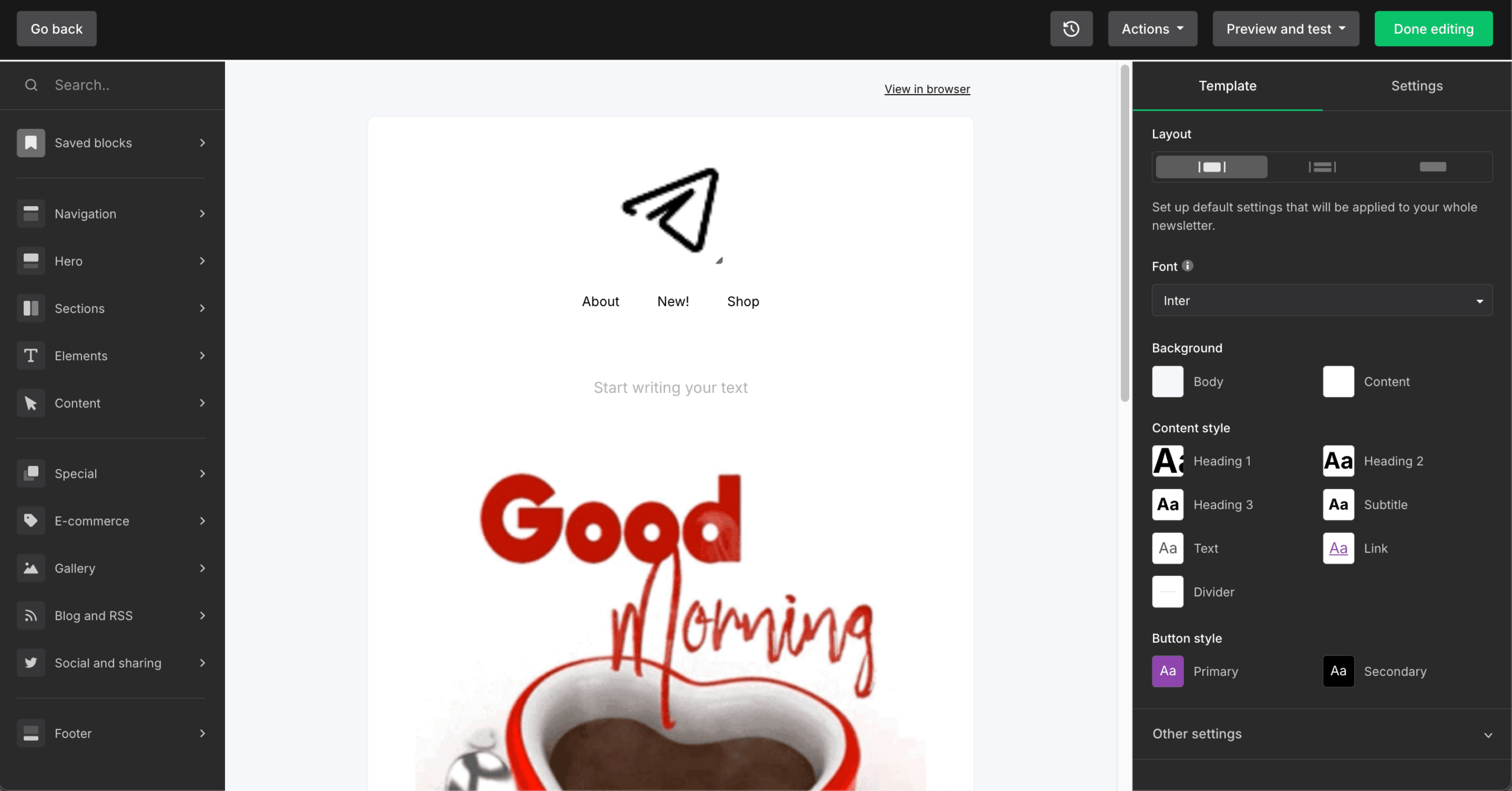
What I really like is the “auto-resend” option—it automatically resends campaigns to people who didn’t open them, with an adjusted subject line or timing. It’s one of those features you don’t know you need until you try it. Note that auto-resend, RSS campaigns, and Smart sending (MailerLite’s send-time optimization) all require a paid Comfort or Power plan.
Mailchimp gives you deeper control and advanced analytics for email marketing campaigns. You get send-time optimization based on behavioral data, tagging for cross-campaign insights, and multivariate testing across multiple variables (subject, content, send time) on the Standard and Premium plans. A/B testing and email scheduling start on Essentials—the Free plan can’t schedule emails at all.
It’s great if you’re on a larger team that relies on iterative testing and detailed performance tracking, though I’ve noticed the setup can feel heavy if you’re just trying to send something quick.
| Feature | MailerLite | Mailchimp |
| Campaign Setup | Streamlined workflow | Advanced, multi-step setup |
| Send Time Optimization | Smart sending + resend to non-openers (Comfort and up) | Send Time Optimization (Standard and up) |
| Campaign Organization | Folders + filters | Tag-based campaign grouping |
| A/B and Multivariate Testing | A/B on every plan; multivariate on Comfort and up | A/B on Essentials and up; multivariate on Standard and up |
Winner: MailerLite for ease and time efficiency; Mailchimp for advanced optimization and testing flexibility.
Creating visually compelling emails is where these email marketing tools really show their differences. In the MailerLite vs. Mailchimp debate, design flexibility often becomes the deciding factor.
MailerLite offers a user-friendly drag-and-drop editor packed with content blocks—countdowns, surveys, quizzes, image carousels, product blocks, you name it. You can build modular, interactive emails without much hassle. There’s also a Simple editor for plain-looking campaigns and a custom HTML editor, and all three editors are available even on the Free plan. Paid plans add an AI writing assistant, the full subject line generator (Free gets a limited version), and dynamic content blocks that only show up for certain segments.
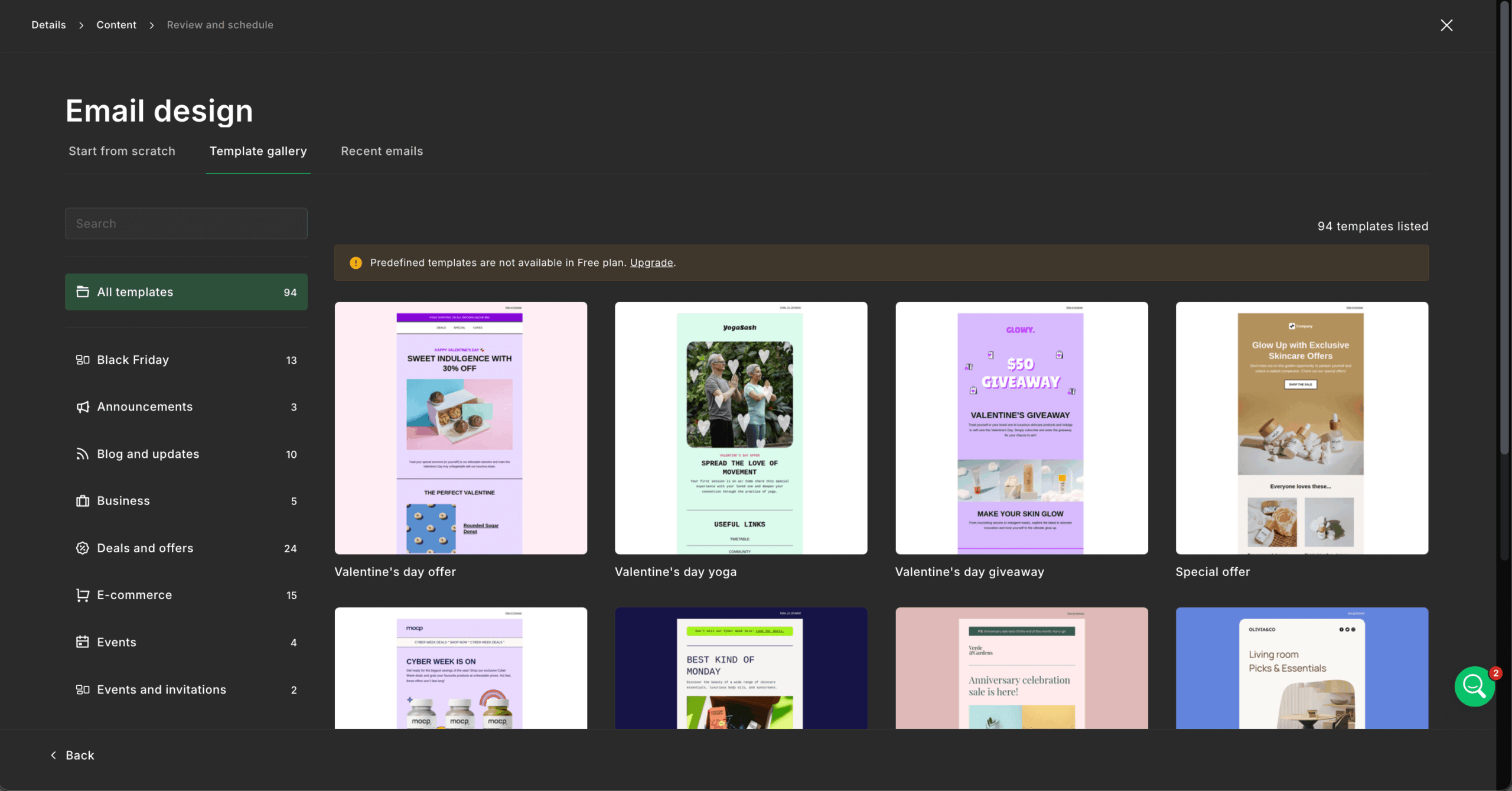
The platform also provides mobile-responsive email templates that look good on any device without requiring technical know-how. The catch: the Free plan only gets a limited selection of pre-made email templates, while Comfort and Power unlock the full library. You can always save your own designs as reusable templates.
Mailchimp’s drag-and-drop email editor is more supportive of design experimentation, with more freedom to work with advanced HTML/CSS and brand assets. That said, custom-coded templates can only be sent on Standard and Premium—on Free and Essentials you can create them but need to upgrade to send. Dynamic content and branded templates are Standard-and-up features too.
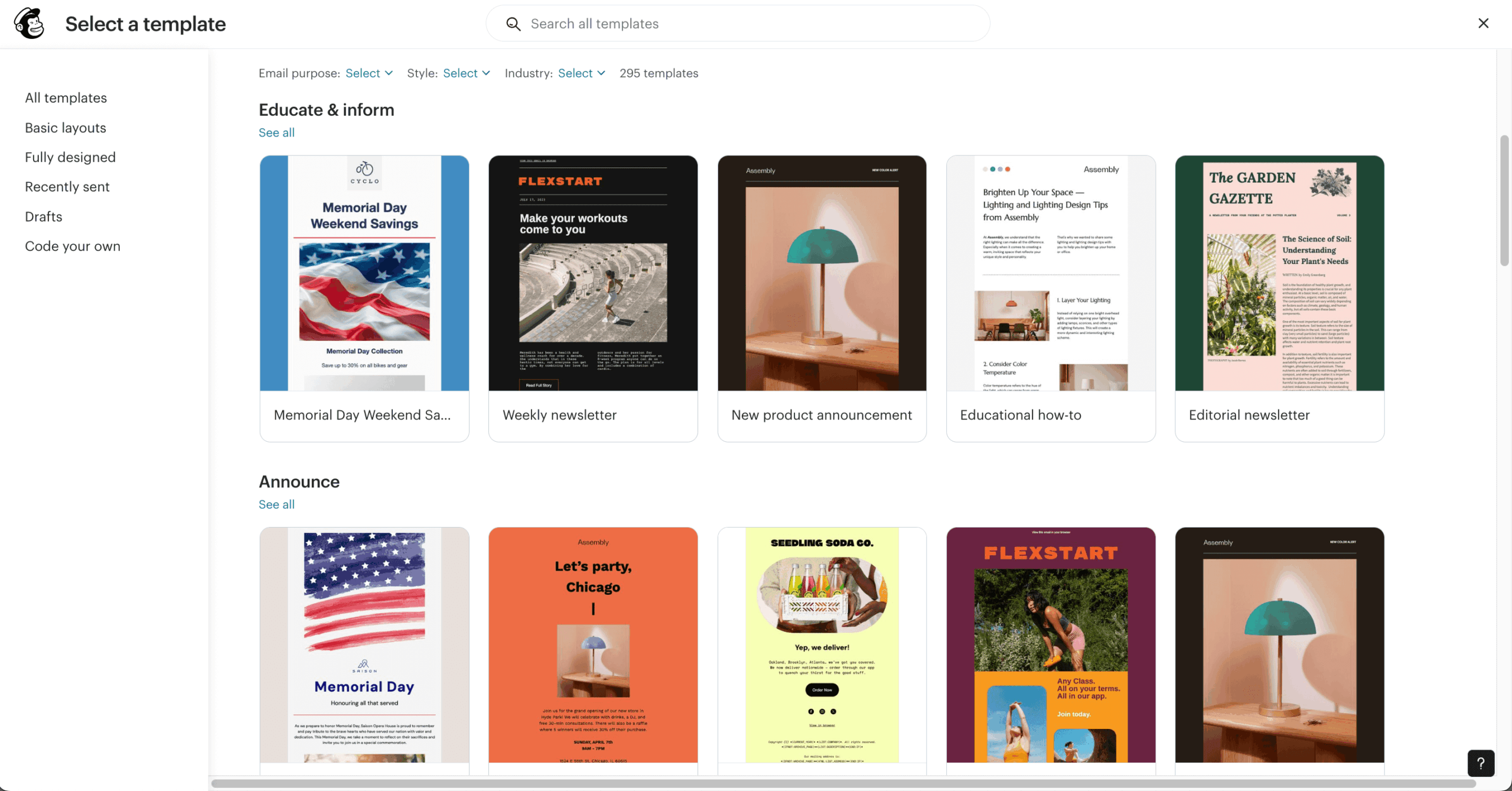
If there’s one thing I wasn’t particularly happy about, it’s that free Mailchimp users get rather limited access to templates. This restriction, while not a deal-breaker, makes it harder to create visually appealing or fully customized emails without upgrading to a paid plan, which can be frustrating for those just starting out or working with tight budgets.
| Feature | MailerLite | Mailchimp |
| Editors | Drag & drop, Simple, custom HTML (all plans) | Drag & drop, custom code |
| Templates | Limited on Free, unlimited on paid plans | Limited on Free, all templates on Essentials+ |
| Custom HTML | Included on every plan | Send custom-coded templates on Standard+ |
| Dynamic Content | Comfort and up | Standard and up |
| AI Features | AI writing assistant (Comfort+) | Generative AI features (Standard and Premium) |
Winner: MailerLite for clean, fast design with good flexibility at a lower plan level; Mailchimp when you need advanced layout freedom and brand controls.
Automation is where email marketing software really flexes its muscles—and differences here can make or break your decision in the MailerLite vs. Mailchimp comparison.
MailerLite supports visual workflows with branching logic and conditional splits through its visual automation builder. I’ve been able to build welcome emails, re-engagement sequences, date-based triggers, ecommerce triggers, and “if / then” paths without pulling my hair out. Custom fields, tags, and dynamic content work together nicely to personalize the flow.
MailerLite’s automation features also include unlimited automation templates on every plan, so you can build automated workflows like welcome series or abandoned cart reminders in minutes.
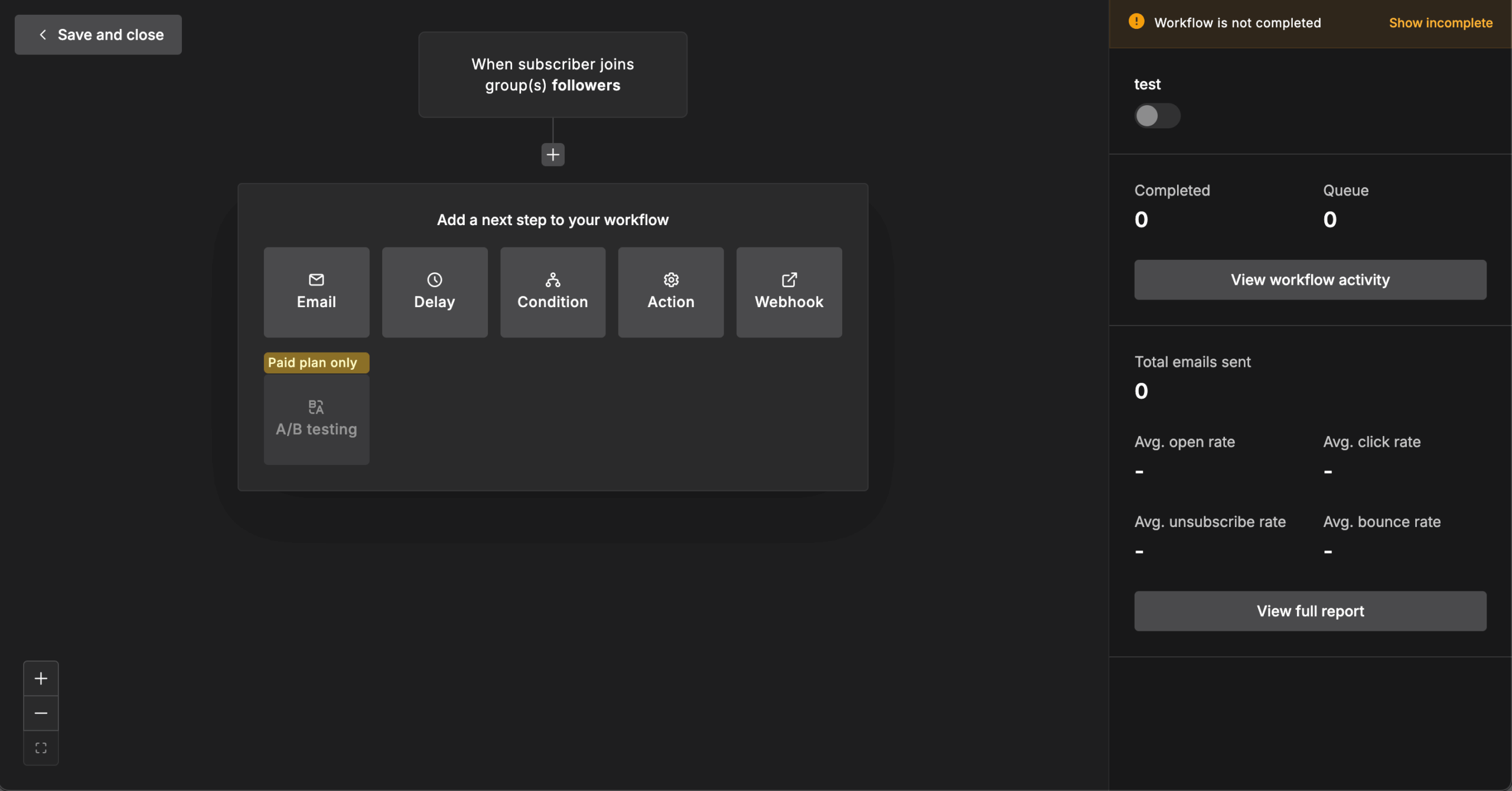
Limits depend on your plan: Free allows 3 active automations with up to 5 steps each, Comfort allows 50 automations with up to 100 steps, and Power makes automations unlimited and adds multiple triggers per workflow. One thing I’ve noticed: workflows are generally more linear compared to enterprise tools, so you might hit “depth” limits with really complex branching.
For transactional emails and SMS, MailerLite relies on MailerSend, a separate companion product. SMS sending is part of MailerSend’s Starter plan and up, billed separately from your MailerLite marketing plan.
Mailchimp supports sophisticated automation with its Marketing Automation Flows builder (formerly the Customer Journey Builder). You get multiple trigger entry points, branching, wait conditions, and behavioral splits. Essentials covers single-email automations and flows of up to 4 steps; Standard and Premium unlock flows of up to 200 steps, up to 3 triggers per flow, conditional and percentage splits, and pre-built flow templates.
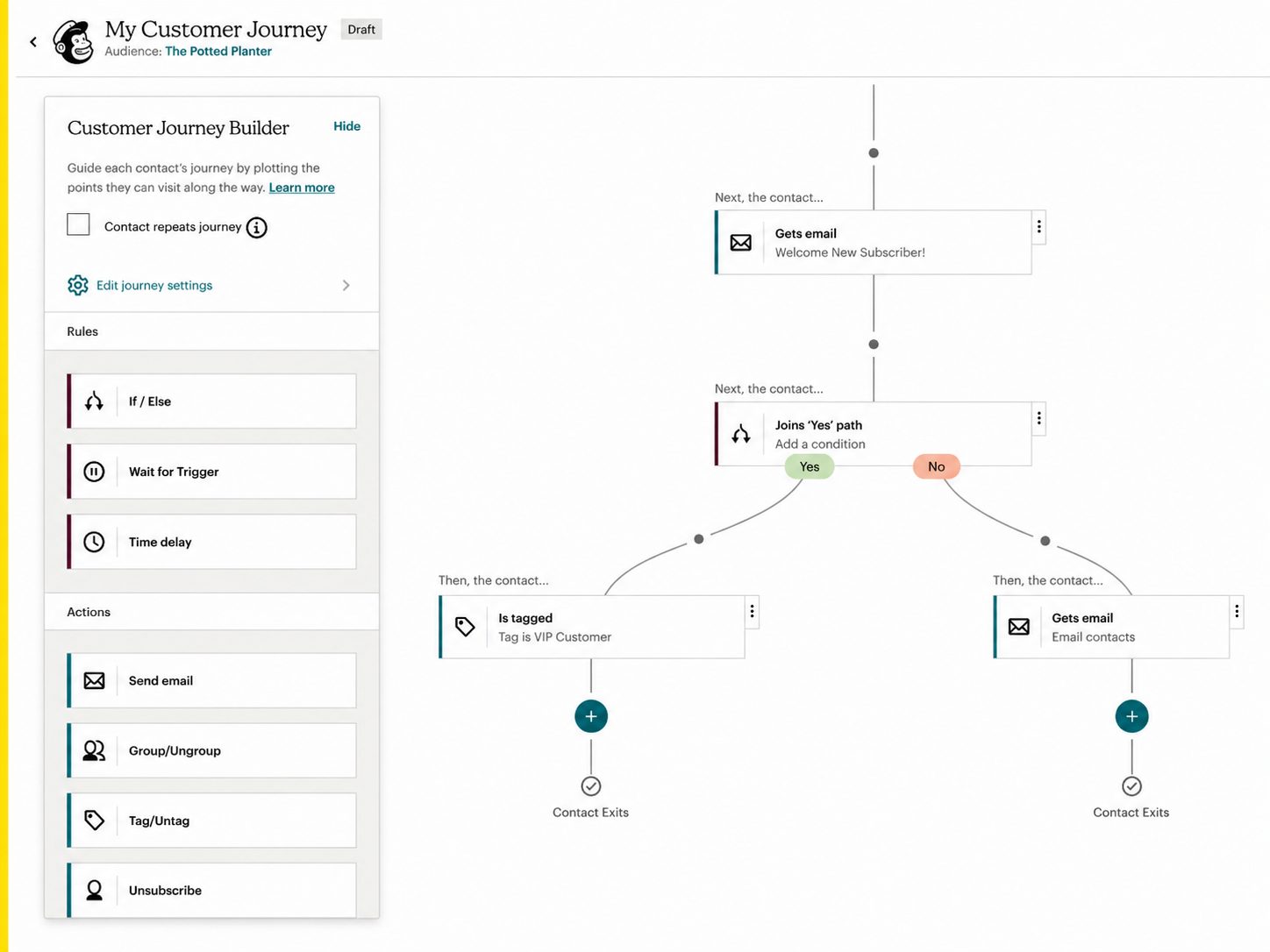
Mailchimp also offers advanced options, including predictive segments (like contacts “likely to buy”) and triggers based on site activity or purchase data. The catch? These advanced automations require the Standard plan or higher.
Also worth noting: MailerLite includes working automations on its Free plan, while Mailchimp’s Free plan only gets a limited preview of automation flows (no branching or multiple starting points). That’s a real caveat for email marketers looking for the better value-for-money option.
| Feature | MailerLite | Mailchimp |
| Workflow Builder | Visual workflow + splits | Marketing Automation Flows + branching |
| Free Plan Automation | 3 automations, up to 5 steps | Free preview only (no branching) |
| Entry Paid Plan | 50 automations, 100 steps (Comfort) | Flows up to 4 steps (Essentials) |
| Trigger Types | Form, date, tag, custom field, ecommerce events; multiple triggers on Power | Multi-event, behavioral, purchase |
| Predictive Automation | — | Predictive segments (Standard and Premium) |
| Transactional / SMS | Via MailerSend (separate product) | Transactional add-on; SMS add-on on paid plans |
Winner: Mailchimp for richer automation breadth and predictive capabilities; MailerLite for a lighter, more approachable automation workflow experience—and the only one of the two with fully working automations on the free plan.
Lead capture is fundamental to email marketing, so a tool that nails forms and landing pages gives you a real advantage.
I’ve been impressed that MailerLite bundles a landing page builder and website builder (with a blog) right in the platform. You can spin up promotion pop-ups, embedded forms, or full landing pages without leaving the tool. Their behavior-based pop-up forms (exit intent, scroll, time) are subtle but effective.
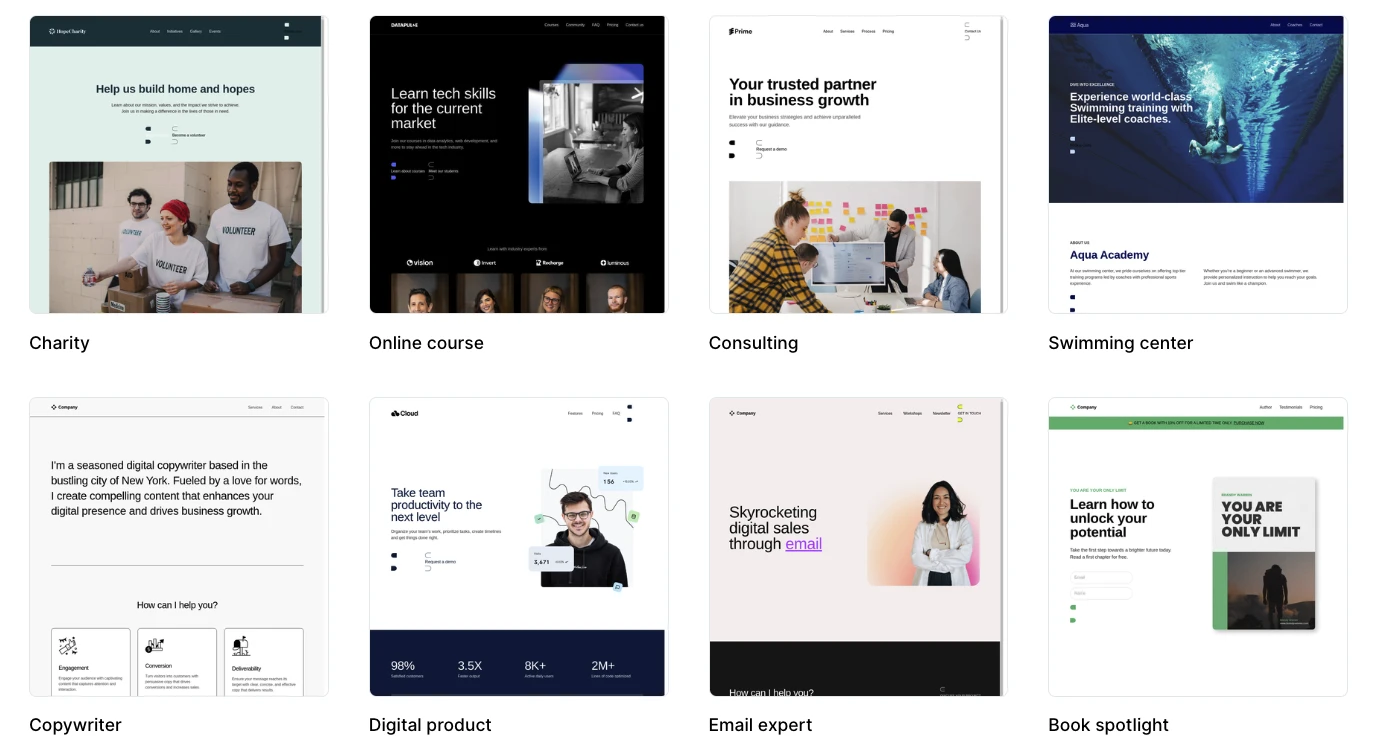
The signup forms editor supports GDPR fields, custom field capture, and double opt-in. Plan limits apply here too: Free includes 1 website, 1 landing page, and 3 active forms; Comfort raises that to 10 sites/landing pages and 10 forms; Power gives you unlimited landing pages, sites, and forms. Password-protected pages and SEO tools are now available on every plan, while custom domains and landing page A/B testing need a paid plan.
Mailchimp also supports sign-up forms, pop-ups, and landing pages with built-in templates and embedding flexibility, though there’s a bit more friction when managing design consistency across campaigns.
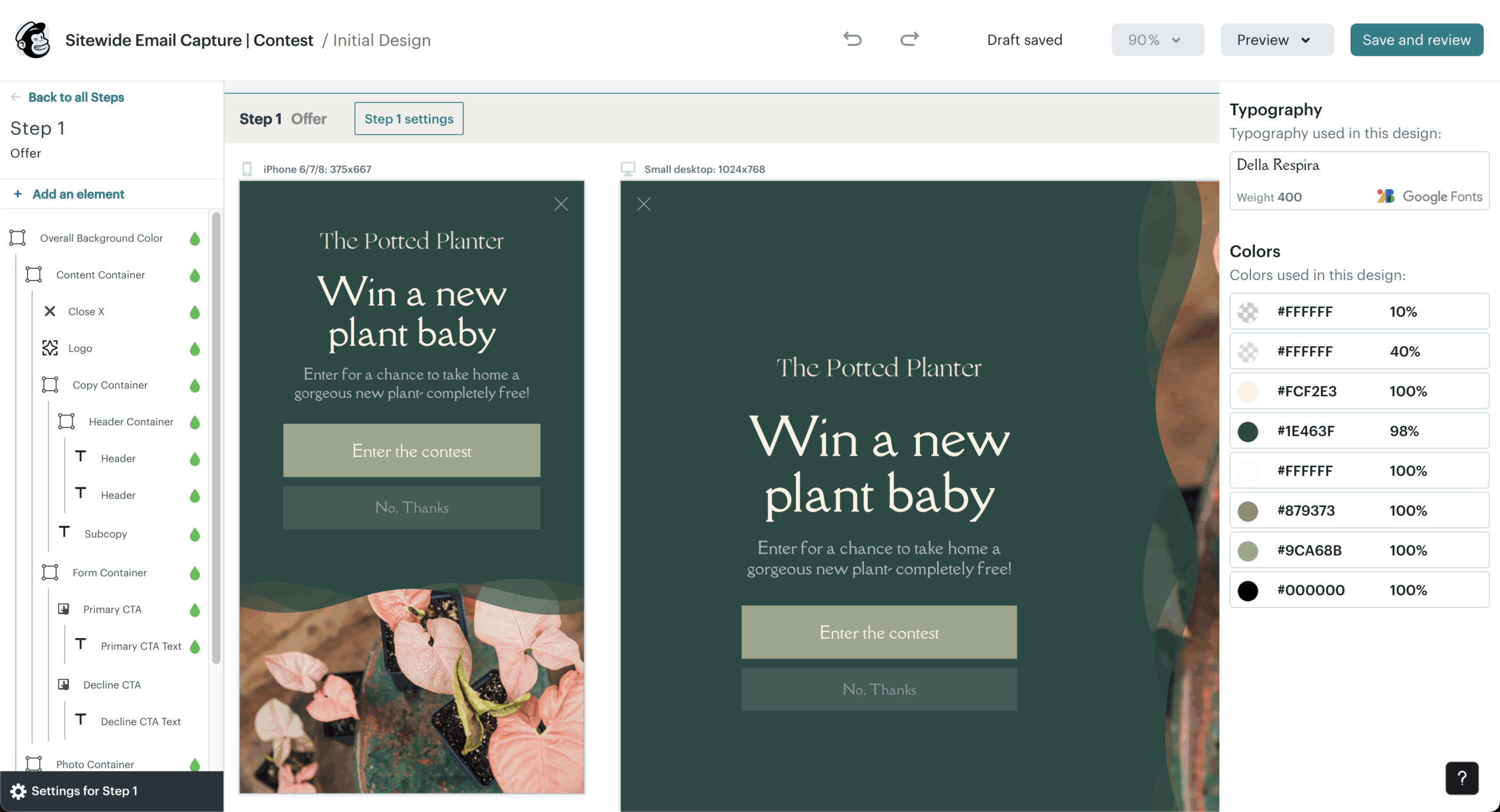
And it’s not only consistency across campaigns—frankly, Mailchimp’s page and form building experience is a bit all over the place. Embedded forms, audience-specific pop-ups, and landing page forms each have separate editors, designs, and rules. Fields and styling don’t carry over, changes must often be repeated, and to make matters slightly more cumbersome—each form is tied to a single Audience.
Where it shines, however, is how forms feed directly into complex automations or audience segments. Its landing page editor is more lightweight than a website builder, but solid for basic capture funnels.
| Feature | MailerLite | Mailchimp |
| Page + Form Builder | Landing pages + website builder with blog | Landing pages + forms |
| Free Plan Allowance | 1 website, 1 landing page, 3 forms | Landing pages and forms available |
| Pop-up Behavior Controls | Exit intent, scroll, delay | Exit intent, scroll, delay |
| Form Customization | Custom fields, GDPR, double opt-in | Custom fields, GDPR, double opt-in, reCAPTCHA |
| Seamless Automations | Yes, built-in | Yes, but switching contexts |
Winner: MailerLite for the stronger landing page builder and built-in site tools; Mailchimp for tighter form-to-automation mapping in bigger workflows.
Good segmentation is how you stop sending generic blasts and start sending relevant messages. Here’s how each tool handles it in the MailerLite vs. Mailchimp matchup:
MailerLite uses groups and segments (dynamic conditions) to control your audience, and both are unlimited on every plan. Custom fields let you store any piece of subscriber data—birthday, preferences, whatever you need. This makes it easier to enrich data at sign-up and segment subscribers from day one. You can also apply exclusion rules so you don’t mail people in other segments.
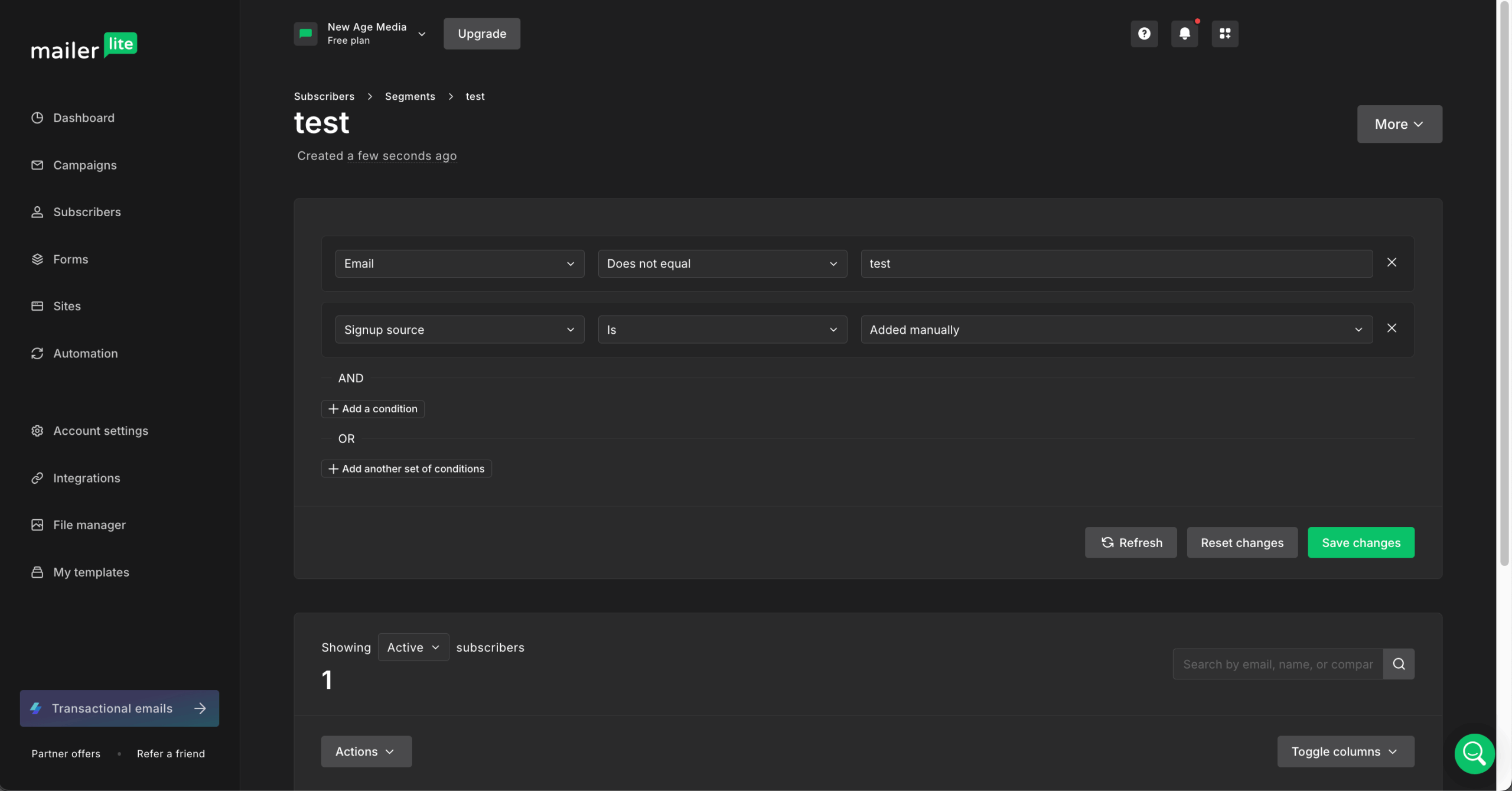
One thing I was pleasantly surprised about: MailerLite counts each subscriber once, so if someone sits in multiple groups, you won’t get double-counted. Mailchimp works differently. Your contact total is the number of contacts stored across all your audiences, so if you keep the same person in two different audiences, they count twice.
Mailchimp offers more robust segmentation tools, especially on higher tiers. Standard and Premium add advanced segmentation, pre-built segments, and predictive segments (like “likely to purchase”), including customer lifetime value insights. Tags, groups, and segments work together to model complex audiences.
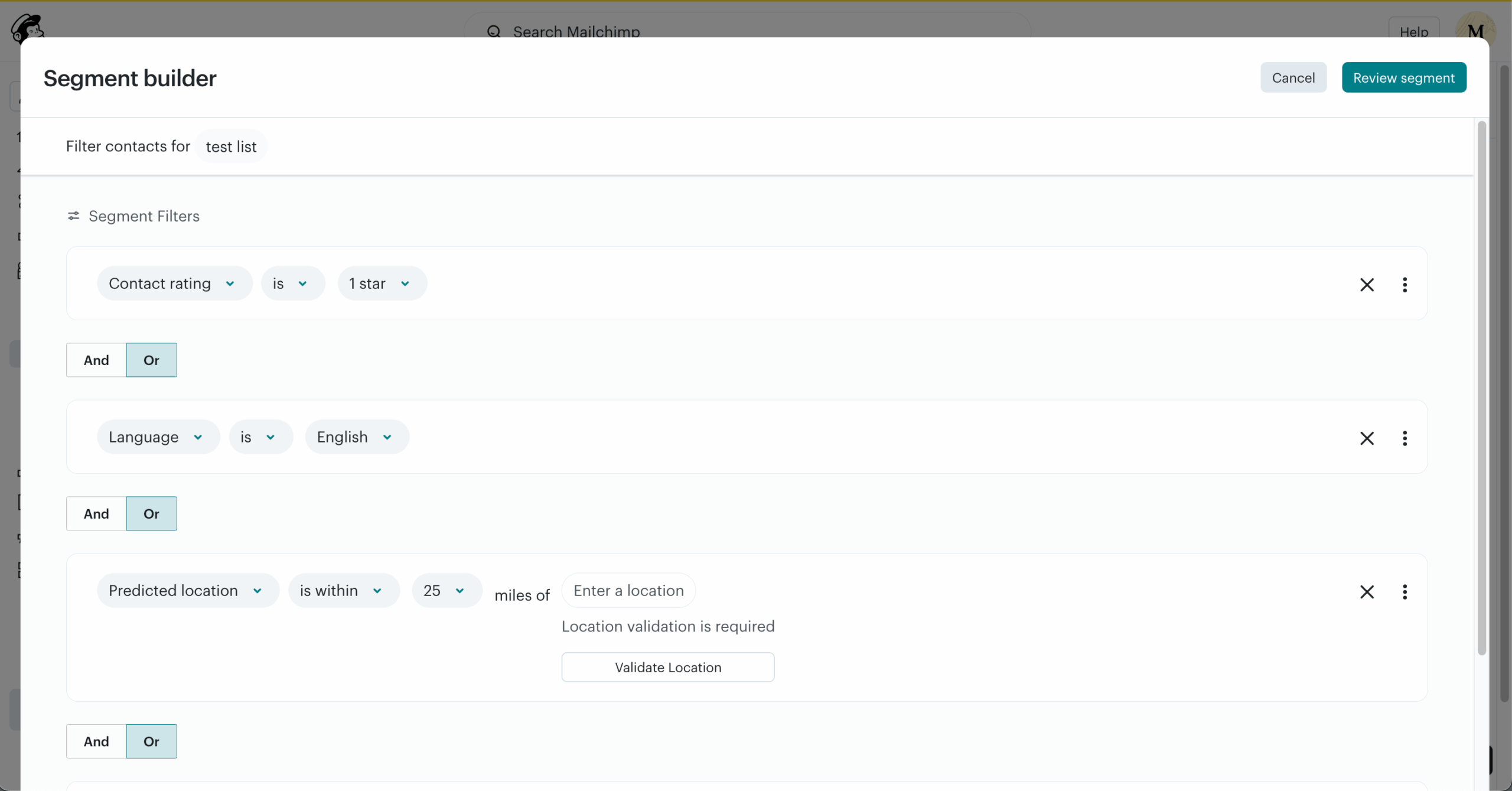
The downside? Mailchimp caps audiences by plan (1 on Free, 3 on Essentials, 5 on Standard, unlimited on Premium), and its audiences are mutually exclusive, meaning you still can’t easily combine two lists in one campaign. Yeah… bafflingly, still a thing in 2026.
| Feature | MailerLite | Mailchimp |
| Segmentation Logic | Dynamic + group-based | Multi-condition + predictive (Standard+) |
| Audiences / Lists | Unlimited on every plan | 1 / 3 / 5 / unlimited by plan |
| Custom Fields | Full support | Full support |
| Deduplication | Each subscriber counted once | Duplicates across audiences count separately |
Winner: Mailchimp for more predictive segmentation; MailerLite for cleaner, simpler contact management without billing surprises.
Neither tool is a full sales CRM, but their CRM features differ. Mailchimp leans into its all-in-one marketing pitch: contact profiles pull together tags, engagement, and purchase history from connected online stores, so you can see customer data like total revenue per contact and use it in segments. It’s handy for lead management on the marketing side, though you won’t find sales pipelines or deal tracking.
MailerLite keeps things lighter. Every plan includes individual subscriber profiles with activity history, custom fields, and groups, which covers basic contact management for newsletters and small stores. If you need real sales CRM features, you’ll want to connect either tool to a dedicated CRM through their integrations.
Winner: Mailchimp, for richer customer data on each contact profile.
For stores, email marketing tools are only as good as their connection to carts, orders, and conversions.
MailerLite supports ecommerce through Shopify, WooCommerce, and Stripe integrations and includes product blocks, ecommerce automation triggers, abandoned cart flows, and sales tracking on every plan. You can also sell digital products, bookings, and paid newsletter subscriptions directly from MailerLite (paid newsletters and recurring subscriptions need Comfort or Power).
The main limitation I’ve noticed: deeper purchase logic or multi-store attribution isn’t as mature as tools built specifically for commerce.
Mailchimp has a long history as an email + ecommerce hybrid. Features include abandoned cart and browse abandonment automations, product recommendation blocks, revenue tracking per campaign, and predictive segments based on purchase history. If your store is already tightly integrated, Mailchimp surfaces product and sales data within campaigns pretty seamlessly.
Worth noting: SMS is a paid add-on on Mailchimp’s paid plans in select countries, and it can work alongside ecommerce campaigns (like pushing offers).
| Feature | MailerLite | Mailchimp |
| Cart Abandonment Flow | Supported (ecommerce triggers on every plan) | Supported (native) |
| Product Blocks / Recommendations | Basic | Advanced + predictive |
| Revenue Tracking | Sales tracking on every plan | Deep per-campaign analytics |
| Sell Directly | Digital products, bookings, paid newsletters | Via connected store |
Winner: Mailchimp for deeper ecommerce integrations and analytics; MailerLite is solid for smaller stores and creators needing core flows without complexity.
Beautiful emails don’t matter if they don’t land in inboxes. Deliverability depends on infrastructure, policies, and sending discipline—a crucial part of any email marketing strategy.
From my research, MailerLite invests in standard deliverability hygiene: domain authentication (SPF, DKIM), a manual account approval process, shared IP monitoring, and suppression of bounces and unsubscribes. It also offers an email verifier for cleaning lists and a dedicated IP as an add-on for high-volume senders (50,000+ emails a week). Because pricing is based on active subscribers only, there’s no incentive to keep dead contacts around, which helps protect your sender reputation.
Mailchimp is more transparent about its compliance infrastructure. Its Omnivore system checks your audience for risky addresses (likely spam traps, complaints, or bounces) and blocks sending when the risk is too high. It also offers domain authentication guides, and encourages gradual warm-up for large new lists.
What about independent numbers? Published inbox-placement figures vary a lot by tester and method, so I wouldn’t pick a tool on a single percentage. For a third-party view, EmailToolTester’s deliverability-features assessment (updated July 2025) rates MailerLite 4 out of 5 stars and Mailchimp 3 out of 5, citing Mailchimp’s lack of a deliverability dashboard and list-hygiene tools. As always, your content, list hygiene, and sending patterns will impact your results more than the platform.
| Factor | MailerLite | Mailchimp |
| Authentication (SPF/DKIM) | Supported | Supported + robust guides |
| Account Vetting | Manual approval for new accounts | Lighter signup process |
| Pre-send scanning / compliance | Account and content monitoring | Omnivore audience screening |
| List Hygiene Tools | Built-in email verifier | Archiving and cleaning |
| Dedicated IP | Add-on on Comfort (50,000+ emails/week); included on Enterprise | Add-on for $29.95/month |
Winner: A slight edge to MailerLite for stricter account vetting and list-hygiene tools; Mailchimp offers more public documentation on its compliance process.
Knowing what’s working (and what’s not) matters—reporting is where these email marketing tools either help you make decisions or leave you guessing.
MailerLite offers standard campaign and automation reports on every plan: opens, clicks, unsubscribes, click maps, comparative reporting, list growth, and ecommerce sales tracking. Paid plans add custom date ranges and report exports. Integration with Google Analytics is supported too.
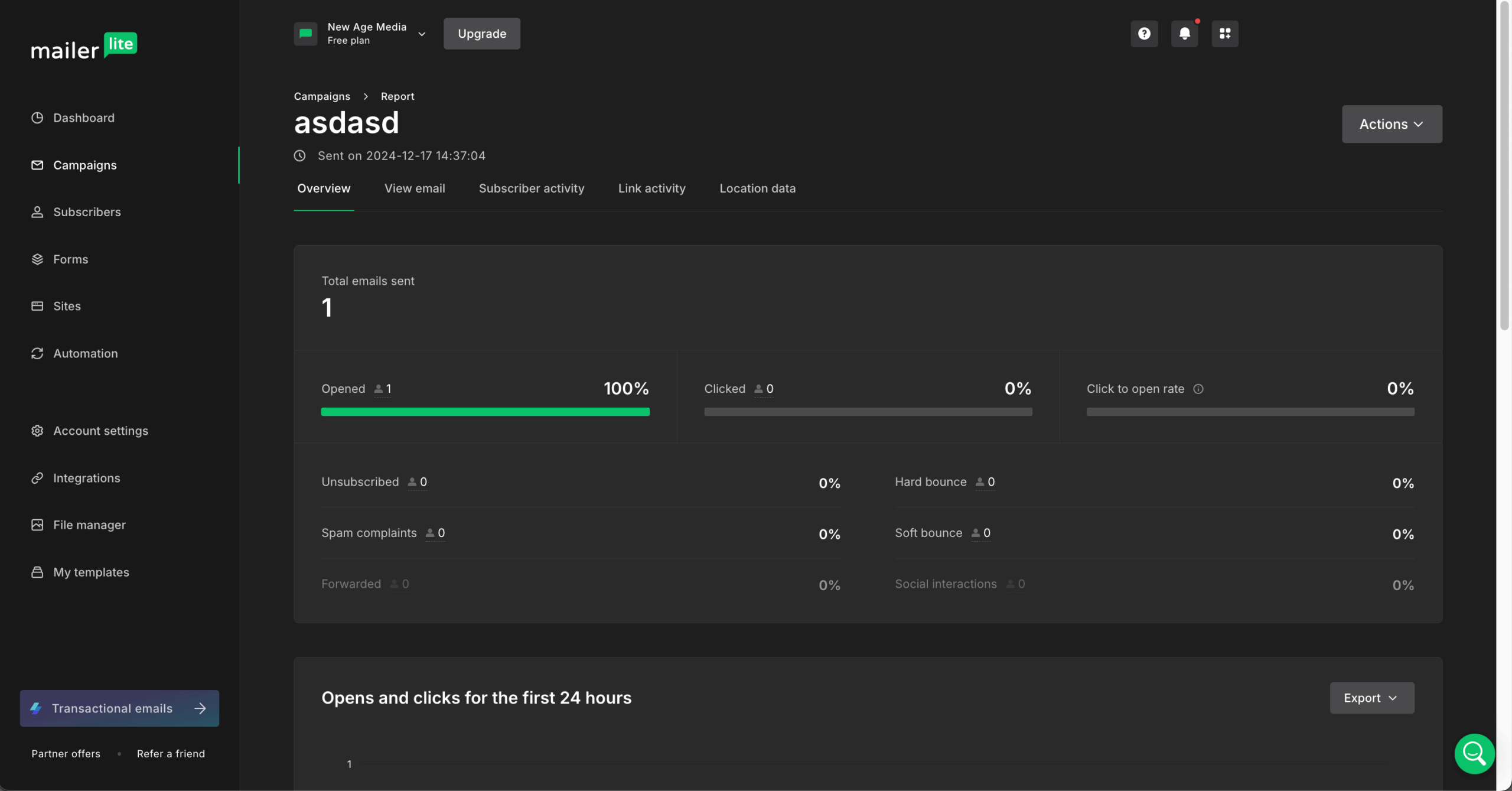
Some advanced metrics (cohort analysis, predictive) are less developed. Their dashboards favor simplicity, which I appreciate when I don’t want to get overwhelmed.
Mailchimp gives you richer, more layered reporting through its audience analytics and campaign reports—campaign-level, flow-level, time-series comparisons, and revenue breakdowns. Thanks to deeper ecommerce ties, you can see per-campaign ROI, purchase paths, and granular segmentation performance.
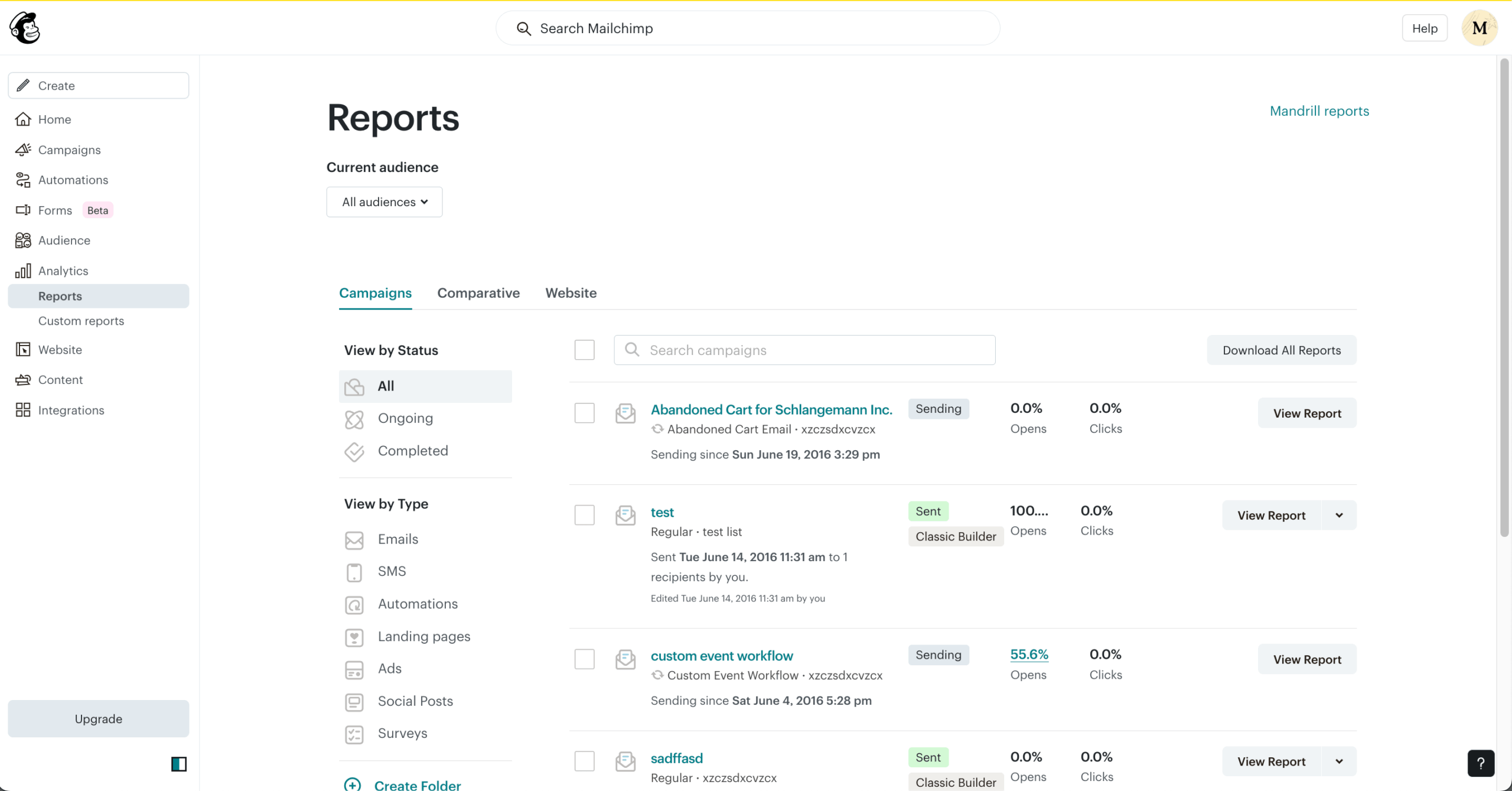
On Standard and Premium, you unlock custom reports and predictive insights. The trade-off? The user interface can feel busy, and some insights are locked behind premium tiers.
| Report Type | MailerLite | Mailchimp |
| Basic Metrics | Open, Click, Bounce, click maps | Open, Click, Bounce + more |
| Revenue Attribution | Ecommerce sales tracking | Yes, more granularity |
| Automation Reports | Real-time automation reports | Advanced flow reports |
| Custom Reports | Custom date ranges + exports (paid) | Custom reports (Standard+) |
| Predictive Insights | Limited | Standard and Premium |
Winner: Mailchimp for depth, multiple angles, and ROI analytics; MailerLite for straightforward, clean reporting without overcomplexity.
How well your email marketing tool plugs into the rest of your tech stack often determines whether it “fits” your workflow—an important consideration in the MailerLite vs. Mailchimp decision.
MailerLite has a healthy integration ecosystem with more than 100 integrations (Shopify, WooCommerce, Stripe, WordPress, Zapier, etc.) on every plan. It also ships an MCP server so tools like Claude and ChatGPT can work with your account. The API and webhooks are full-featured on paid plans; on the Free plan, API and MCP access is limited and doesn’t include sending.
Looking for a Mailchimp-MailerLite integration? MailerLite has a native Mailchimp integration that imports your Mailchimp audiences directly, which is the easiest way to move subscribers over. For ongoing two-way syncing between the two tools, you’d need a third-party connector such as Zapier.
Mailchimp has a wider playground. With 300+ integrations advertised and available on every plan, including Free, you’ll find native support for CRMs, analytics tools, ecommerce platforms, and more. Its Marketing API is robust, supporting advanced endpoints across audiences, tags, campaigns, and templates.
| Integration Scope | MailerLite | Mailchimp |
| Third-party Ecosystem | 100+ integrations | 300+ integrations |
| API / Webhooks | Full on paid plans; limited on Free | Rich Marketing API |
| AI Assistants | MCP server (Claude, ChatGPT) | Intuit Assist (beta) on Standard/Premium |
| Ease of Setup | Simple, guided | Varied, sometimes requires dev |
Winner: Mailchimp for sheer breadth and capability; MailerLite for dependable integrations that cover most needs.
When you’re stuck, service quality matters more than features in your email marketing platform.
MailerLite’s support now depends on your plan. Free users get the knowledge base and webinars only, Comfort includes 24/7 email support, and Power adds 24/7 live chat plus priority email support. Every new account also gets 24/7 live chat and email during its 14-day premium trial. Since the interface is simpler, many users find they don’t need support as often anyway.
Mailchimp provides support tiers too: email support for the first 30 days on Free, 24/7 email and chat support on Essentials and Standard, and phone plus priority support on Premium. Standard includes one personalized onboarding session, and Premium includes four.
The downside? Users often report that support is slower or less helpful on the cheapest tiers, and there can be friction when trying to escalate complex issues.
| Support Channel | MailerLite | Mailchimp |
| Free Plan | Knowledge base + webinars | Email for first 30 days |
| Email / Chat | 24/7 email (Comfort), + live chat (Power) | 24/7 email + chat (Essentials and up) |
| Phone Support | No | Premium plan |
| Onboarding Services | Self-service + tutorials + webinars | 1 session (Standard), 4 sessions (Premium) |
Winner: Mailchimp now has the edge on entry-level paid plans, since Essentials includes chat while MailerLite reserves live chat for Power. MailerLite wins if you’re on Power or rarely need help.
A mobile presence lets you check stats, manage lists, and handle light campaign oversight on the go—a modern necessity for busy email marketing professionals.
MailerLite has its own iPhone app, MailerLite Manager. While not a full replacement for the desktop experience, it lets you view dashboard stats, write and send or schedule rich-text campaigns, add and manage subscribers, and switch automations on or off. There’s also an iPad Subscribe app for collecting sign-ups offline at events or in-store.
Mailchimp provides a well-developed mobile app for iOS and Android that lets you monitor campaign performance, manage contacts, send campaigns, and view reports from your phone. It’s not a full builder or automation editor, but it supports key actions.
| Capability | MailerLite | Mailchimp |
| Mobile App | Yes (iOS: MailerLite Manager) | Yes (iOS and Android) |
| Key Actions Supported | Stats, rich-text campaigns (send/schedule), subscribers, automation on/off | View stats, send campaigns, manage contacts |
| Extras | iPad app for offline sign-ups | — |
Winner: Mailchimp wins this one thanks to its Android app; both apps let you send campaigns and manage contacts.
MailerLite vs. Mailchimp — Pricing & Plans
Pricing Comparison
Here’s what MailerLite vs Mailchimp pricing looks like on each tool’s entry paid plan, billed monthly in USD.
Subscribers
MailerLite Comfort
Mailchimp Essentials
500
$12/mo
$13/mo
2,500
$33/mo
$45/mo
5,000
$49/mo
$75/mo
10,000
$89/mo
$110/mo
50,000
$319/mo
$385/mo
A few things the table doesn’t show:
- Sending limits differ. MailerLite Comfort includes 10× the top of your subscriber tier each month (5,000 emails at the 500 tier), so it doesn’t offer unlimited emails. For unlimited emails you need Power, whose paid plans start at $25/mo for 500 subscribers (unlimited sends under fair use). Mailchimp Essentials allows 10× your contact limit, Standard 12×, and Premium 15×.
- Mailchimp’s best features sit on Standard, whose paid plans start at $20/month for 500 contacts, while Premium starts at $350/month. On MailerLite, every paid plan gets the full feature set—Power mainly lifts usage limits and adds live chat.
- MailerLite’s prices changed in 2026. With the June 16 rename, Comfort replaced Growing Business and Power replaced Advanced, and prices and limits were updated at the same time, so older comparisons quoting $9 or $10 for 500 subscribers are out of date.
MailerLite’s pricing is notably more transparent and scales predictably as your subscriber count grows. You only pay for active subscribers, which keeps costs fair. Mailchimp’s pricing tends to rise faster—especially since it counts unsubscribed and non-subscribed contacts toward your total.
Another small but noticeable win for MailerLite is its nonprofit discount. Mailchimp offers a 15% discount for nonprofits, but MailerLite doubles that with a 30% discount on paid plans, which can make a real difference for budget-conscious teams.
Hidden Costs & Billing Practices
This is where the MailerLite vs. Mailchimp pricing gap becomes more obvious over time. Mailchimp charges based on your total contact count, not just people who actually receive your emails. According to Mailchimp’s own help center, subscribed, unsubscribed, and non-subscribed contacts all count toward your contact total, while archived, cleaned, and deleted contacts don’t.
Say you have a 5,000-contact list with 500 unsubscribed users. Mailchimp still counts all 5,000 contacts unless you archive the unsubscribes, while MailerLite only counts the 4,500 active subscribers.
Two smaller things to watch on both sides. MailerLite counts subscribers cumulatively within each billing cycle, so deleting people mid-cycle won’t lower that month’s count. And Mailchimp doesn’t stop your campaigns if you exceed your contact limit on a paid plan—it bills you overage charges instead.
For growing lists, that difference quietly sneaks up—making MailerLite the more predictable, budget-friendly option long term.
Free Plan Comparison
Feature
MailerLite Free
Mailchimp Free
Subscriber Limit
250
250
Monthly Emails
2,500
500 (max 250/day)
Automation
3 automations, up to 5 steps
Limited free preview
Websites & Landing Pages
1 website + 1 landing page
Available
Templates & Editor
All 3 editors, limited templates
Limited templates
Email Scheduling
Yes
Not included
User Seats
2
1
Support
Knowledge base + webinars
Email (first 30 days)
Note: MailerLite cut its free plan from 500 subscribers and 12,000 emails/month to 250 subscribers and 2,500 emails/month on June 16, 2026. Mailchimp’s free plan is now capped at 250 contacts and 500 sends a month.
From my evaluation, MailerLite’s free plan is still the more usable of the two for ongoing newsletters, thanks to five times the monthly sends, working automations, and a free website. Mailchimp’s free plan feels more like a trial—functional but heavily capped, with no scheduling and only a preview of automation flows, nudging you toward a paid plan pretty quickly.
When you compare Mailchimp and MailerLite, the free plan differences are significant, but neither is a generous free plan anymore, and neither is a long-term home once you pass 250 contacts. If you need a bigger free tier, look at the free Mailchimp alternative options in the FAQ below.
MailerLite vs. Mailchimp — Pros & Cons
Provider
MailerLite
- Clean, intuitive interface
- Transparent pricing (pay only for active subscribers)
- Built-in website, landing page, and digital-product tools
- Automation on every plan, including Free
- Free plan cut to 250 subscribers in 2026
- Live chat only on Power
- Limited predictive features
- iOS-only mobile app
- Fewer native integrations than Mailchimp
Mailchimp
- Deep automation and segmentation tools
- Rich analytics and predictive insights
- Strong ecommerce and integration ecosystem (300+)
- iOS and Android apps
- Complex pricing structure
- Counts unsubscribed contacts toward billing
- Key features gated to Standard and up
- Very limited free plan
- Steeper learning curve for beginners
Both platforms excel in different ways: MailerLite wins on simplicity, transparency, and cost-effectiveness, while Mailchimp shines with its data depth, integrations, and scalability.
Choosing between them depends on whether you value ease and affordability—or advanced automation and analytics depth. For those asking if MailerLite is better than Mailchimp, the answer depends on your specific email marketing use case and how comfortable you are with tech.
Which Platform Should You Choose?
MailerLite is Best For
MailerLite works best for small businesses, content creators, and nonprofits looking for a straightforward, budget-friendly email marketing platform that scales without getting complicated. The intuitive drag-and-drop editor, built-in website and landing page creator, and affordable pricing make it ideal for teams with limited technical resources.
Small businesses benefit from quick campaign setup and transparent billing, while nonprofits get a 30% discount and features like segmentation and automated thank-you emails. Ecommerce brands can use simple Shopify, WooCommerce, and Stripe integrations for product promotions and abandoned cart recovery, and creators can sell digital products or paid newsletters directly.
For a typical small business owner, Comfort covers regular newsletters (with 10× your tier in monthly sends), while Power adds unlimited emails, automations, and 24/7 live chat. Overall, MailerLite fits teams focused on consistent engagement and storytelling rather than advanced data modeling or enterprise analytics.
Mailchimp is Best For
Mailchimp is designed for growing ecommerce stores, digital agencies, and established B2B companies that want advanced automation, analytics, and multi-channel capabilities for their email marketing strategies.
Ecommerce brands use its predictive segmentation, product recommendations, automation flows, and in-depth sales tracking. Digital agencies appreciate its multi-audience handling, role-based access, and integrations with CRMs and analytics platforms.
The Standard and Premium plans appeal to experienced users who need sophisticated email marketing tools, including custom reports, multivariate testing, and personalized onboarding. While it’s more complex and pricier, Mailchimp excels for data-driven marketers who care about personalization, experimentation, and detailed ROI reporting across email and SMS.
MailerLite vs. Mailchimp — What Users Are Saying

From my review of G2 feedback, many MailerLite users praise its customer support responsiveness and ease of use in their email marketing operations. One reviewer notes: “Their customer service is amazing. Minimal to no wait time for chat help … very friendly and helpful.”
Others emphasize how smooth the migration process is from other platforms, highlighting the flexibility of the templates and the overall value.
In comparative G2 scores, MailerLite often outpaces Mailchimp on quality of support and ease of use as perceived by users. These views reinforce that MailerLite tends to delight users who value simplicity, clear support, and cost-efficiency over feature overload.
Meanwhile, Mailchimp fans talk up its feature richness and evolving capabilities. One reviewer reports: “Mailchimp has surpassed our expectations. Way more than what it was years ago… the templates make life easier.”
Another common praise: Mailchimp “streamlines my marketing workflow” and has “so many capabilities” within one tool. That said, some G2 critiques point to pricing and UX friction: Mailchimp gets criticized for charging for unsubscribed/cleaned contacts, and its interface is described as sometimes confusing as features get added.
I’ve found that MailerLite users on Capterra frequently emphasize how approachable and reliable the platform is for email marketing. One reviewer says, “My experience with MailerLite has been incredibly positive. It’s a strong tool that simplifies email marketing…”
Many highlight the clean UI, low learning curve, and solid core features like campaign creation and scheduling. Downsides mentioned in reviews include fewer advanced integrations compared to bigger platforms, and a somewhat lighter feature set in analytics and automation beyond basics.
Mailchimp reviews on Capterra tend to stress familiarity, rich templates, and broad marketing utility. One user praises: “Mailchimp’s email campaign management is effective and user-friendly,” while many appreciate the segmentation, scheduling, and interface for professionals.
Yet several reviewers warn about ballooning costs as lists grow and the complexity that comes along—some say features are gated to higher tiers or that the value diminishes for smaller users.
On Reddit, I’ve noticed MailerLite often draws praise for its clean UI and strong deliverability—one user in r/Emailmarketing says: “I loved Mailerlite: simple, efficient, great-looking emails and improved significantly our deliverability rates.” But critics caution about their customer support: “they’re useless … no reply for a week on a complaint.”
Others describe bugs and account-shutdown behavior, and the 2026 price increases and free-plan cut have added to the grumbling. The general vibe is that MailerLite delivers when things go right, but its support and consistency can be brittle at higher stakes.
Mailchimp’s Reddit narrative is messier but full of honest critique. Some users complain about creeping complexity: “Logging into Mailchimp … it’s gotten significantly more complicated than I remember.”
Others are more blunt: “Don’t go down the Mailchimp path … they’ll burn you eventually, either through pricing, or through their increasingly terrible UI.”
On the positive side, one user in r/ecommerce comments: “Mailchimp works fine and has a great API.” But even then, the Mailchimp vs. competitors like Klaviyo discussion boils down to: Mailchimp is solid but not top-tier for complex workflows.
FAQs
For most small businesses, creators, and nonprofits, yes: MailerLite is cheaper, easier to use, and only bills active subscribers. At 10,000 subscribers, MailerLite Comfort costs $89/month versus around $110/month for Mailchimp Essentials. Mailchimp is the better choice if you need predictive segmentation, deep ecommerce analytics, or 300+ native integrations.
MailerLite costs $0 on the Free plan (up to 250 subscribers), from $12/month on Comfort, and from $25/month on Power, all quoted at 500 subscribers with monthly billing. Prices rise with your subscriber count—for example, Comfort is $49/month at 5,000 subscribers and $89/month at 10,000. Annual billing saves 10%, and lists above 200,000 subscribers need a custom Enterprise plan.
The most common reasons are price and complexity. Mailchimp counts unsubscribed and non-subscribed contacts toward your bill, gates features like dynamic content and multivariate testing behind its Standard plan, and has cut its free plan to 250 contacts and 500 emails a month with only a limited preview of automation flows. Many users also say the interface has grown more complicated over the years.
Yes. MailerLite is one of the most popular Mailchimp alternative picks for small businesses because it’s cheaper at most list sizes, simpler to use, and bills only active subscribers. It’s a weaker fit if you rely on Mailchimp’s predictive segmentation, 300+ integrations, or Android app.
For a free plan, both MailerLite and Mailchimp now cap you at 250 contacts, so look elsewhere if you need more room. Sender is a solid free option, with a free plan for up to 2,500 subscribers and 15,000 emails a month including automation. Kit and Brevo also offer free plans with different limits.
If price is the main driver, Sender is one of the most affordable Mailchimp alternatives, with a free plan for up to 2,500 subscribers and 15,000 emails a month including automation, and a Standard plan at $69/month for 10,000 contacts. Other options worth comparing are Brevo for volume-based pricing and Kit for creators. If you need more advanced automation than MailerLite offers, see our MailerLite vs ActiveCampaign comparison.
Yes, MailerLite has a native Mailchimp integration that imports your Mailchimp audiences into MailerLite. It’s designed for migrating rather than running both tools side by side. If you want ongoing two-way syncing, you’d need a third-party connector like Zapier.
To migrate from Mailchimp to MailerLite, connect your Mailchimp account through MailerLite’s Mailchimp integration, or export your contacts from Mailchimp as a CSV and import them into MailerLite. Remember to bring your unsubscribed contacts across too, so they stay suppressed. You’ll need to recreate templates and automations manually, since workflows don’t transfer directly. MailerLite’s migration page also offers help for larger lists.
Content such as pornography and escort services, affiliate and MLM offers, gambling or betting, get-rich-quick schemes, forex, loan or quick-credit services, weight-loss material, counterfeit products, and illegal goods is prohibited by MailerLite. They also don’t allow sending to unsolicited or purchased lists. Violating these rules can result in account suspension or termination.
No, MailerLite does not include SMS marketing on its Free plan or its Comfort and Power marketing plans. SMS is available through MailerSend, MailerLite’s separate transactional product, on its Starter plan and up (Starter includes 100 SMS a month to US and Canadian numbers).
In the MailerLite vs. Mailchimp debate for ecommerce, Mailchimp generally offers more advanced ecommerce tools—predictive segmentation, product recommendations, and deeper analytics for connected stores.
On the other hand, MailerLite focuses on simplicity and affordability, with ecommerce triggers and sales tracking on every plan, plus the ability to sell digital products and bookings directly. That appeals to creators and small stores that don’t need heavyweight ecommerce intelligence.
Who's behind these reviews?


- Hands-on testing across multiple email marketing tools
- Fair comparisons using a unified evaluation process
- Insights verified with real user reviews from trusted sources
- No sponsorships or affiliate ties
- Clear, unbiased scoring and methodology