Ontraport Review 2025: All-in-One CRM That Actually Delivers
I’ve been watching Ontraport for a while now, and it’s fascinating how they’ve built something genuinely comprehensive without falling into the enterprise complexity trap. While HubSpot and Salesforce chase big corporations with feature bloat, this Santa Barbara company keeps focusing on what growing businesses actually need.
After nearly two decades in business, they’re serving thousands of companies in 60+ countries. That’s not accident — it’s what happens when you build something that actually works for real businesses.
What is Ontraport?
Think of Ontraport as the platform for businesses that have outgrown basic email marketing but aren’t ready for enterprise-level complexity. Started back in 2006 as OfficeAutopilot, it’s evolved into something pretty special: a unified system that handles your marketing, sales, and operations without making you feel like you need an IT department.
What sets them apart is something called custom objects — basically the ability to create your own databases within the system. Most platforms give you contacts, companies, and deals. That’s it. Ontraport lets you build whatever your business needs. Tracking events? Managing inventory? Running affiliate programs? You can create custom databases for all of it.
The whole philosophy is about eliminating the tool proliferation problem. You know the one — where you start with an email marketing tool, add a CRM, throw in a landing page builder, and before you know it you’re paying for six different subscriptions that barely talk to each other.
Ontraport Key Features
Building emails in Ontraport feels straightforward once you get the hang of it. The drag-and-drop editor works like you’d expect, and the templates are mobile-friendly by default. Nothing groundbreaking here, but nothing frustrating either.
Where it gets interesting is the deliverability side. They’ve built solid relationships with ISPs and handle all the technical stuff — SPF, DKIM, authentication protocols. Users often see their open rates jump after switching from other platforms, sometimes by 50% or more.
The real strength shows up in how emails connect with everything else. When someone clicks a link, that action can trigger updates in your CRM, start automation sequences, or even assign tasks to team members. It’s this integration that makes the difference.
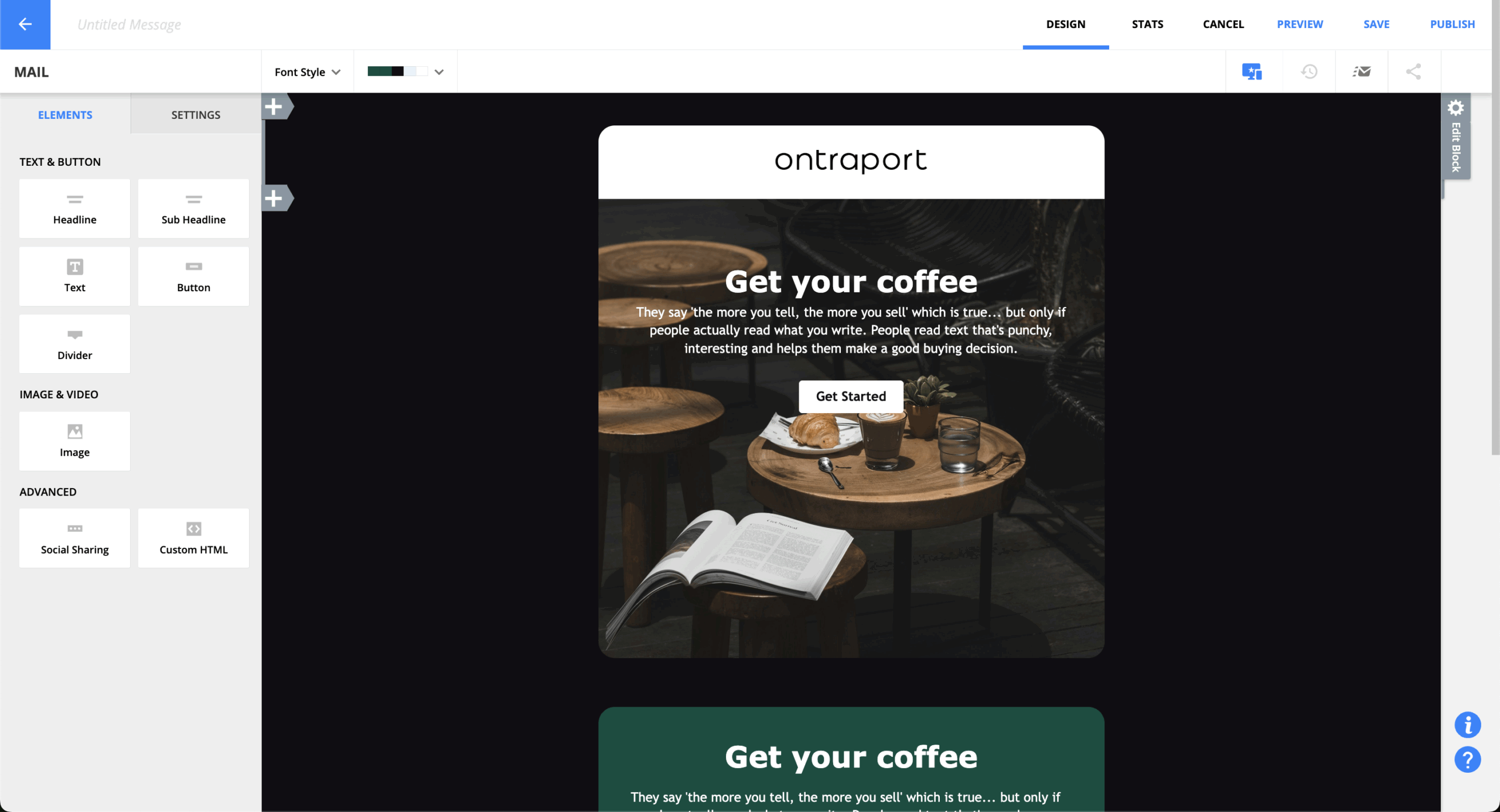
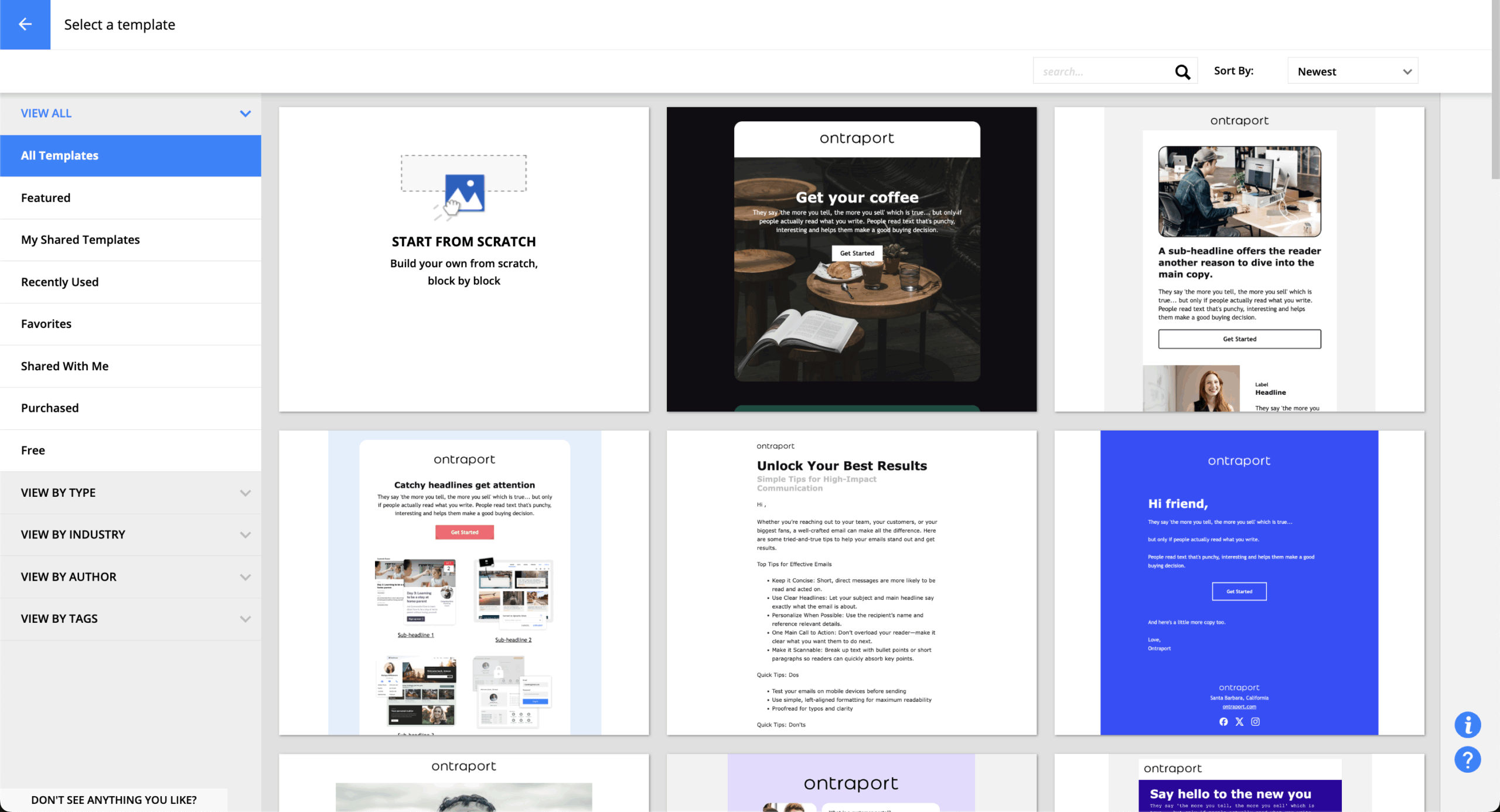
The template selection is decent but not overwhelming. They’ve gone for quality over quantity — about what you’d expect from a platform that focuses on business results rather than design variety. Each template is professional and converts well, which probably matters more than having 500 options.
You can customize everything through the visual editor without touching code. Save your designs as templates, share them with your team, that sort of thing. Dynamic content works well too — names, locations, purchase history can all populate automatically.
Honestly, if you’re coming from Mailchimp or Constant Contact, you might miss the extensive template libraries. But most businesses end up using the same 3-4 templates anyway.
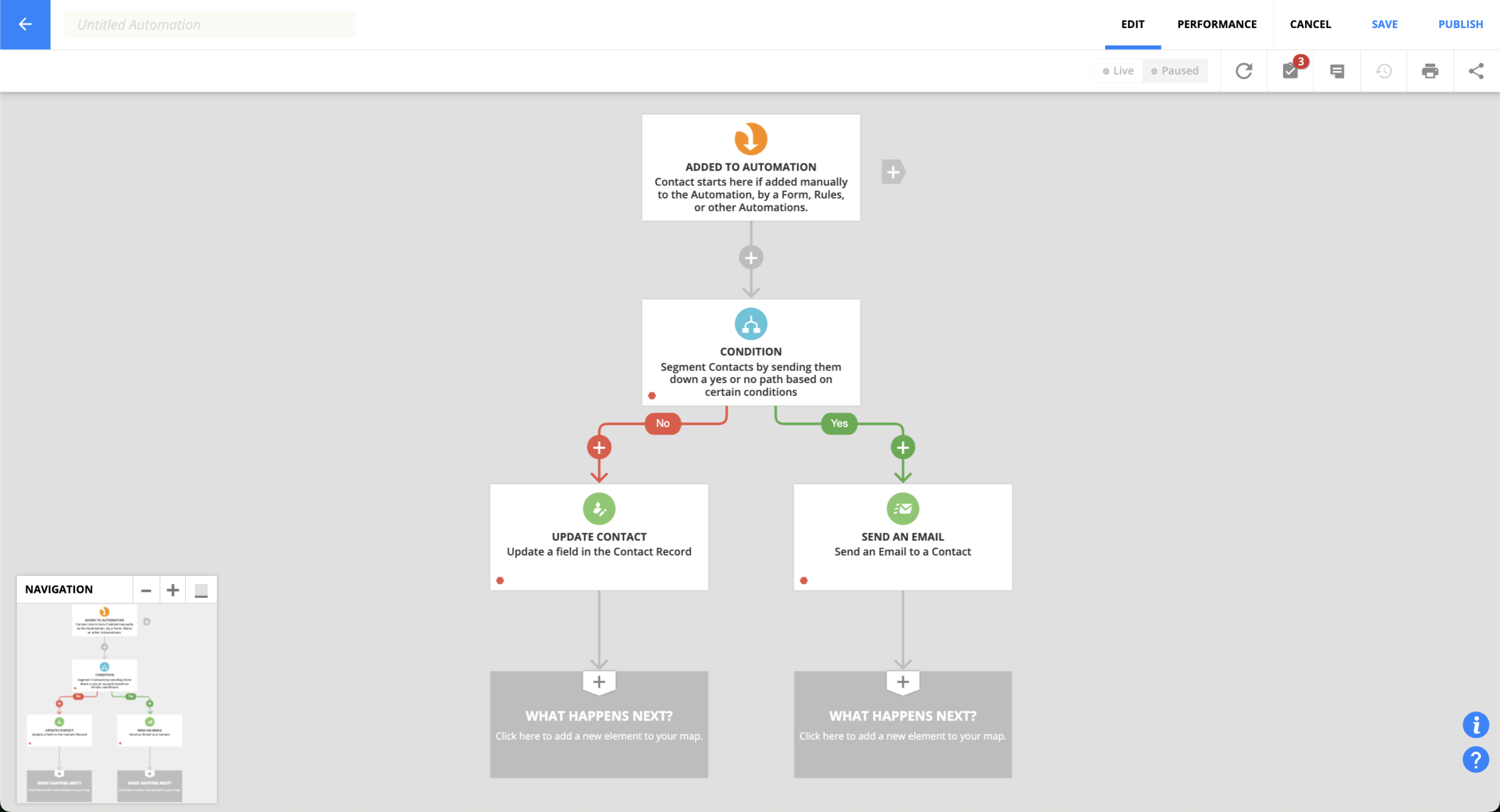
This is where Ontraport really shines. The visual automation builder lets you create complex workflows that would require a team of developers elsewhere. You can map out entire customer journeys — from first website visit to repeat purchase — all in one place.
The pre-built automation maps are smart. Instead of starting from scratch, you get proven templates for lead nurturing, customer onboarding, sales follow-up. Customize them for your business, or use them as-is. Either way works.
What impressed me most is how automation extends beyond marketing. You can automate task assignments, update custom databases, trigger fulfillment processes. It’s like having a really smart assistant that never forgets anything.
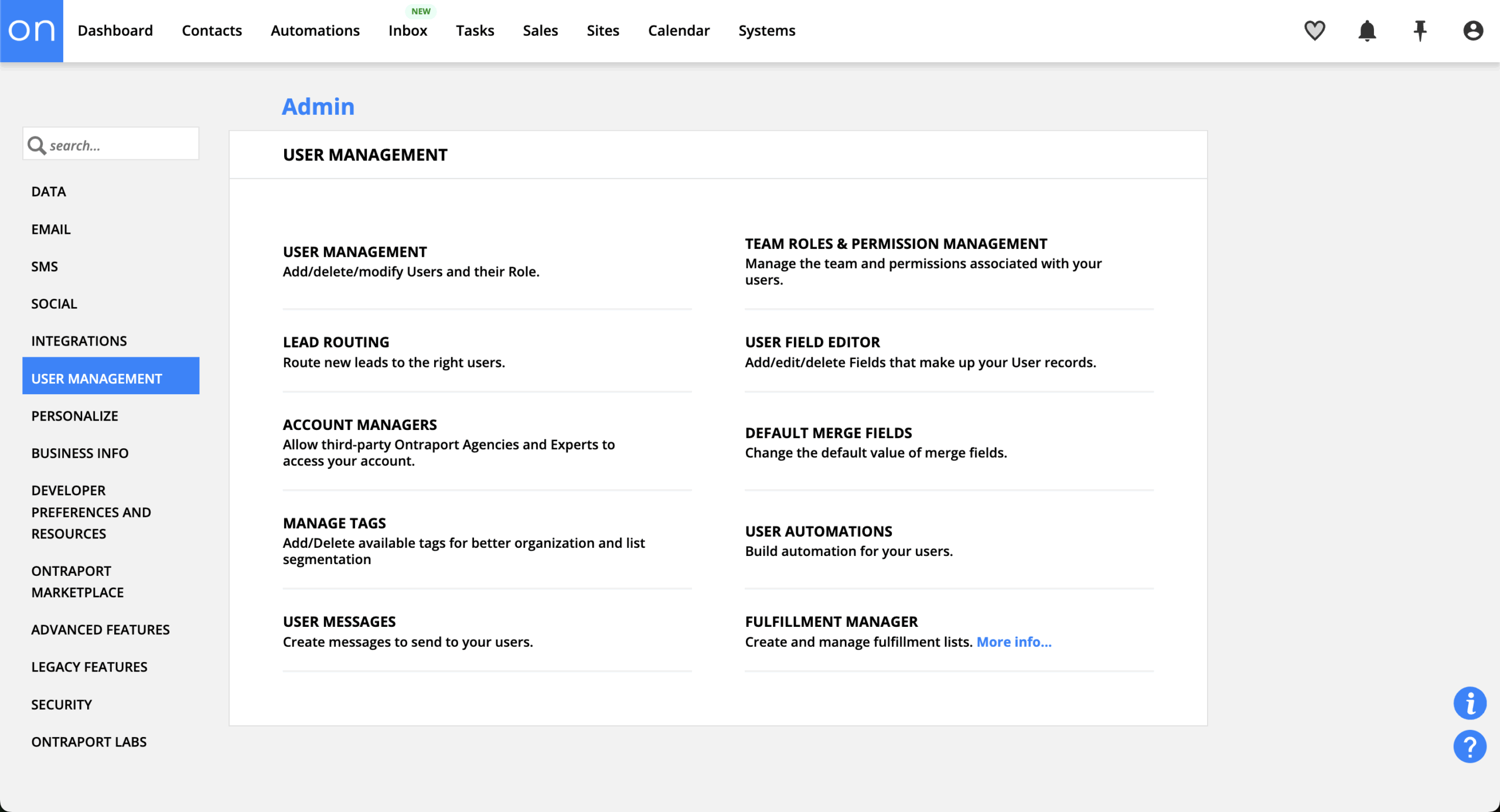
Contact management goes way beyond typical email list stuff. You get unlimited custom fields, tags, and scoring options to build detailed customer profiles. The search and filtering capabilities let you slice your audience any way you want.
Those custom objects I mentioned earlier? This is where they really matter. You can create databases for events, products, projects — whatever your business tracks — and link them to your contacts. So you know exactly which customers attended which events, bought which products, participated in which programs.
The data hygiene tools handle duplicates automatically and keep you compliant with privacy regulations. Contact history shows every interaction, transaction, and automated action in one timeline.
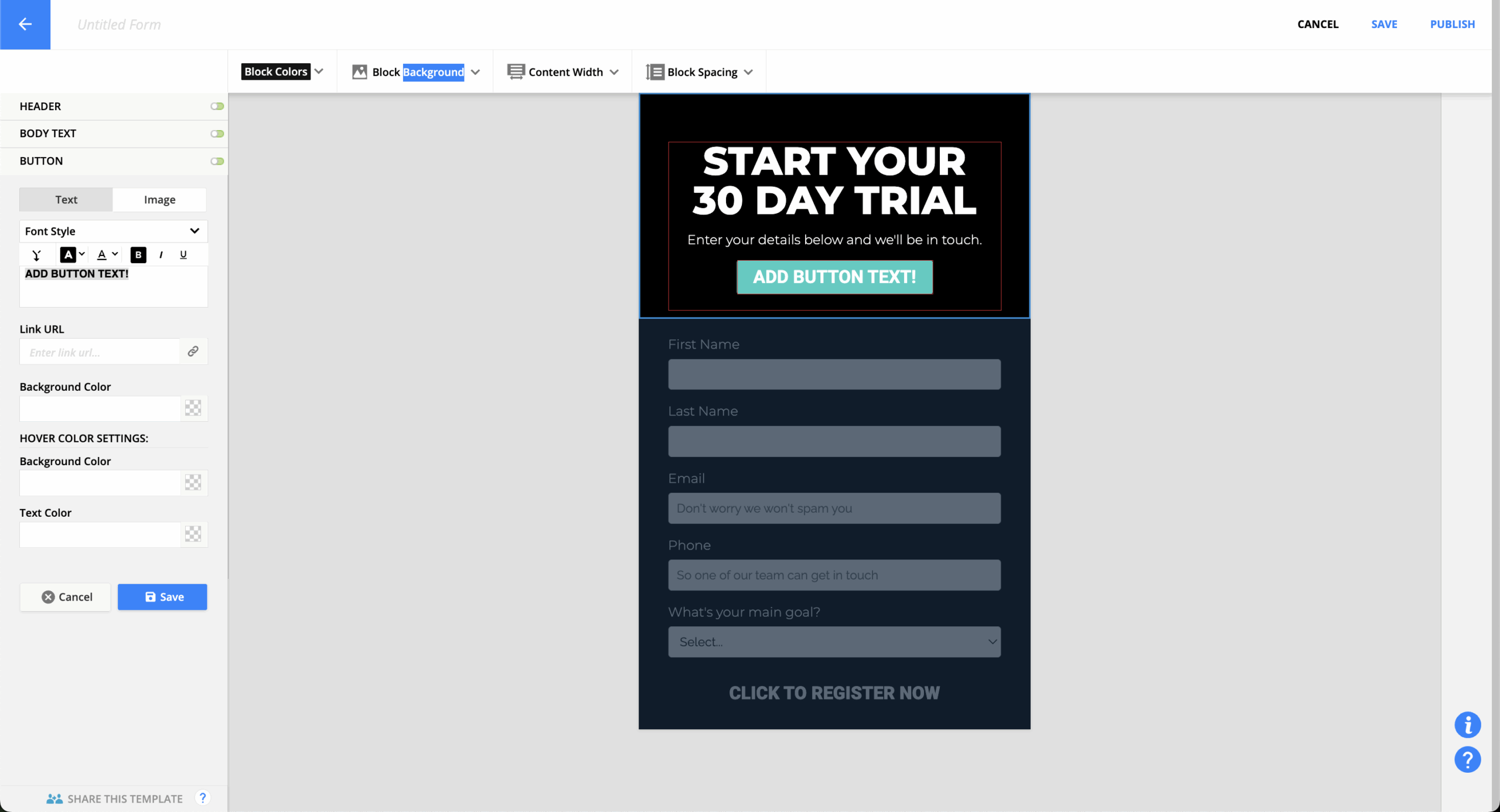
The page builder creates responsive landing pages and forms without needing external tools. It’s not as sophisticated as dedicated platforms like Unbounce, but it covers most business needs. Drag and drop elements, add videos and testimonials, integrate payment forms.
Dynamic content means pages can show different information based on who’s visiting. Forms can pre-populate with known contact information and adjust fields based on visitor segments. Pretty neat when it works smoothly.
The conversion optimization tools give you basic analytics and form tracking. A/B testing works for individual elements or entire pages. It integrates with the automation system, so visitor actions can trigger immediate follow-up.
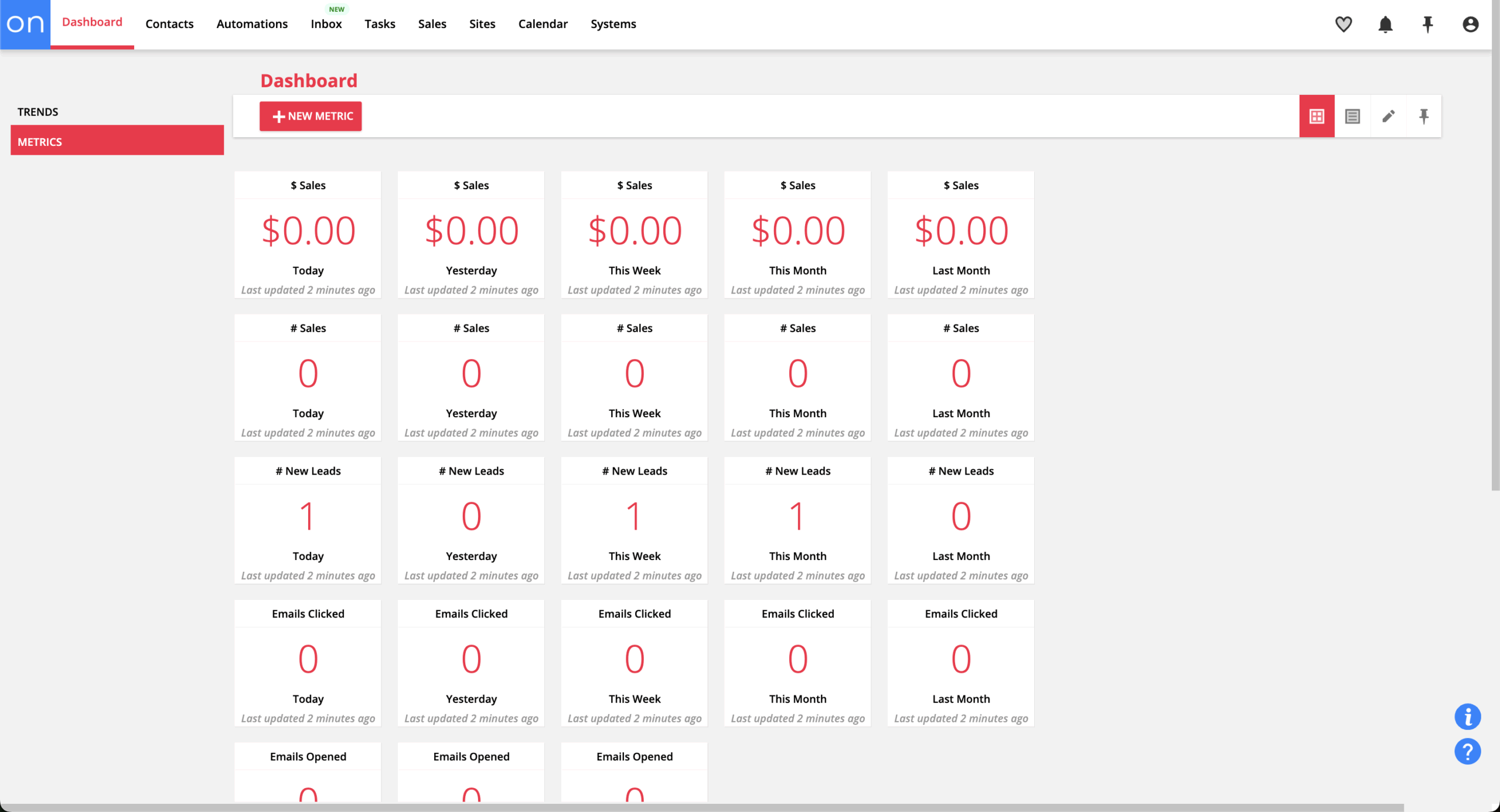
The reporting system covers everything happening in your business, not just email metrics. You get sales funnel analysis, customer lifetime value calculations, revenue attribution across touchpoints. The visual campaign mapping shows performance data right on your automation workflows.
Custom dashboards let you focus on what matters for your business. Schedule reports to deliver automatically, export data for external analysis. The system tracks complete customer journeys so you can see how leads move through your business before converting.
Revenue reporting connects marketing activities to actual sales results. Finally, you can calculate real ROI for your campaigns instead of guessing based on email opens and clicks.
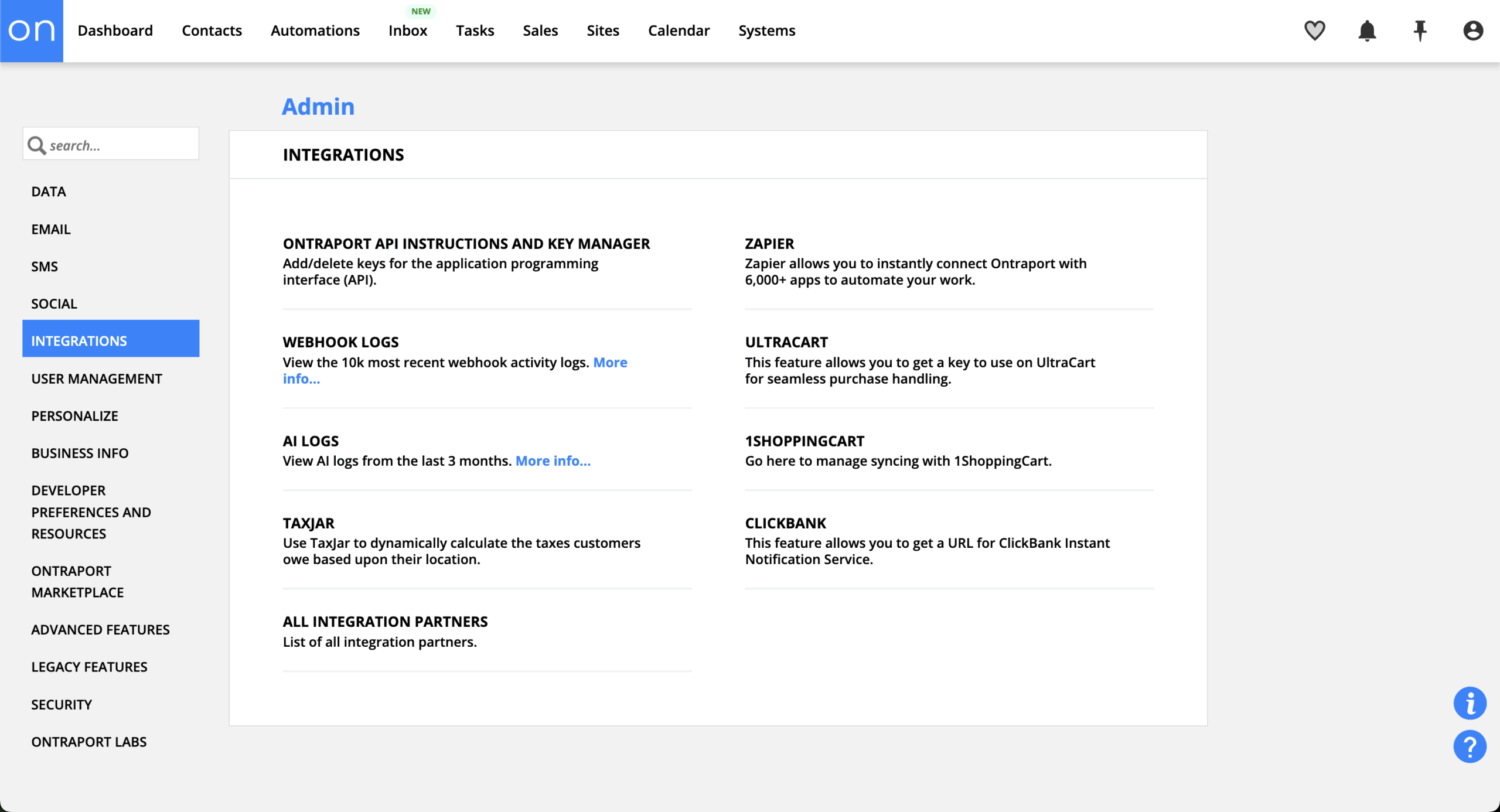
Ontraport connects with the usual suspects — Stripe, PayPal, Shopify, Zoom, Calendly. The Zapier integration opens up thousands more connections. The API is solid if you need custom development work.
Native integrations cover most common business tools. Webhooks provide real-time data sync for immediate action on external events. The REST API gives developers comprehensive access to all your data and functions.
The integration ecosystem isn’t as vast as HubSpot’s 1,000+ connections, but it covers what most businesses actually use. Quality over quantity, which seems to be their approach to everything.
This might be Ontraport’s secret weapon. The support team doesn’t just answer questions — they provide unlimited screen sharing sessions where they’ll work alongside you to solve problems. That’s pretty unusual in the software world.
Ontraport University offers 150+ video lessons covering platform features and business strategy. The knowledge base is comprehensive, and the user community provides peer support. Support is available seven days a week with response times typically under two hours.
The in-house team gets consistently high marks for going beyond basic problem resolution. They’ll provide strategic advice and optimization recommendations, which explains why customer satisfaction ratings stay so high.
Ontraport Pricing Plans and Value
Price
Contacts
Features
Best For
Basic
$29/month
Up to 1,000
Email marketing, basic CRM, landing pages
Small businesses starting automation
Plus
$79/month
Up to 2,500
Advanced automation, SMS, affiliate management
Growing businesses needing full features
Pro
$147/month
Up to 10,000
Advanced reporting, API access, priority support
Established businesses scaling operations
Enterprise
Custom
25,000+
Custom objects, dedicated IP, advanced integrations
Large organizations with complex needs
The pricing makes sense when you consider what you’re getting. Even the Basic plan includes automation and landing pages that many competitors charge extra for. The Plus plan hits the sweet spot for most businesses — comprehensive functionality without enterprise complexity.
No setup fees or long-term contracts. The 14-day free trial gives you access to everything, so you can properly evaluate whether it fits your business. That’s refreshing in a market full of limited demos and feature restrictions.
When you add up the cost of separate tools for email marketing, CRM, landing pages, payment processing, and automation, Ontraport often saves businesses 50-70% while providing better integration and functionality.
Ontraport Pros and Cons
- Genuine all-in-one platform that works
- Enterprise features at reasonable pricing
- Outstanding customer support with screen sharing
- Custom objects for sophisticated business modeling
- No setup fees or contracts
- Strong automation and deliverability
- Learning curve for advanced features
- Limited template selection
- Can feel complex for simple needs
- Fewer integrations than enterprise platforms
- Overkill for basic email marketing
- Some features require technical understanding
Pros
The biggest advantage is having everything work together seamlessly. No more data stuck in different systems, no more integration headaches, no more wondering why your email platform doesn’t know about your latest sale. Everything talks to everything else.
Custom objects are genuinely powerful. Being able to create databases tailored to your specific business needs — that’s enterprise-level functionality that typically costs thousands per month. Here it’s included in the standard plans.
The support quality consistently impresses people. Unlimited screen sharing sessions where they’ll work through problems with you? That level of service significantly reduces implementation time and helps you get real value from the platform.
Cons
The comprehensive feature set can overwhelm people who just want to send newsletters. If you’re looking for simple email marketing, Ontraport might feel like using a sledgehammer to crack a nut. The learning curve exists, especially for advanced features.
Template selection is smaller than platforms focused purely on email marketing. The designs are professional and convert well, but you won’t find the creative variety that some brands want.
While the integration ecosystem covers most needs, it’s not as extensive as enterprise platforms. If you use specialized industry tools or need deep connections with enterprise systems, you might hit limitations.

Should You Choose Ontraport?
Best For
Consider Alternatives If
Service businesses wanting complete automation
You only need basic email marketing
Companies tired of managing multiple tools
Advanced integrations are critical
Coaches and consultants building membership sites
Visual email design is your main concern
Businesses needing custom data relationships
Simplicity trumps comprehensive features
Teams wanting exceptional support
Budget is extremely tight
Who Ontraport is Perfect For
Service-based businesses get the most value here. Coaches, consultants, agencies — anyone who needs to manage the complete customer lifecycle from lead generation through service delivery and ongoing relationships. The platform handles client onboarding, course delivery, payment processing, and relationship management in one place.
Growing businesses that have outgrown basic tools but aren’t ready for enterprise complexity find Ontraport hits the sweet spot. You get sophisticated automation and business modeling without needing dedicated technical staff.
Companies seeking tool consolidation can replace multiple subscriptions with Ontraport’s comprehensive feature set. The total cost often decreases while capabilities increase substantially.
Who Should Consider an Alternative
If you only need basic email marketing, Ontraport is probably overkill. Platforms like Mailchimp or Kit provide adequate functionality with less complexity and lower costs for straightforward newsletter scenarios.
Organizations requiring extensive integrations with enterprise systems might benefit from platforms with broader connectivity options. While Ontraport covers most common business tools, specialized requirements might need more extensive ecosystems.
Design-focused brands requiring cutting-edge email templates or advanced visual customization might prefer platforms specializing in email aesthetics over Ontraport’s more functional approach.
Ontraport User Experience and Reputation
G2 users consistently mention how everything connects and works together. The interconnected features get frequent praise — marketing, sales, and fulfillment operating as one system rather than separate tools requiring integration management.
People often describe business transformation after implementing Ontraport. The automation capabilities and comprehensive feature integration enable business processes that weren’t practical before. Support quality gets regular positive mentions.
The main complaints center on the learning curve for advanced features and occasional interface complexity. But most users feel the benefits outweigh these challenges, especially with the support provided.
Capterra reviewers emphasize how Ontraport replaces multiple business tools while providing superior functionality. The automation sophistication and depth of features available at each pricing tier receive particular praise.
Customer support consistently gets positive feedback. Users highlight responsiveness, knowledge, and strategic guidance beyond basic problem resolution. The unlimited screen sharing feature is often mentioned as a differentiator.
Common improvement requests include interface simplification for basic users and expanded template libraries. Overall satisfaction remains high across different business types and use cases.
Trustpilot users highlight the comprehensive platform capabilities and effectiveness for business automation. Many reviews come from long-term users who have successfully scaled operations using advanced features.
Support experiences receive consistent positive feedback. Users praise both technical competence and strategic guidance from the support team. The educational resources and multiple support channels get frequent mentions.
Overall satisfaction stays high across different business types, with users consistently recommending the platform for businesses seeking comprehensive automation rather than simple email marketing.
Ontraport Alternatives
Ontraport combines a CRM, email and SMS automation, payments and subscriptions, membership sites, affiliate management and custom objects in one platform for small businesses. But it has no free plan, only a 14-day trial, and extra users, SMS, AI and other features are billed as separate add-ons on top of your plan, so costs add up as you grow. Its broad feature set also takes time to learn. These five alternatives cover the most common reasons people switch.
Keap: best for service businesses that need scheduling and invoicing
Keap is the closest like-for-like alternative to Ontraport, built for small service businesses that want CRM, automation, email, text messaging and payments in one place. It adds built-in appointment booking and invoicing, and it sells a single all-inclusive plan instead of tiered features. The trade-off is cost: that plan starts at $249 a month billed annually for 2 users and 1,500 contacts, onboarding is a required paid package, and it doesn’t offer native membership sites. Read our full Keap review.
ClickFunnels: best for sales funnels
ClickFunnels makes sense if your business runs on sales funnels, with tools for high-converting sales pages, checkouts, order bumps and upsells. It’s built around guiding buyers through each step of a purchase and makes funnel building faster than in Ontraport. The trade-off is that its email marketing and CRM are more basic than Ontraport’s, so businesses relying on detailed automation or contact management may need extra tools.
ActiveCampaign: best for advanced email automation
ActiveCampaign suits businesses that mainly use Ontraport for marketing automation and want more depth there. It offers more advanced segmentation, personalization and branching workflows, a more intuitive interface for email-focused teams, and CRM and lead scoring as you move up its plans, with a much larger integration library. The trade-off is that it has no membership sites, affiliate management or native payment processing, so you’d need separate tools for those. Read our full ActiveCampaign review.
HubSpot: best for a CRM that scales with larger teams
HubSpot makes sense if you’re growing toward a bigger sales and marketing team. It offers a free CRM, advanced analytics and attribution, separate hubs for marketing, sales and service, and an integration library of 1,500+ apps. The trade-off is cost and complexity at the next level: Marketing Hub Professional starts at $890 a month plus a mandatory $3,000 onboarding fee, and smaller teams often need consulting help to set it up well. Read our full HubSpot review.
Sender: best for email and SMS marketing only
Sender suits small businesses that mainly use Ontraport to send emails and texts and want to cut costs significantly. Its free plan covers 2,500 subscribers and 15,000 emails a month with automation and segmentation included, and SMS is available on paid plans. The trade-off is that Sender isn’t a business platform, so there’s no CRM, payment processing, membership sites or affiliate management. Read our full Sender review.
Which alternative should you choose?
Pick based on what’s pushing you away from Ontraport:
- Want an all-in-one with scheduling and invoicing: Keap
- Your business runs on sales funnels: ClickFunnels
- Need more advanced email automation: ActiveCampaign
- Growing toward a larger sales and marketing team: HubSpot
- Only need email and SMS marketing: Sender
Bottom Line
Ontraport delivers on its promise of comprehensive business automation without enterprise complexity or pricing. For service-based businesses, coaches, consultants, and digital entrepreneurs who’ve outgrown basic email marketing, it offers genuine consolidation benefits that go beyond marketing into complete business operations.
The platform succeeds where many others fail — providing enterprise-level capabilities with small business accessibility. The custom objects functionality, comprehensive automation, and exceptional support create a compelling package for businesses ready to streamline their operations.
Choose Ontraport if you want genuine business automation that grows with your company while providing outstanding support throughout the journey. The 14-day free trial makes evaluation risk-free. Look elsewhere if you need only basic email marketing or require extensive enterprise integrations that justify premium platform investments.
Who's behind these reviews?

- Hands-on testing across multiple email marketing tools
- Fair comparisons using a unified evaluation process
- Insights verified with real user reviews from trusted sources
- No sponsorships or affiliate ties
- Clear, unbiased scoring and methodology