Mailmodo Review 2025: Interactive Email Marketing Made Easy
You know that feeling when you get an email asking for feedback, but clicking the link takes you to some slow-loading page that makes you lose interest? Mailmodo figured out how to skip that whole mess. Instead of sending people away from their inbox, everything happens right there in the email itself.
I’ve been watching this email platform since it started making noise around 2019. The idea is simple but clever—turn emails into mini web apps where people can fill forms, book meetings, even buy stuff without ever leaving their email client. Sounds gimmicky? The engagement numbers tell a different story.
What is Mailmodo?
Mailmodo builds emails that work more like apps than traditional newsletters. The company jumped on Google’s AMP technology early, back when most people were still figuring out what that even meant. AMP emails let you embed interactive elements that actually function inside Gmail, Yahoo, and a few other email clients.
Here’s the thing most email platforms miss—people hate extra steps. You send someone to a landing page, they have to wait for it to load, maybe get distracted by another tab, probably abandon the whole thing. Mailmodo keeps everything in one place. Someone wants to register for your webinar? They do it right in the email. Need customer feedback? The survey lives in the message itself.
The results speak for themselves. Companies using Mailmodo typically see 2-3x higher engagement because there’s no friction between “this looks interesting” and actually doing something about it. Over 10,000 businesses use the platform, from scrappy startups to enterprise teams who’ve gotten tired of watching their conversion rates suffer from redirect fatigue.
Mailmodo Key Features
Building campaigns here feels less like traditional email design and more like constructing something functional. You drag in forms, surveys, polls, booking calendars—elements that people can actually use without clicking away. The editor handles both regular HTML and interactive AMP emails automatically.
Campaign creation is pretty straightforward. Pick a template, customize it, add your interactive bits, and send. The platform creates both versions—fancy interactive for supported clients, normal HTML fallback for everything else. This dual approach means nobody gets left out, even if their email client can’t handle the interactive features.
What sets this apart is the widget selection. Want event registrations? Drop in a calendar booking system. Collecting product feedback? Add a rating widget. Everything works inside the email, which removes the biggest barrier to actually getting responses—having to go somewhere else to respond.
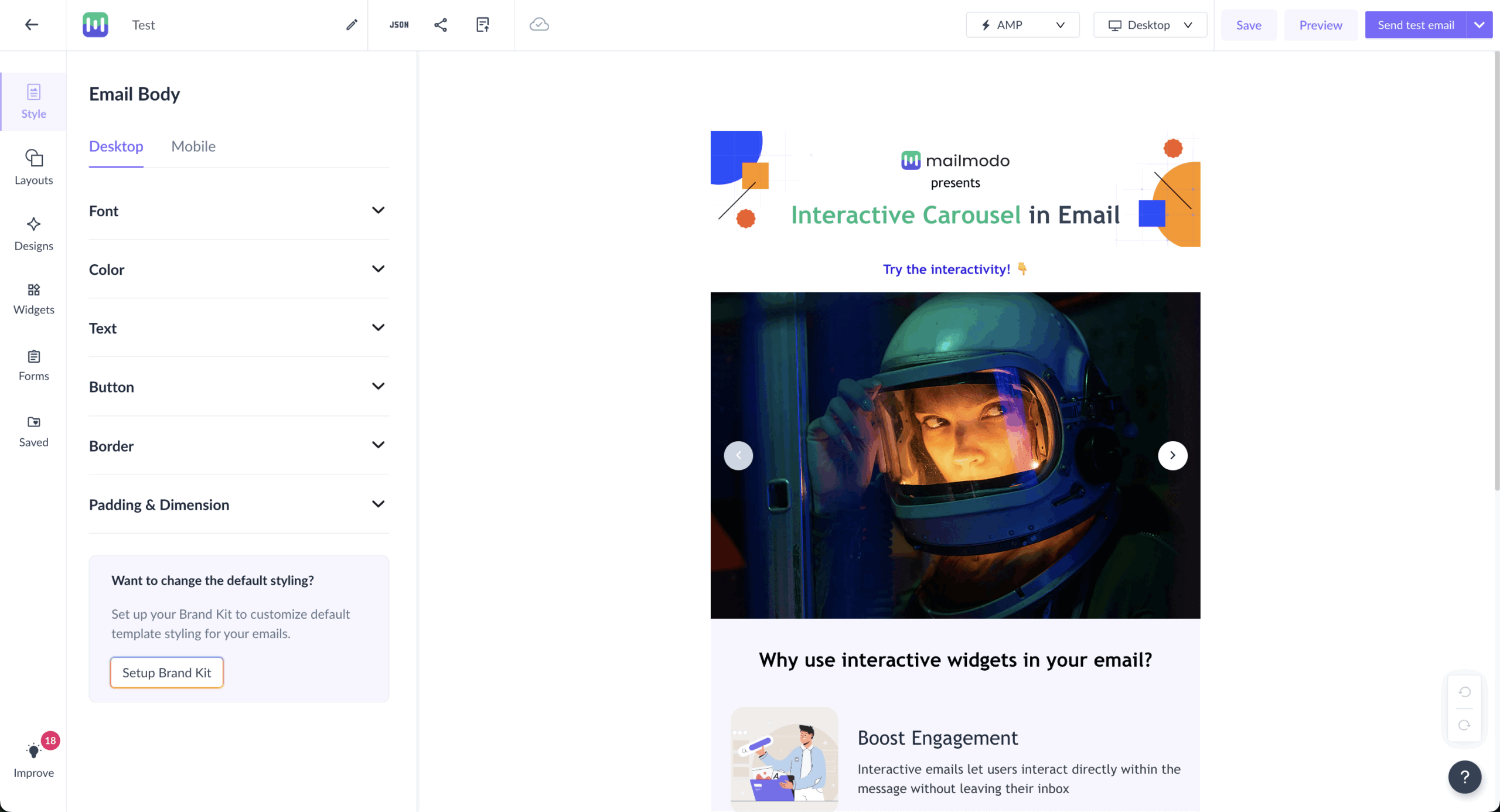
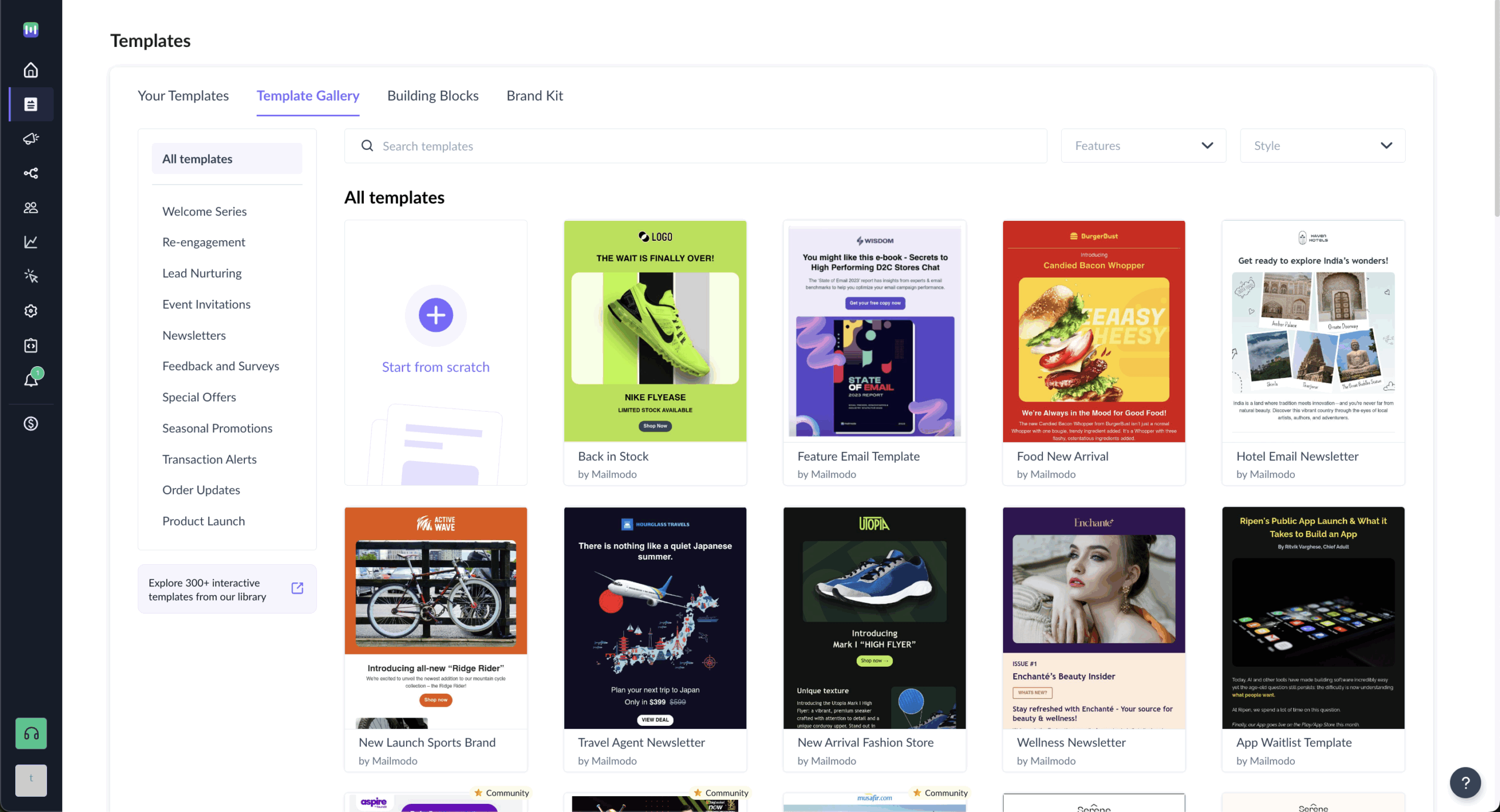
The template library prioritizes function over form, which makes sense given what Mailmodo does. Each template comes loaded with interactive elements designed for specific business goals rather than just looking pretty. You get working forms, functional polls, booking systems built right in.
Template customization goes deeper than surface changes. You can modify form fields, adjust poll questions, reconfigure booking calendars to match your needs. The templates feel more like starting points for building something useful rather than just design frameworks.
Industry-specific options cover common scenarios—webinar signups, product launches, customer surveys, e-commerce promotions. Each template includes proven interactive strategies, so you’re not just getting a design but a tested approach to keeping people engaged within your email.
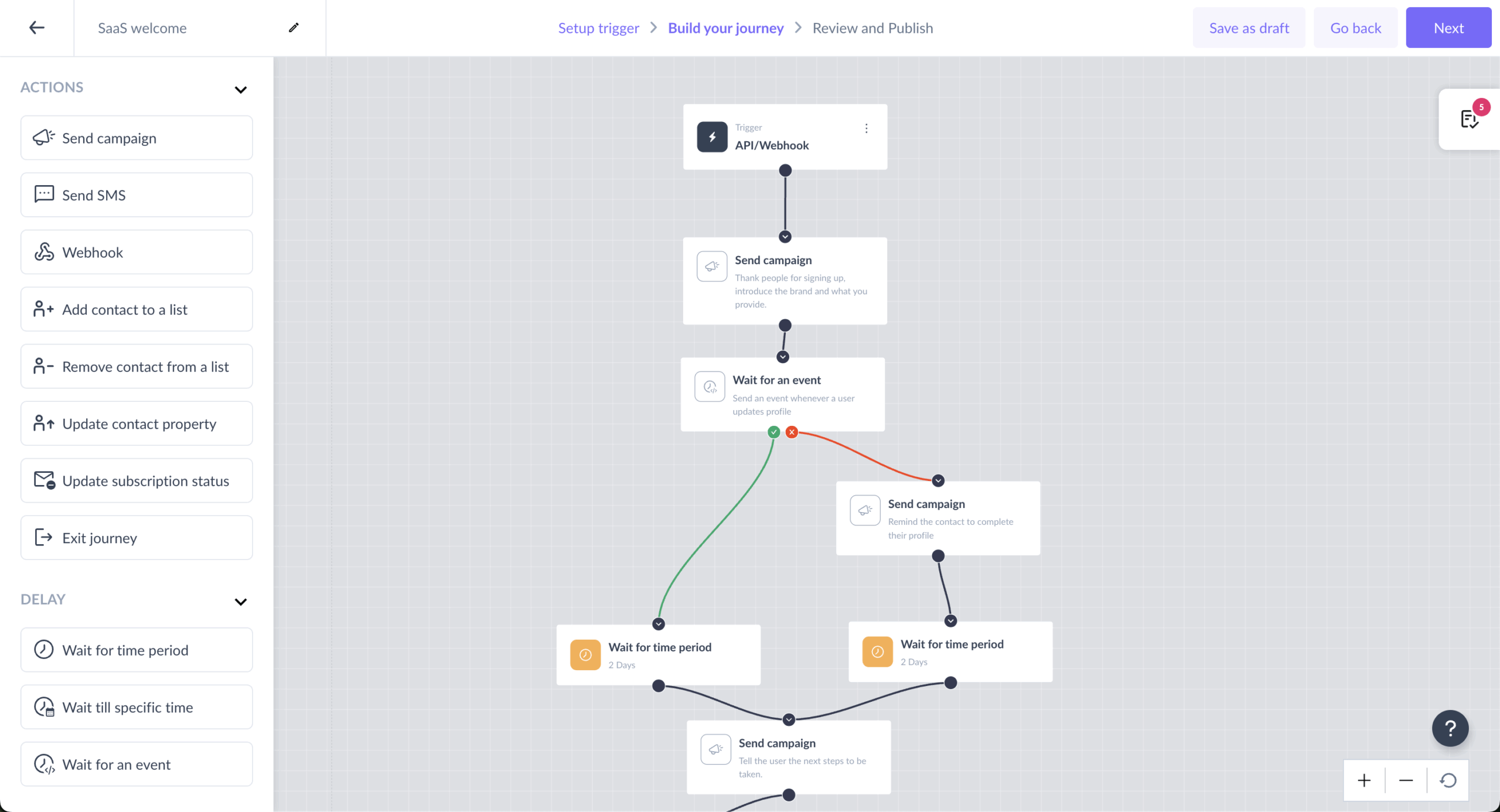
Mailmodo calls their automation “Journeys,” and the visual builder makes complex workflows feel manageable. You can trigger different paths based on how people interact with your emails—did they fill out the form, choose option A in your poll, click the booking calendar?
This is where interactive emails get interesting from a marketing standpoint. Traditional automation mostly responds to opens and clicks. Mailmodo automation responds to actual engagement—form submissions, poll answers, survey completion. That’s much more meaningful data for personalizing follow-up campaigns.
Journey creation supports advanced triggers like API calls and webhook integration. The interface stays beginner-friendly, but underneath you can build sophisticated workflows that respond to real user behavior rather than just basic email activity.
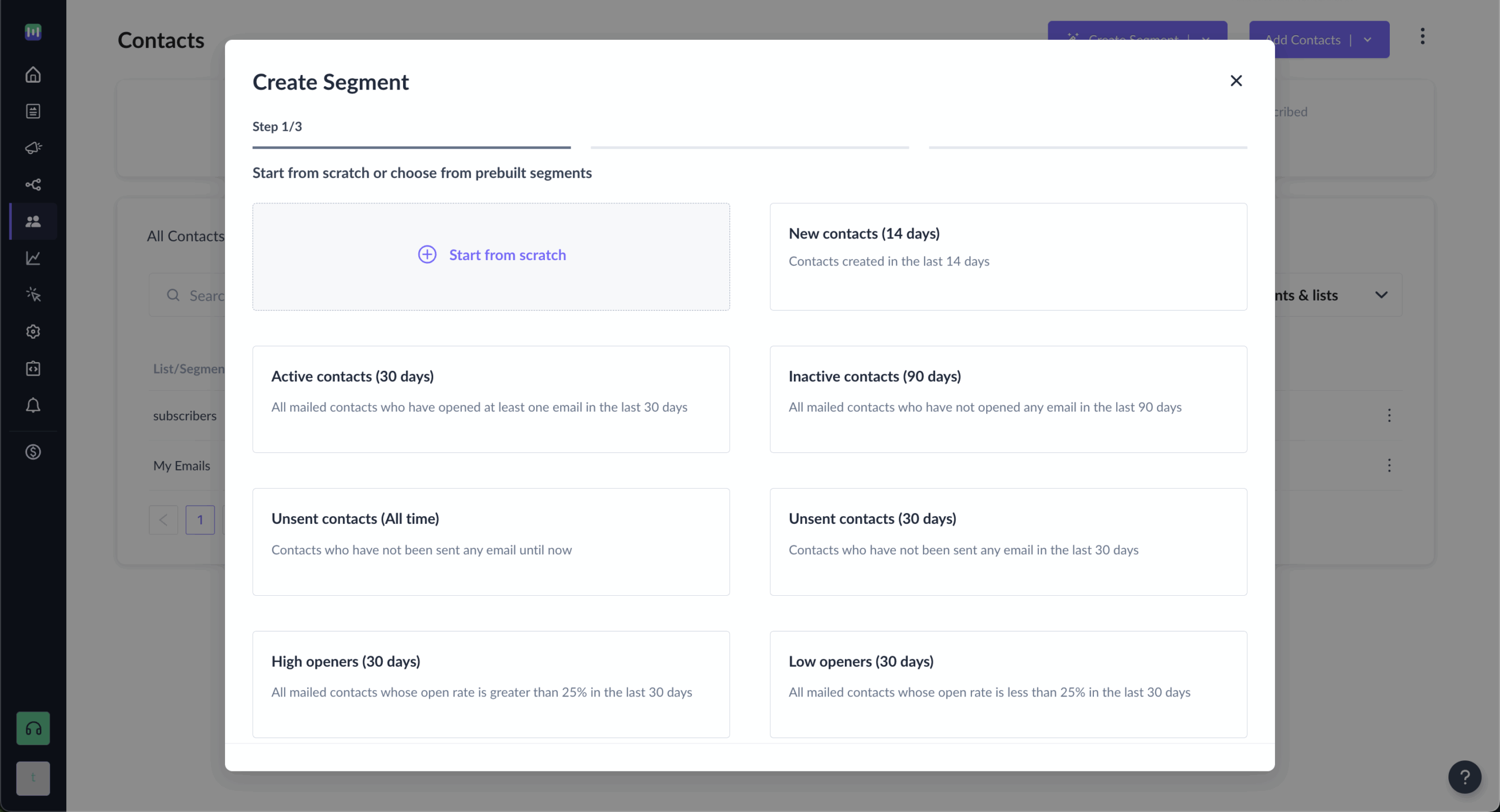
Managing subscribers here means working with richer data than most email platforms provide. When people interact directly within emails, you get detailed insights into form submissions, poll responses, survey answers—engagement that goes way beyond traditional metrics.
Segmentation becomes more precise when you can group people based on how they actually engage with your content. Did they submit feedback? Show interest in specific products through poll responses? These behavioral insights create segments that reflect genuine interest, not just email activity.
List management includes the usual stuff—suppression lists, bounce handling, compliance tools. The platform handles deliverability best practices while giving you the detailed engagement data needed to improve your targeting and make future campaigns more relevant.
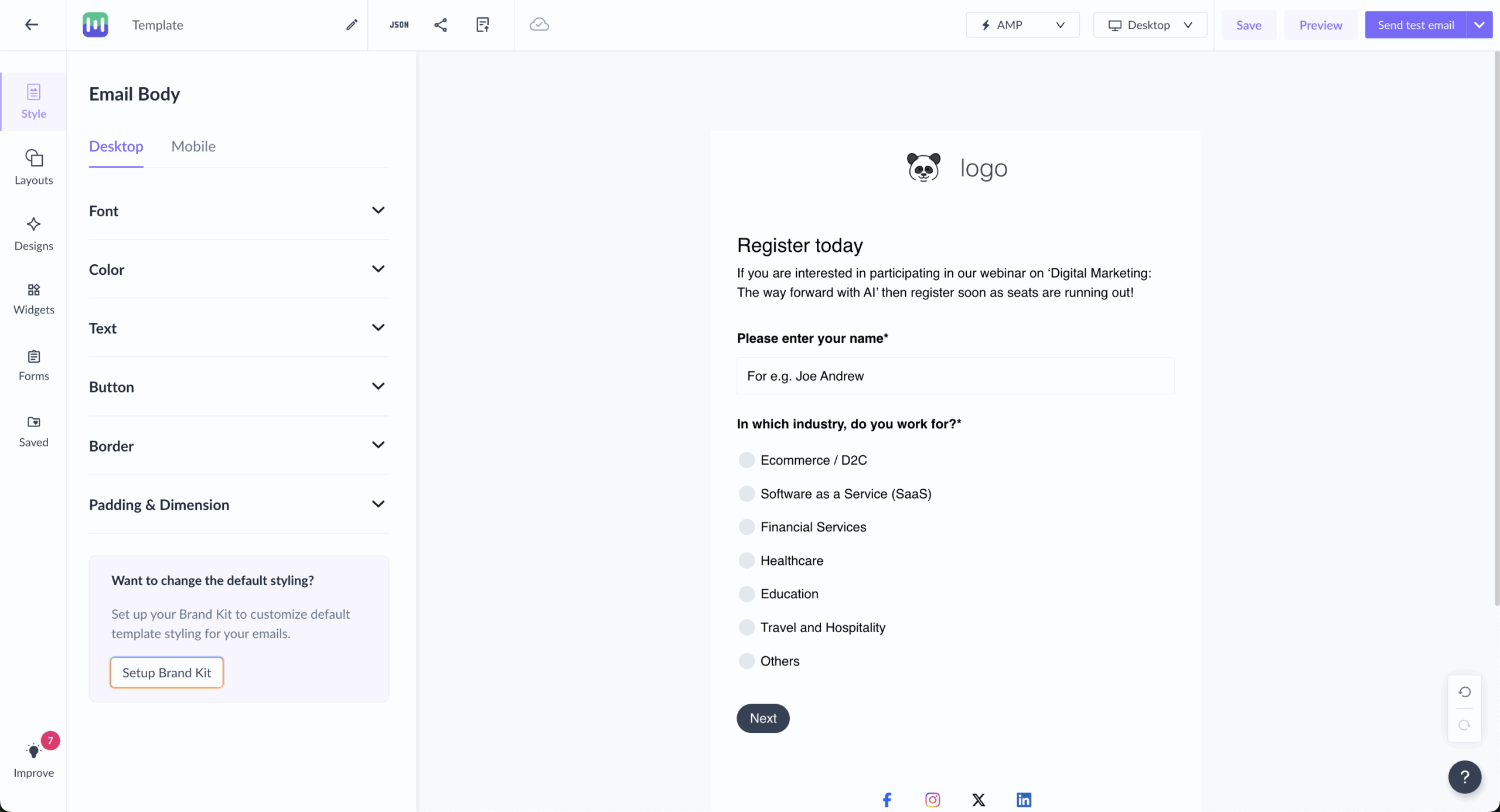
Here’s where Mailmodo completely flips the traditional playbook. Instead of sending people to landing pages, you bring the landing page experience into the email. Forms, surveys, registration widgets, even checkout flows live inside the email content.
Form creation uses the same interface as email building. You can create multi-step forms, add conditional fields, build complex data collection workflows that people complete without leaving their inbox. No redirect friction means higher completion rates.
Interactive forms connect with your existing tools through native integrations or Zapier. When someone submits a form in your email, that data flows directly into your CRM, marketing automation platform, whatever system you’re using. No manual export/import nonsense.
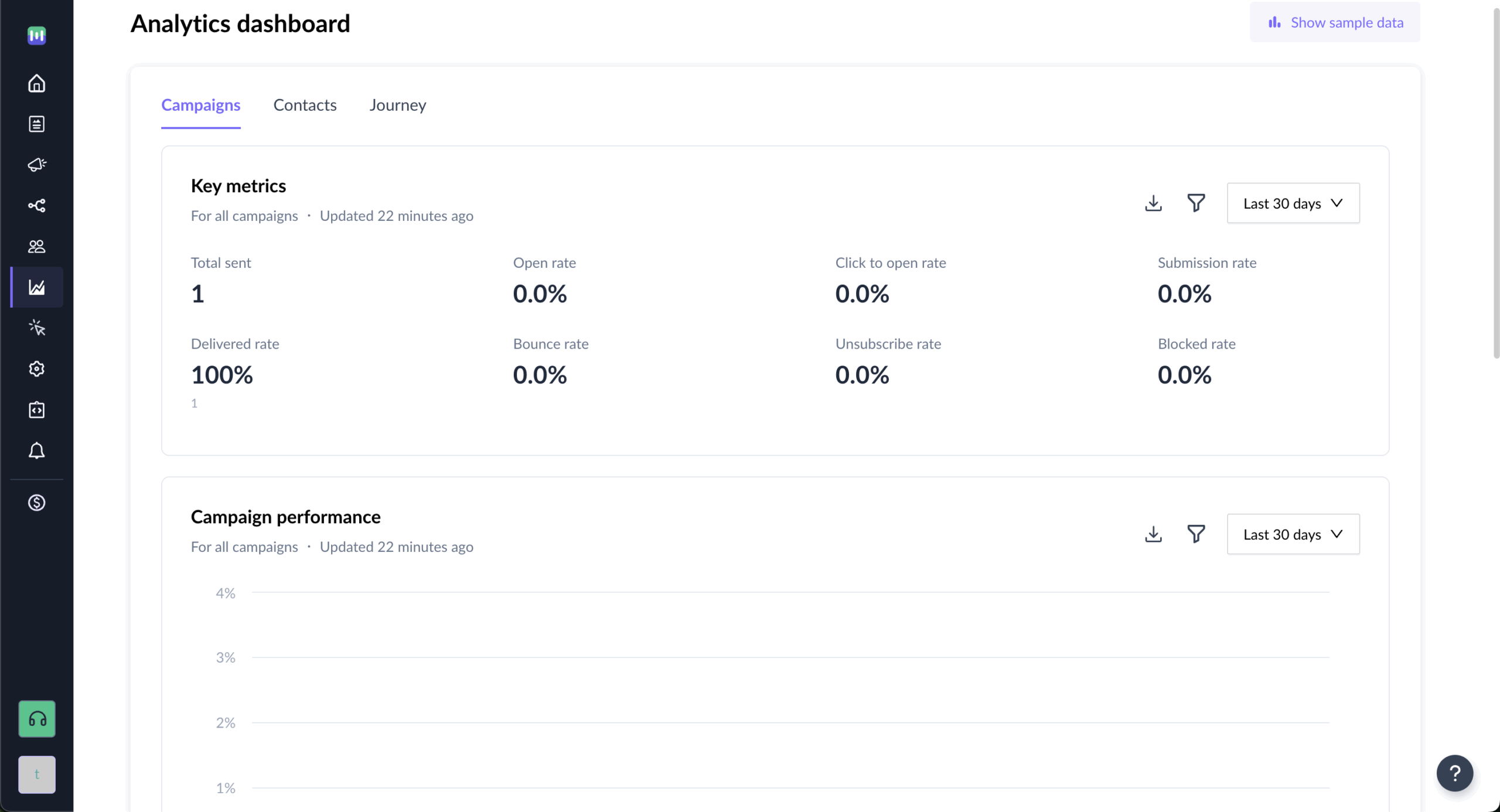
Analytics go beyond standard email metrics because interactive emails generate more meaningful data. You see form submission rates, poll responses, survey completion data—insights that reveal genuine engagement rather than just curiosity clicks.
Real-time reporting shows immediate results from interactive elements. You can watch form submissions come in live, see poll results update as people respond, track exactly which interactive elements drive the most engagement. This immediate feedback helps you optimize campaigns while they’re still running.
Campaign performance includes both traditional metrics and interaction-specific insights. You’ll see which templates drive the most form submissions, which subject lines lead to higher engagement with interactive elements, how different audience segments respond to various types of interactivity.
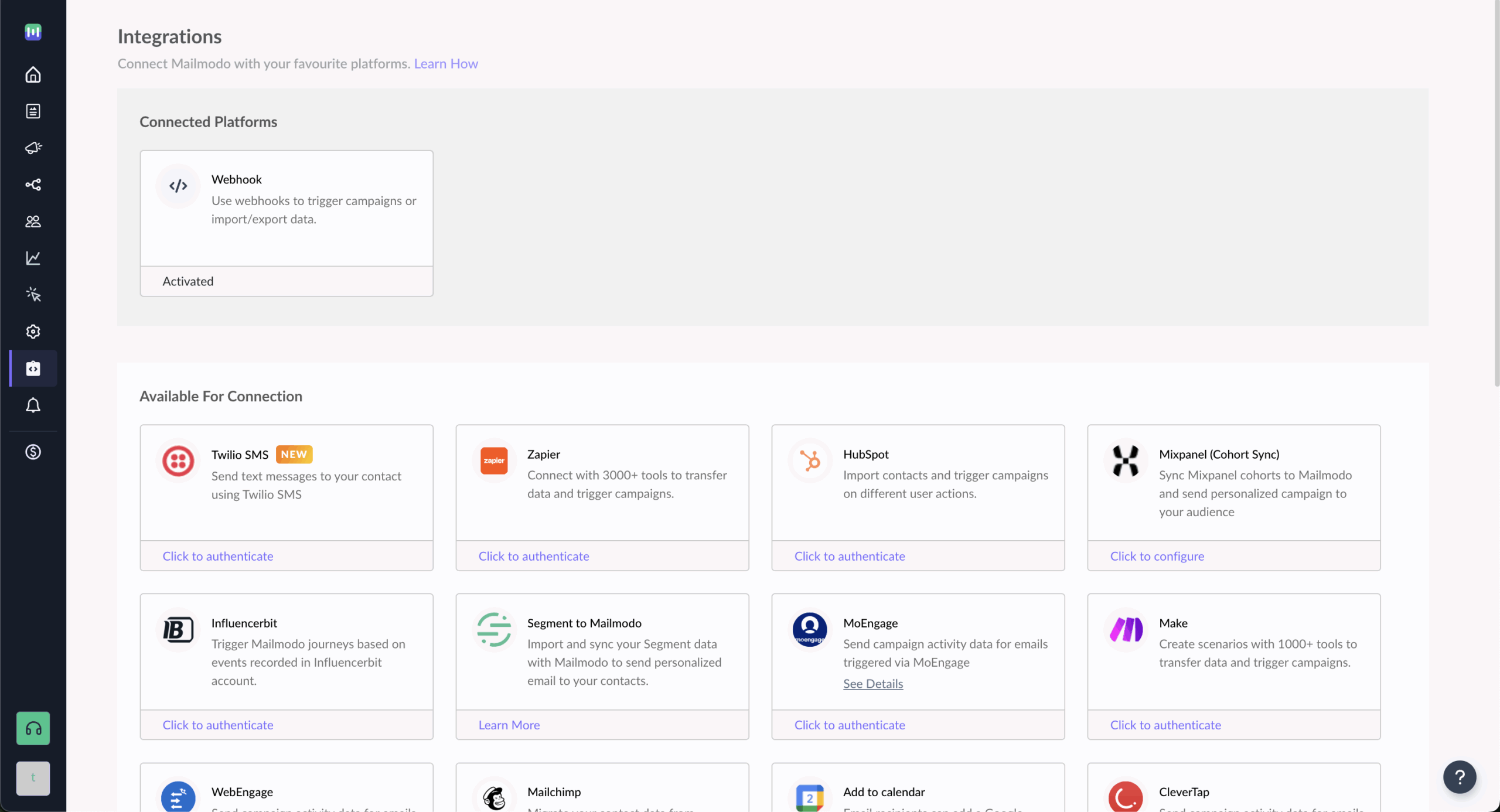
Mailmodo connects with over 1,000 tools through native integrations and Zapier. Popular connections include HubSpot, Salesforce, Shopify, and most major CRM and marketing automation platforms. The focus is making interactive email data flow seamlessly into your existing business processes.
API access comes standard even on basic plans, which is unusual in email marketing. This lets developers create custom integrations, trigger campaigns from your app or website, sync interactive email data with proprietary business systems.
Webhook support enables real-time data sync between Mailmodo and your other tools. When someone interacts with an element in your email, that action can immediately trigger workflows in other platforms, creating connected customer experiences that respond to actual behavior.
Support quality consistently gets praise from users who appreciate responsive, knowledgeable help. The team provides assistance through live chat, email, and phone depending on your plan level. Most users report quick response times and solutions that actually solve their problems.
Dedicated account managers are available for higher-tier plans, providing strategic guidance on maximizing interactive email results. This goes beyond technical support to include campaign optimization advice and best practice recommendations based on your specific use case.
Educational resources include comprehensive guides on AMP email creation, interactive email best practices, detailed tutorials for advanced features. The documentation covers both beginner basics and advanced implementation scenarios for teams with specific technical requirements.
Mailmodo Pricing Plans and Value
Price
Key Features
Best For
Free
$0/month
10,000 emails, AMP emails, basic automation, templates
Testing interactive emails
Lite
$39/month
40,000 contacts, unlimited emails, advanced automation
Small businesses
Pro
$99/month
Remove branding, API access, priority support, webhooks
Growing companies
Max
$199/month
Custom SMTP, phone support, dedicated onboarding
High-volume senders
Mailmodo’s pricing feels refreshingly honest—no hidden fees or surprise charges based on email volume. The free plan includes AMP email functionality, which most platforms don’t offer at any price. This makes it easy to test interactive emails and see results before committing money.
The Lite plan provides solid value for small businesses ready to get serious about interactive email marketing. At $39/month, you get unlimited email sends, full automation capabilities, access to all interactive features. Compare that to other platforms where similar functionality costs way more or doesn’t exist.
Higher-tier plans focus on scale and support rather than limiting core features. The Pro plan adds API access, webhook integration, removes Mailmodo branding—things enterprise customers need but don’t fundamentally change how you create emails.
Mailmodo Pros and Cons
- Unique interactive AMP email technology
- Significantly higher engagement rates
- Excellent customer support and onboarding
- API access included in all paid plans
- Strong focus on reducing conversion friction
- Limited email client support for AMP
- Steeper learning curve for advanced features
- Smaller template library compared to giants
- AMP approval process can be time-consuming
- Fewer third-party integrations than established platforms
Pros
Interactive emails actually work. Users consistently report 2-3x higher engagement rates compared to traditional campaigns. When people can complete actions without leaving their inbox, more of them actually do it. This isn’t just novelty—it’s better user experience that translates to real business results.
Customer support sets a high bar for the industry. Users frequently mention getting actual help from knowledgeable team members rather than scripted responses. The dedicated account management for higher plans provides strategic guidance that helps companies maximize their interactive email results.
Feature development stays focused on solving real email marketing problems rather than adding complexity for complexity’s sake. The platform continuously improves interactive capabilities while maintaining an interface that doesn’t overwhelm users with options they’ll never use.
Cons
AMP email support remains limited to Gmail, Yahoo Mail, and Mail.ru. While these cover a significant portion of email users, recipients using other clients see the HTML fallback version. This limits the interactive experience to a subset of your audience, though fallback emails still work fine.
The learning curve exists for teams transitioning from traditional email marketing. Interactive elements require different thinking about campaign design and user experience. While the interface is intuitive, maximizing the platform’s potential takes time and experimentation.
Template selection is smaller than established platforms like Mailchimp or Constant Contact. However, available templates focus specifically on interactive functionality, so quality often matters more than quantity for achieving engagement goals.

Should You Choose Mailmodo?
Mailmodo is Perfect For
Who Should Consider an Alternative
Companies frustrated with low email engagement rates
Businesses satisfied with basic email functionality
Organizations wanting to reduce landing page dependencies
Teams requiring extensive template customization options
Businesses focused on improving conversion funnels
Companies with limited budget for email marketing
Teams ready to experiment with cutting-edge email tech
Organizations needing extensive offline email client support
E-commerce stores wanting in-email shopping experiences
Enterprises requiring complex workflow automation beyond email
Who Mailmodo is Perfect For
Companies struggling with low engagement find Mailmodo transforms their email results almost immediately. If your current campaigns get decent open rates but poor click-through or conversion rates, interactive emails can dramatically improve those numbers by eliminating redirect friction.
E-commerce businesses discover particular value in shopping capabilities. Being able to showcase products, collect orders, even process payments directly in emails creates a seamless shopping experience that traditional emails can’t match. Several users report significant revenue increases from in-email commerce features.
Service-based businesses love the lead generation capabilities. Instead of sending people to booking pages, they include calendar widgets directly in emails. Rather than linking to feedback forms, they embed surveys right in the message. This convenience factor often doubles or triples response rates.
Who Should Consider an Alternative
Teams wanting extensive design flexibility might feel constrained by Mailmodo’s template-focused approach. While customization is possible, the platform works best when you embrace its interactive templates rather than trying to recreate complex custom designs from scratch.
Organizations requiring broad email client compatibility should consider whether AMP email limitations affect their audience. If a significant portion of your recipients use email clients that don’t support AMP, you’ll miss out on interactive benefits for those users.
Budget-conscious small businesses might find better value in basic email platforms if they don’t need interactive features. While Mailmodo’s pricing is competitive for its capabilities, simpler needs might be better served by less expensive alternatives.
Mailmodo User Experience and Reputation

G2 Reviews Summary
G2 users consistently praise the interactive capabilities and their impact on engagement rates. The platform maintains a strong 4.6/5 rating with users specifically highlighting how AMP emails transform their relationship with subscribers. Comments frequently mention responsive support and quick implementation of requested features.
Common criticisms focus on the AMP approval process and learning curve for advanced features. Some users find getting AMP email authorization from Google time-consuming, while others mention that maximizing the platform’s potential requires more strategic thinking than traditional email tools.
The overall sentiment remains highly positive, with users recommending the platform particularly for businesses wanting to differentiate their email marketing and achieve higher engagement rates. Many reviews mention switching from larger platforms specifically for Mailmodo’s interactive capabilities.
Capterra Reviews Summary
Capterra reviewers emphasize the conversion improvements from interactive emails. Multiple users share specific metrics showing 2-3x increases in form submissions, survey responses, and overall engagement after switching to Mailmodo from traditional email platforms.
Pricing receives frequent praise for being transparent and affordable compared to enterprise email platforms. Users appreciate getting advanced features like API access and automation capabilities without paying premium prices or dealing with complex tier restrictions.
Support quality gets consistent mentions, with users noting helpful onboarding, responsive assistance, strategic guidance that goes beyond basic technical support. The combination of good support and innovative features creates high user satisfaction.
Mailmodo Alternatives
Mailmodo specializes in interactive AMP emails, letting recipients fill in forms, answer surveys, book meetings or shop without leaving their inbox, all built with a no-code editor that few mainstream tools offer. But AMP only renders in some inboxes, including Gmail and Yahoo Mail, while Outlook users see a static fallback. Its entry Lite plan now costs $149 a month for 500 contacts, with Mailmodo branding and a single active journey, and there’s no free plan beyond a trial. These four alternatives cover the most common reasons people look elsewhere.
Mailchimp: best for a broad marketing toolkit
Mailchimp makes sense if you want more marketing tools and design choice for less money. It offers thousands of templates, landing pages, social posting, detailed analytics and one of the largest integration ecosystems in email marketing, with a free plan and paid plans from $13 a month. The trade-off is that it has no interactive AMP email builder, its free plan covers only 250 contacts and 500 emails a month, and multi-step automation requires a paid plan. Read our full Mailchimp review.
HubSpot: best for CRM and full-funnel marketing
HubSpot suits businesses that need email as part of a complete customer platform. It combines a free CRM with marketing automation, lead scoring and workflows across email, social, sales and service, so every team works from the same customer data. The trade-off is that it doesn’t offer Mailmodo-style interactive emails, and while Starter seats are affordable, Professional plans jump to hundreds of dollars a month plus a mandatory onboarding fee. Read our full HubSpot review.
Customer.io: best for SaaS lifecycle messaging
Customer.io is the one to pick if you use Mailmodo mainly for SaaS onboarding, trial conversion and retention emails. It triggers email, push, in-app and SMS messages from product events and user behavior, with published pricing starting at $100 a month for 5,000 profiles. The trade-off is that it’s built for technical teams, interactive in-email experiences aren’t its focus, and its pricing counts every profile in your workspace. Read our full Customer.io review.
Sender: best for affordable email marketing
Sender suits small businesses that want solid email marketing without Mailmodo’s price tag. Its free plan covers 2,500 subscribers and 15,000 emails a month with automation, segmentation and landing pages included, compared with Mailmodo’s $149 a month for 500 contacts, and SMS is available on paid plans. The trade-off is that Sender doesn’t support interactive AMP emails, so if in-email forms and purchases are central to your strategy, you’ll lose that capability. Read our full Sender review.
Which alternative should you choose?
Pick based on what’s pushing you away from Mailmodo:
- Want more templates, tools and integrations for less: Mailchimp
- Need a CRM with marketing automation: HubSpot
- Mainly send SaaS lifecycle emails: Customer.io
- Want affordable email marketing with a free plan: Sender
Bottom Line
Mailmodo succeeds by solving a fundamental email marketing problem—the friction between user interest and action completion. While other platforms focus on making emails look better or adding more features, Mailmodo eliminates the steps that cause people to abandon their intended actions.
Interactive emails aren’t just a novelty—they’re a practical solution to conversion rate challenges that most email marketers face. When you can collect feedback, process registrations, or even complete sales without sending people away from their inbox, more people actually follow through. The 2-3x engagement improvements users report aren’t marketing hype; they’re natural results of removing friction.
This platform isn’t right for everyone, particularly teams satisfied with traditional email results or those needing extensive design customization. The focus on interactive functionality over visual flexibility means you work within Mailmodo’s template framework rather than creating completely custom designs from scratch. But for businesses frustrated with email engagement rates or looking to differentiate their marketing approach, Mailmodo offers capabilities that simply don’t exist elsewhere.
Who's behind these reviews?

- Hands-on testing across multiple email marketing tools
- Fair comparisons using a unified evaluation process
- Insights verified with real user reviews from trusted sources
- No sponsorships or affiliate ties
- Clear, unbiased scoring and methodology