Sendy Review 2025: The Self-Hosted Email Marketing Tool
Remember when email marketing meant choosing between burning cash on monthly subscriptions or sending emails one by one from Gmail?
Sendy flipped that script completely. For a one-time $69 fee, you get an email platform that sends emails at $1 per 10,000 — which is basically pocket change if you’re used to paying Mailchimp hundreds every month.
What is Sendy?
Picture this: instead of renting email marketing software forever, you buy it once and run it yourself. That’s Sendy in a nutshell — a self-hosted email newsletter app that hooks up with Amazon’s email infrastructure (SES) to send bulk emails without the bulk pricing. You install it on your own web server, kind of like WordPress, and suddenly you’re paying Amazon’s wholesale rates instead of marked-up monthly fees.
The catch? You need to be comfortable with basic server stuff. We’re talking PHP, MySQL, and knowing your way around hosting settings. It’s not rocket science, but if terms like “DNS records” make you nervous, you might want to grab a tech-savvy friend. Once it’s running though, you control everything — your data, your lists, your sending schedule. No more surprise price hikes when your list grows.
Sendy Key Features
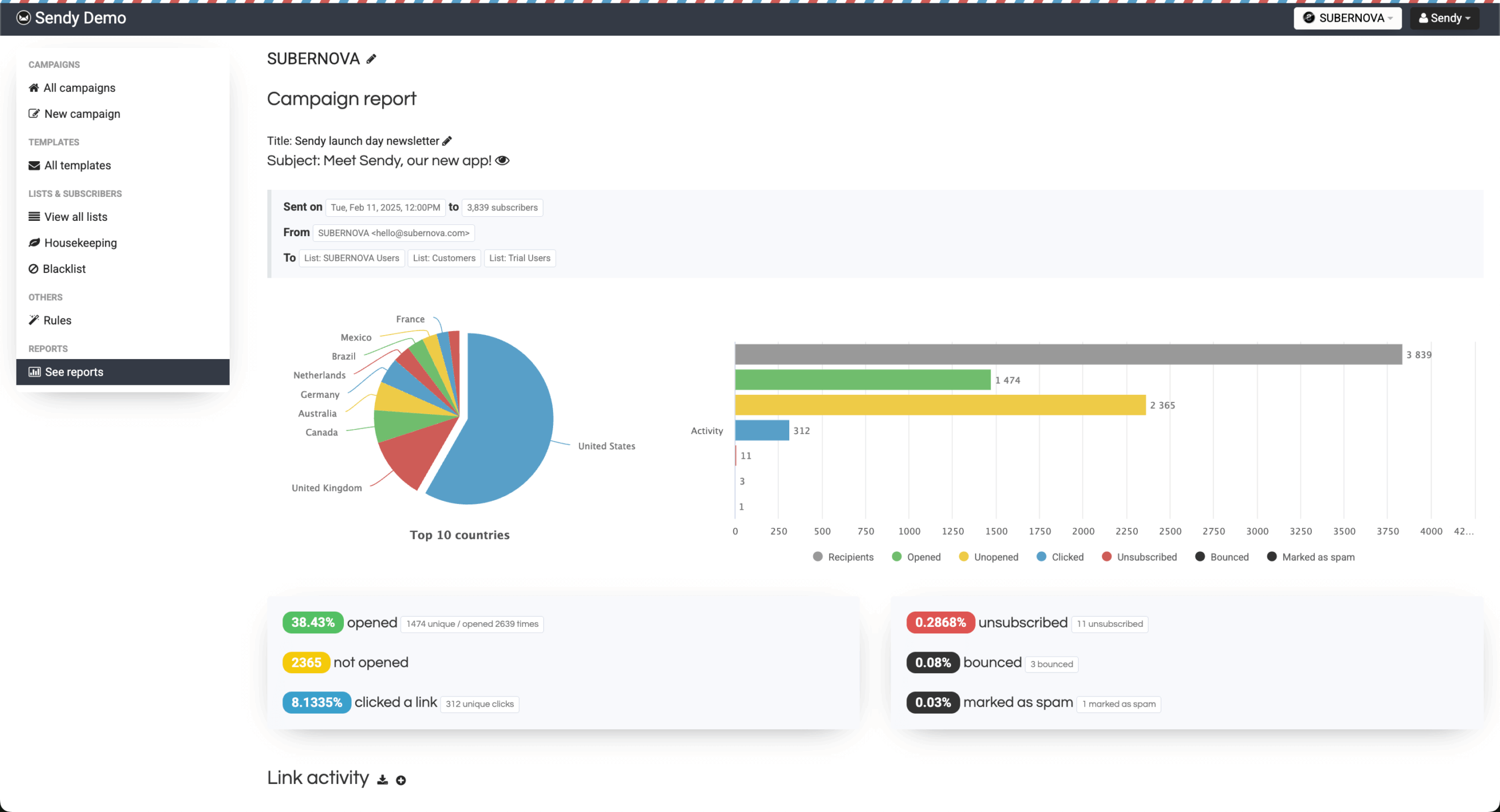
Sendy handles the email campaign basics pretty well. You create your newsletter, hit send, and watch the stats roll in through clean, visual reports showing opens, clicks, bounces — even which countries your readers are from. What I like is how it lets you export specific subscriber segments right from your campaign reports, so if you want to re-target people who clicked but didn’t buy, it’s just a few clicks.
The platform supports both blast-it-now and schedule-for-later sending, which sounds basic but honestly, that covers 90% of what most businesses need. You can manage multiple brands or clients from one installation too. Each gets their own space, their own reports, their own sending limits if you want. Pretty handy if you’re an agency or running multiple projects.
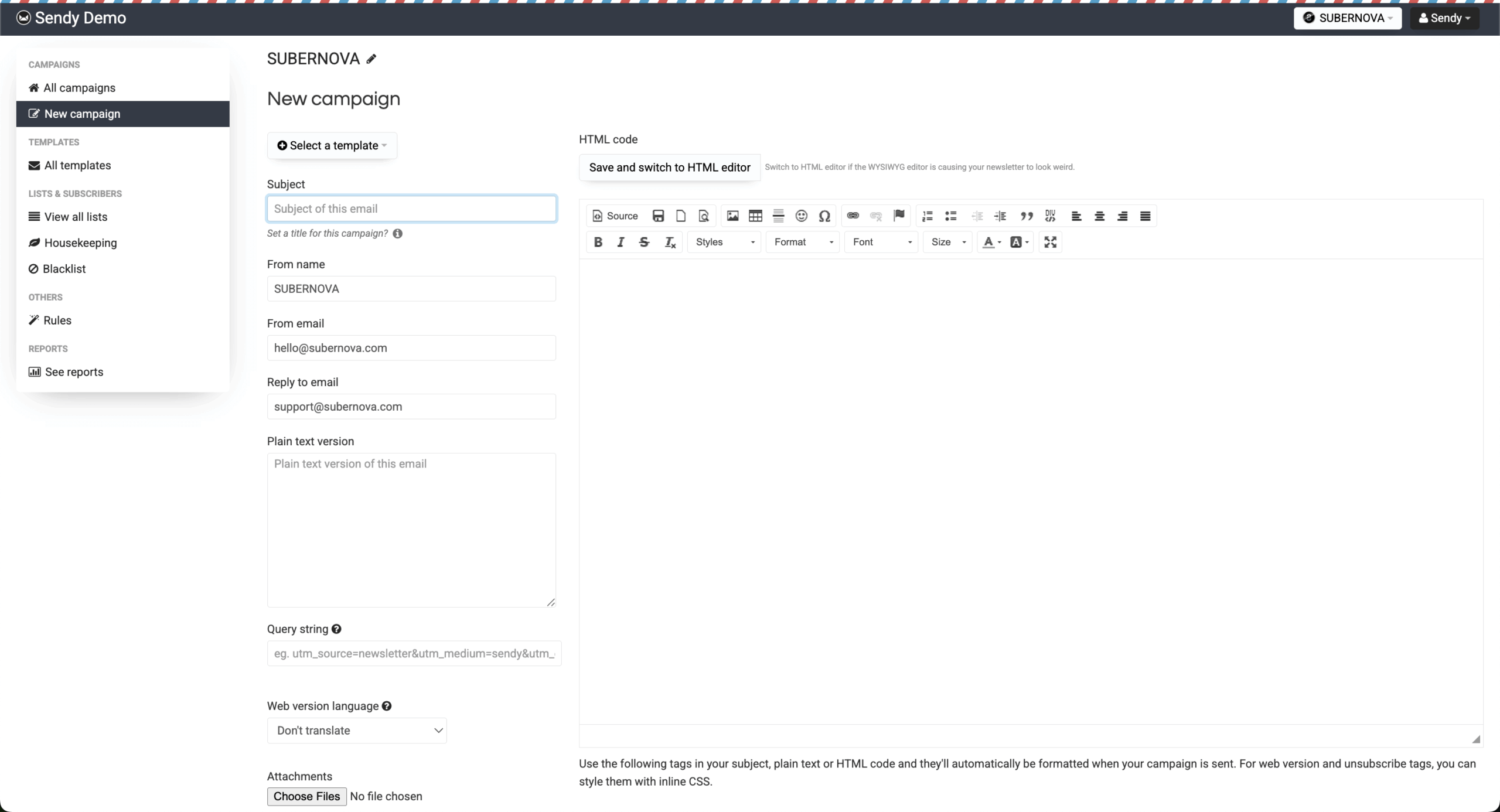
Here’s where things get a bit old school. Sendy doesn’t have the drag-and-drop builder you might be expecting. You’ll need to know HTML or at least be comfortable tweaking it. That said, you can import any HTML template you want, add personalization tags for things like names and custom fields, and the emails look great on phones and desktops.
Is it as easy as Mailchimp’s builder? Not even close. But if you have a developer on your team or you’re comfortable with code, you actually get more control this way. Plus, once you set up your templates, you can reuse them forever. Some users even prefer this approach — no bloated editors, just clean HTML that works.
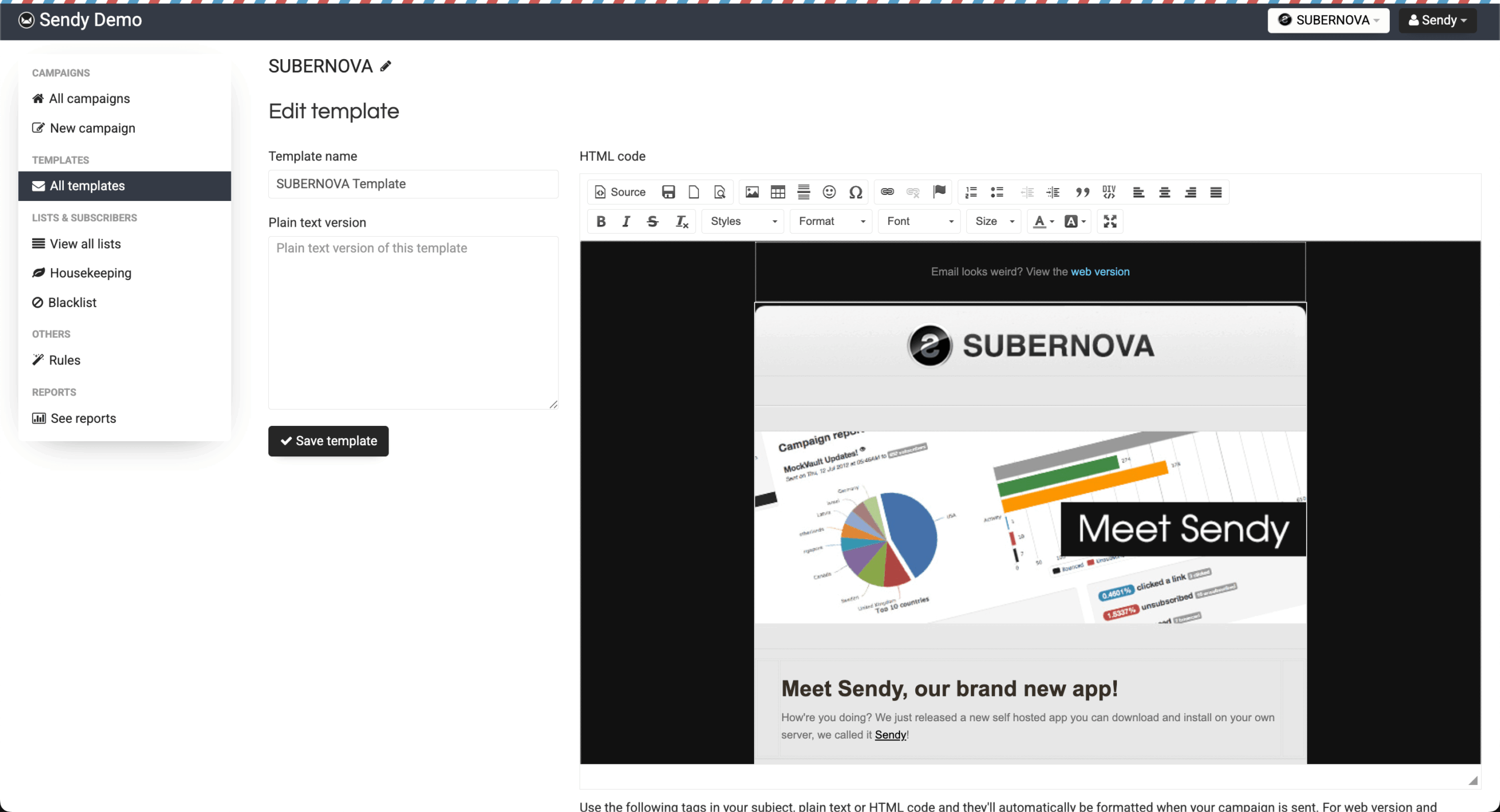
Sendy’s automation is… functional. You can set up drip campaigns that send emails automatically based on time delays — think welcome series, onboarding sequences, that sort of thing. It handles the basics: someone signs up, they get email one immediately, email two after three days, email three a week later. Simple but effective.
What you won’t find are fancy behavioral triggers or complex branching logic. No “if they clicked link A, send them down path B” workflows. For many businesses, especially those focused on newsletters rather than complex funnels, this is actually fine. But if you need sophisticated automation, you’ll feel limited here.
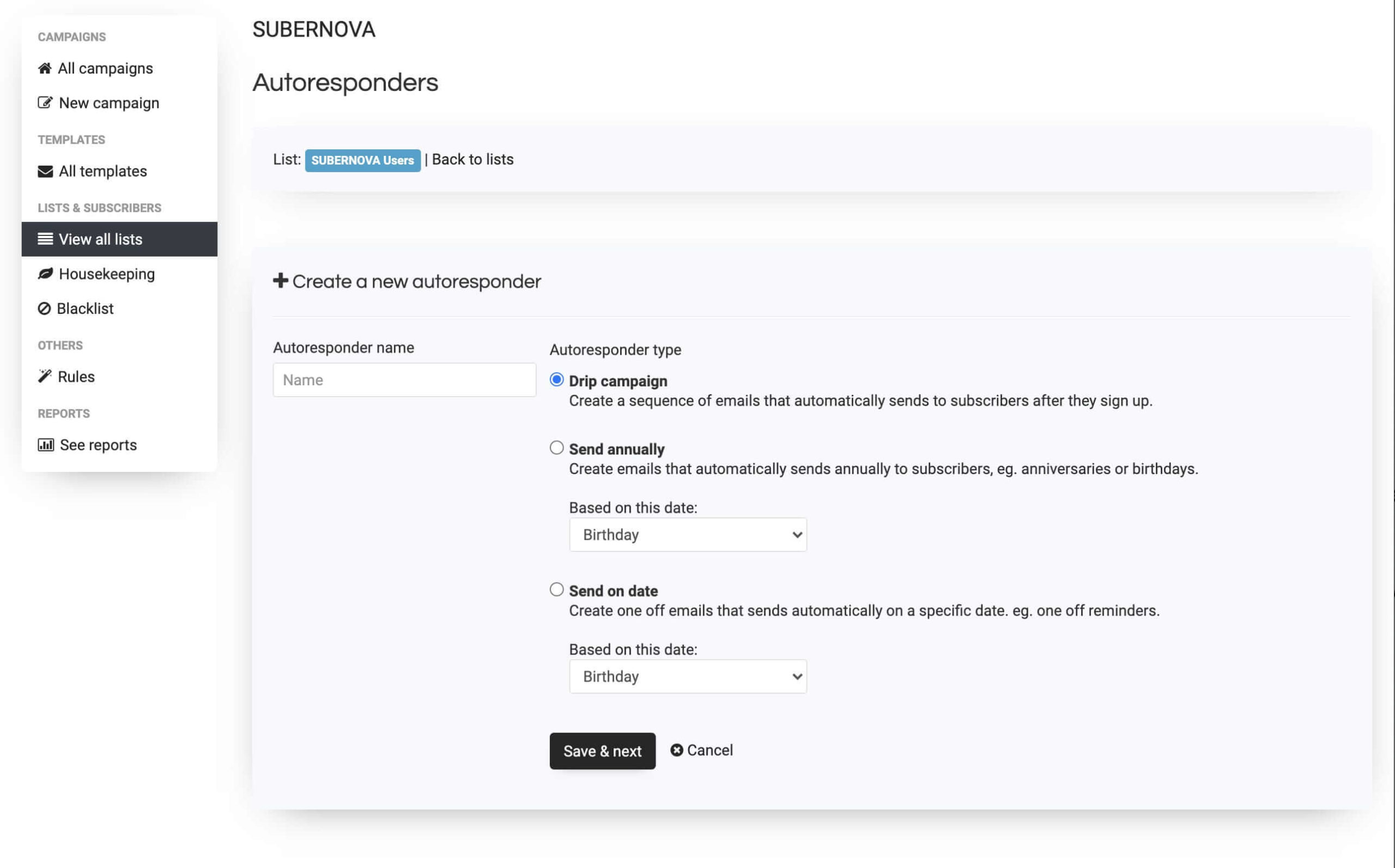
This is where Sendy shines for its price point. Import thousands of contacts via CSV, no problem. Create custom fields to store whatever data you need beyond email addresses. Set up single or double opt-in (your choice), customize your confirmation pages, even design specific goodbye messages for people who unsubscribe.
The real magic happens with list cleaning. Sendy automatically removes bounces, complaints, and unsubscribes in real-time. No manual cleanup needed. There’s even a one-click option to purge subscribers who never open your emails. When you’re dealing with lists of 50,000+, this automatic hygiene saves hours of work.
Let’s be clear: Sendy doesn’t build landing pages. What it does is generate HTML forms you can embed on your existing website. Developers love this because they can style the forms however they want. Marketers without coding skills? Not so much.
The forms work fine — they capture emails, handle confirmations, redirect to thank you pages. But you’ll need another tool if you want pop-ups, exit-intent forms, or dedicated landing pages. Many users pair Sendy with tools like Leadpages or just build forms in WordPress. The API is solid though, so if you want to build custom subscription flows, you totally can.
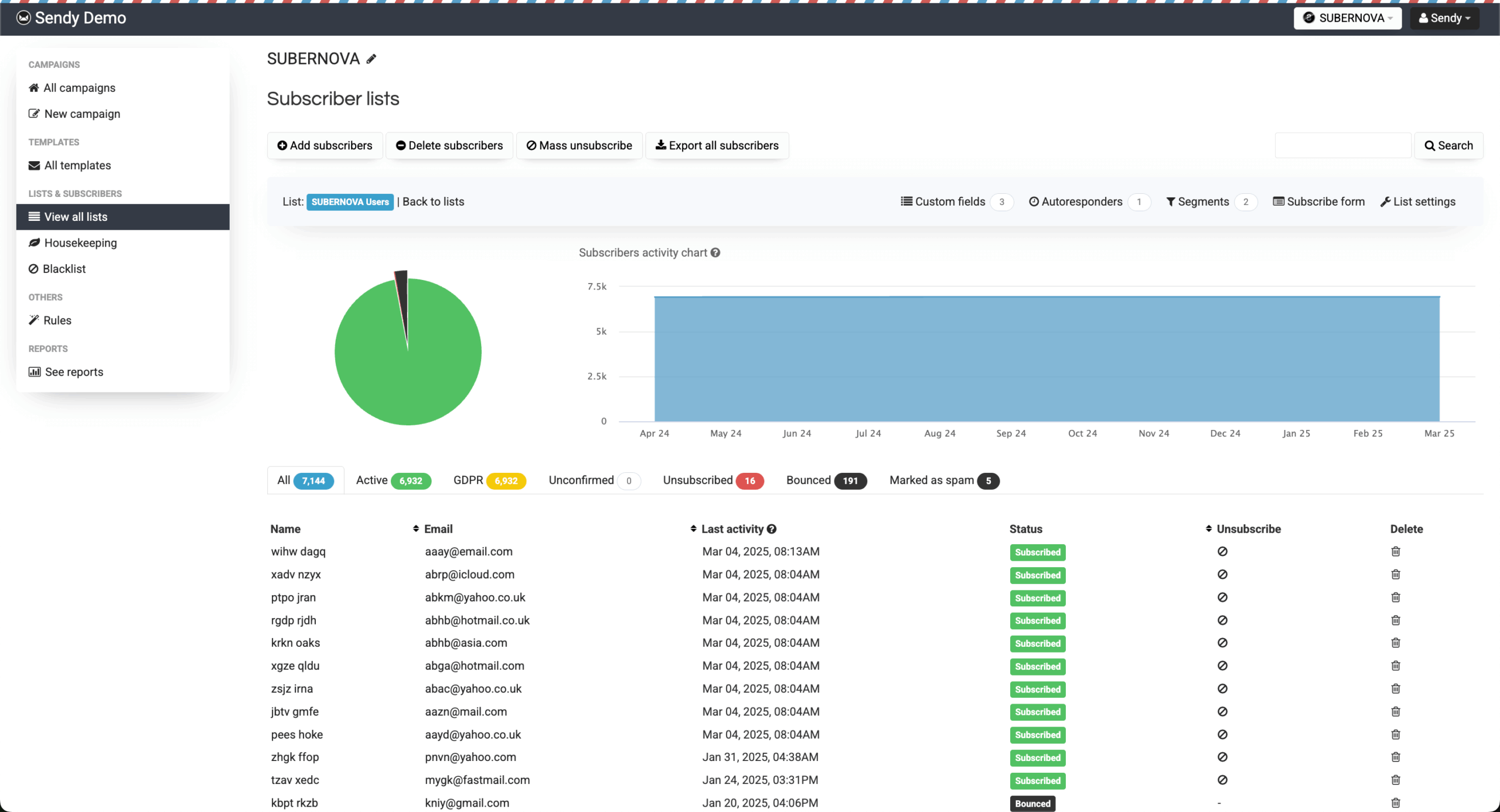
Sendy’s reports look surprisingly good for such a budget tool. You get the essentials displayed in clean charts: open rates, click rates, bounces, complaints, even geographic data showing where your subscribers are located. The real-time aspect is nice too — you can watch engagement roll in as your campaign sends.
What’s missing? Advanced stuff like heat maps, predictive analytics, or super detailed engagement scoring. You can export your data for deeper analysis elsewhere, but don’t expect the kind of insights you’d get from enterprise platforms. For most newsletter publishers though, knowing who opened, who clicked, and who bounced is enough.
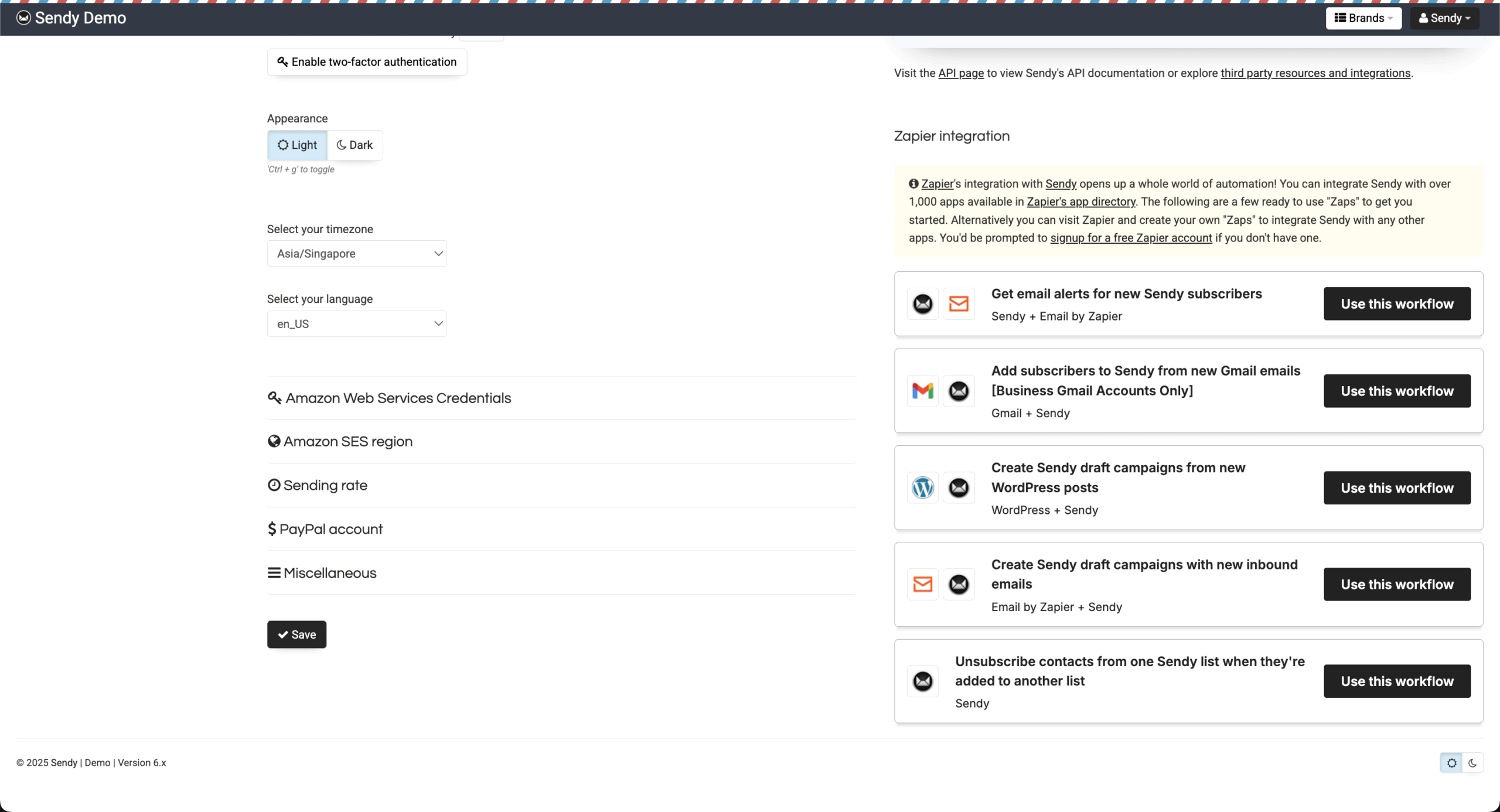
Thanks to its API and Zapier support, Sendy plays nicely with tons of other tools. WordPress users have multiple plugin options. Ecommerce folks can connect it to Magento or WooCommerce. The Zapier integration opens up thousands more possibilities — trigger emails from form submissions, CRM updates, whatever you need.
The Amazon SES integration is rock solid (it better be, since that’s the whole point). But you can also configure other SMTP services if needed. Webhooks let you push data to other systems when people subscribe or engage. It’s surprisingly flexible for developers who want to build custom workflows around it.
Okay, here’s the elephant in the room. Sendy’s support can be… frustrating. It’s basically one developer handling everything, and response times vary wildly. Some users report quick, helpful replies. Others say their emails disappeared into the void. The forum exists but needs approval to post, which can take days.
Documentation is decent — setup guides, videos, technical specs are all there. The community has created tons of tutorials and resources too. But if you hit a serious technical issue and need immediate help? You might be on your own for a while. This is the trade-off for that low price point.
Sendy Pricing Plans and Value
Plan
Price
Subscribers
Email Sends
Key Features
One-Time License
$69
Unlimited
Pay-per-use
Full platform access, updates until next major version, self-hosted control
Amazon SES Costs
$0.10/1,000
N/A
Usage-based
High deliverability, scalable infrastructure, pay only for sends
Optional Updates
~$29
N/A
N/A
Major version upgrades, new features, continued development support
The math here is pretty simple. You pay $69 once for Sendy, then Amazon charges you $0.10 per 1,000 emails. Send 100,000 emails? That’s $10. Compare that to Mailchimp charging $200+ for the same volume, and you see why people get excited about Sendy.
Sendy Pros and Cons
- Cheap for high volume
- No monthly fees ever
- You own all your data
- Amazon’s deliverability is solid
- Manage unlimited brands/lists
- API makes it expandable
- Need technical skills to set up
- No drag-and-drop editor
- Support can be hit or miss
- Automation is pretty basic
- Self-hosting means you handle problems
- Interface feels dated
Pros
The cost savings are real. I’ve seen businesses cut their email expenses by 95% after switching to Sendy. When you’re sending to 100,000+ subscribers, we’re talking thousands of dollars saved annually. Plus, owning your data matters — no platform can suddenly change terms or hold your lists hostage.
The Amazon SES partnership means your emails actually reach inboxes. Their infrastructure is battle-tested, handling billions of emails. And since you can manage unlimited brands and lists from one Sendy installation, agencies love this thing. Set different prices for different clients, keep everything organized, bill them however you want.
Cons
Setup isn’t exactly plug-and-play. You need a server, you need to configure DNS records, you need to verify your domain with Amazon. If something breaks at 2 AM, guess who’s fixing it? (Spoiler: it’s you.) The editor situation is rough too — no templates marketplace, no drag-and-drop, just raw HTML or whatever you can import.
The automation limitations hurt if you’re coming from modern platforms. And while the interface works, it looks like it was designed in 2010 because, well, it kind of was. Support issues are real — when you need help urgently and can’t get it, that $69 savings starts feeling less amazing.

Should You Choose Sendy?
Best For
Not Recommended For
Lists over 50,000 subscribers
People who hate technical stuff
Agencies with multiple clients
Advanced automation needs
Tech-comfortable teams
Drag-and-drop design lovers
Newsletter-focused businesses
Anyone needing instant support
Budget-conscious marketers
Landing page builders
Who Sendy is Perfect For
Got a massive email list and a tight budget? Sendy was built for you. Agencies running campaigns for multiple clients save ridiculous amounts using this — we’re talking five-figure annual savings for some. If your team includes someone who knows their way around servers and HTML, even better.
Newsletter publishers love it because newsletters don’t need complex automation. You write, you send, you track. Simple. Ecommerce stores with huge customer lists use it for basic campaigns while keeping their fancy automation in specialized tools. And if you’re already comfortable with WordPress hosting, Sendy feels familiar.
Who Should Consider an Alternative
If “SSH into your server” sounds like gibberish, stop right here. Sendy isn’t for you. Same goes if you need sophisticated automation with behavioral triggers, sophisticated A/B testing, or AI-powered optimization. Sender gives you that modern, visual experience with zero technical headaches — the free plan is generous too.
Small lists don’t make sense either. If you’re sending to 5,000 people monthly, free tiers from Sender or MailerLite will serve you better. And if you need hand-holding support or built-in landing pages, look elsewhere. Sendy assumes you’re technically self-sufficient or have someone who is.
Sendy User Experience and Reputation

G2 users give Sendy 4.2 stars, and the pattern is clear: people who need it love it, people who don’t hate it. The lovers talk about saving thousands, finally escaping monthly fees, and getting exactly what they need without bloat. One user mentioned sending millions of emails for what used to cost them in a single month with their old provider.
The haters? Usually folks who bought it thinking it was like Mailchimp, then discovered they needed technical skills. The dated interface bothers some, though others say who cares what it looks like if it works. The lack of fancy features is either a dealbreaker or a relief, depending on who you ask.
Capterra shows 4.7 stars with really polarized reviews. Long-term users rave about reliability — some have been using it for 5+ years without major issues. They’ve figured out the quirks, built their workflows around it, and are saving buckets of money. Agency owners especially love the multi-brand features.
But then you’ve got the support horror stories. Users waiting weeks for responses, forum posts never approved, feeling completely abandoned when things go wrong. One reviewer nailed it: “If you get Sendy working and don’t have issues, you’re golden. If something breaks, you’re on your own.”
Trustpilot’s harsh 1.8 rating tells a different story. Lots of anger about the no-refund policy and poor support. People who didn’t realize it was self-hosted feel misled. Some bought it, couldn’t set it up, couldn’t get help, and lost their money. The PHP requirement catches Python developers off guard.
Yet even here, successful users are evangelical. They talk about sending to 500,000 subscribers for pennies, automating their entire newsletter operation, finally being free from platform lock-in. It seems like Sendy either completely solves your problem or becomes one itself — no middle ground.
Sendy Alternatives
Sendy is a self-hosted newsletter app that sends through Amazon SES, so you pay a one-time $69 license per domain plus about $0.10 per 1,000 emails. That makes 100,000 emails cost roughly $10. But you have to install and maintain it on your own PHP and MySQL server, configure Amazon SES and manage deliverability yourself, and its features are basic compared with hosted email tools. The first three alternatives below are hosted, so there’s no server to manage, while the last two keep you self-hosted with a different app.
Sender: best for hosted email with a generous free plan
Sender suits businesses that want to stop managing servers and SES settings. Its free plan covers 2,500 subscribers and 15,000 emails a month with a drag-and-drop editor, automation and segmentation included, and SMS is available on paid plans. The trade-off is cost at scale: once your list grows into the tens of thousands, a monthly subscription costs far more than Sendy’s SES fees. Read our full Sender review.
EmailOctopus: best for low-cost hosted email
EmailOctopus is the closest hosted alternative to Sendy’s economics. It was originally built on Amazon SES and keeps its prices low, with a free plan for 2,500 subscribers and 10,000 emails a month, and its EmailOctopus Connect option lets you send through your own SES account without running a server. The trade-off is that you still pay a monthly fee as your list grows, and its automation and design tools are basic. Read our full EmailOctopus review.
Mailchimp: best for an all-in-one marketing platform
Mailchimp makes sense if you want far more than newsletters. It offers a large template library, advanced automation, multichannel campaigns, a website builder, basic CRM and one of the biggest integration ecosystems around, all fully managed. The trade-off is price: a large list can cost hundreds of dollars a month, compared with roughly $10 per 100,000 emails on Sendy, and Mailchimp bills for unsubscribed contacts while Sendy doesn’t. Read our full Mailchimp review.
Listmonk: best for free, open-source self-hosting
Listmonk suits technical teams that want to stay self-hosted without paying for a license. It’s free and open source, written in Go and deployable with Docker, handles lists of millions of subscribers, and works with any SMTP provider, not just Amazon SES. The trade-off is that its email editor is more basic, its automation is limited, and there’s no commercial support, so you rely on the community and your own skills.
MailWizz: best for advanced self-hosted email marketing
MailWizz makes sense if you want a self-hosted tool with more features than Sendy. Like Sendy, it’s a one-time license, but it adds automation workflows, A/B testing, landing pages, bounce management, white-label options and support for multiple delivery servers, so you can send through Amazon SES, SendGrid and others. The trade-off is that it’s a heavier PHP application to install and maintain, and support comes mainly through its marketplace and a smaller community.
Which alternative should you choose?
Pick based on what’s pushing you away from Sendy:
- Want hosted email with a generous free plan: Sender
- Want hosted email that stays low-cost: EmailOctopus
- Need an all-in-one marketing platform: Mailchimp
- Want to self-host for free: Listmonk
- Want more features while staying self-hosted: MailWizz
Bottom Line — Is Sendy the Right Tool for You?
Sendy isn’t trying to be everything to everyone. It’s laser-focused on one thing: sending bulk emails as cheaply as possible without sacrificing deliverability. For the right user — someone technical enough to self-host, with a big list and basic needs — it’s almost magical. Suddenly, email marketing costs basically nothing.
But that “right user” caveat is huge. This isn’t a set-and-forget solution. You’re essentially becoming your own email service provider, with all the responsibility that entails. When it works, which is most of the time, you feel like a genius saving all that money. When it breaks and support is MIA, you’ll question every decision that led you here.
My take? If you’re sending to 50,000+ people regularly and have technical chops (or someone who does), Sendy pays for itself in the first month. Everyone else should probably stick with Sender’s newsletter software or similar services that hold your hand. Sometimes convenience is worth paying for. Sometimes it isn’t. With Sendy, you’re betting it isn’t.
Who's behind these reviews?

- Hands-on testing across multiple email marketing tools
- Fair comparisons using a unified evaluation process
- Insights verified with real user reviews from trusted sources
- No sponsorships or affiliate ties
- Clear, unbiased scoring and methodology